

DLO vs DMO, explained
Data Lake Objects hold ingested data as it arrives. Data Model Objects give it a shared shape. Here is how they fit together.

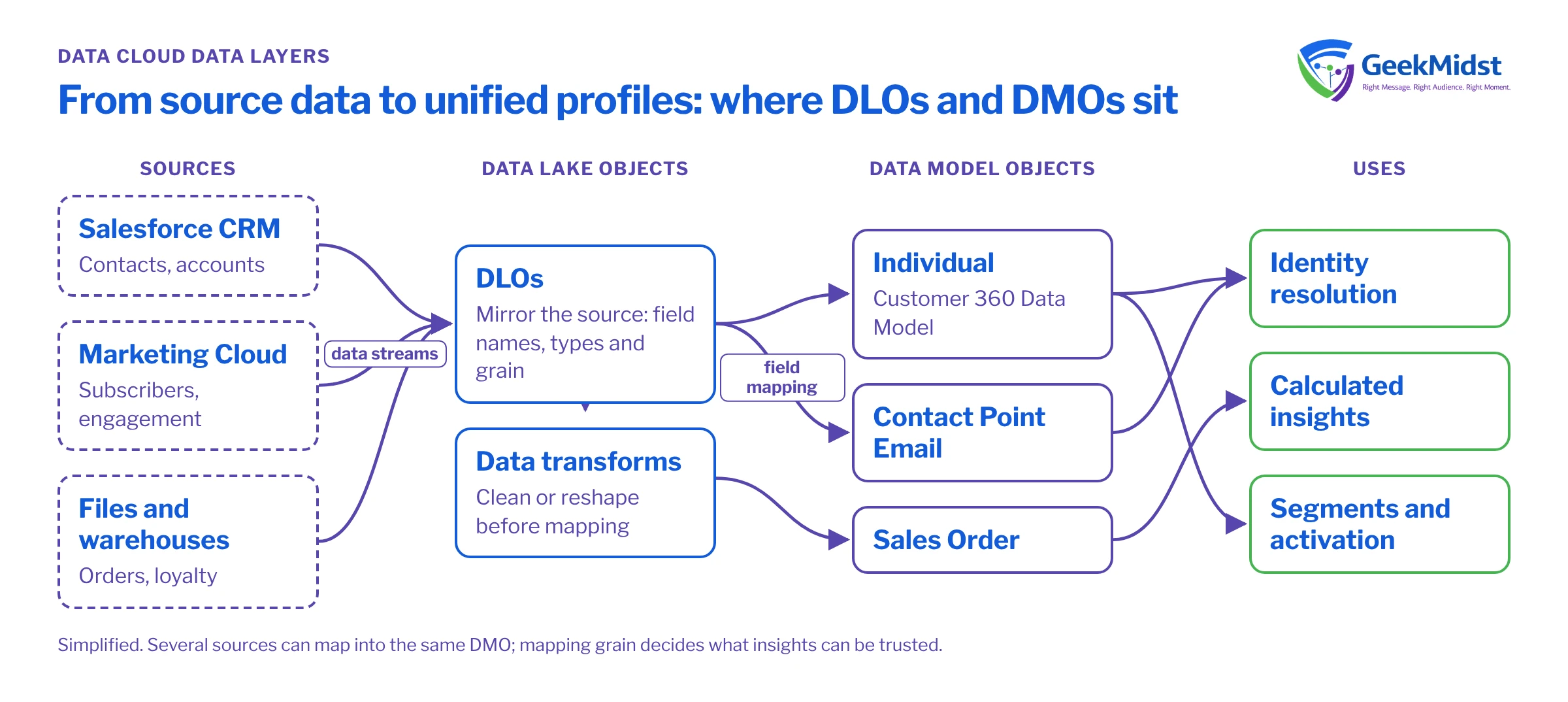
Data in Salesforce Data Cloud moves through layers. Understanding the difference between Data Lake Objects (DLOs) and Data Model Objects (DMOs) is the foundation for everything that comes after — identity resolution, insights, segments and activation.
Data Lake Objects
When a data stream ingests data, it lands in a DLO. A DLO keeps the structure of the source: field names, types and grain. Think of it as a staged copy of what the source system sent.
Data Model Objects
DMOs are the harmonised, canonical shape of your data based on the Customer 360 Data Model — objects such as Individual, Contact Point Email or Sales Order. You map DLO fields to DMO fields. Several sources can map into the same DMO, which is what makes unification possible.
Why the distinction matters
- Identity resolution, calculated insights and segmentation operate on DMOs, not DLOs.
- Mapping decisions determine which records can be matched and how profiles are built.
- Getting the grain wrong (for example, mapping order lines to an order-level object) produces misleading insights later.
Data stream categories
When you create a data stream you choose a category, typically Profile, Engagement or Other. The category tells Data Cloud how to treat the data:
- Profile data describes people or accounts — names, contact points, attributes.
- Engagement data describes events over time — orders, web visits, email opens. Engagement streams need an event date field, which Data Cloud uses for time-based processing.
- Other covers reference data such as product catalogues or store lists.
Choose carefully: the category is set when the stream is created and is not easy to change later. A DMO also takes its category from the data mapped into it, so a poor choice at the stream level can follow you into the model.
Each data stream also needs a primary key. If the source has no natural unique key, create one (for example in a formula field or upstream) rather than relying on fields that can repeat.
At a glance
| DLO | DMO | |
|---|---|---|
| Shape | Mirrors the source | Canonical data model |
| Created by | Data streams / transforms | Standard model or custom objects |
| Used for | Staging and transformation | Identity resolution, insights, segments |
| Typical mistake | Ingesting unneeded fields | Mapping at the wrong grain |
Worked example: an ecommerce order feed
Illustrative example. Suppose your commerce platform sends a daily file with one row per order line: order number, line number, SKU, quantity, price, customer email and order date.
- The data stream lands this in a DLO at order-line grain. The primary key is the combination of order number and line number, not order number alone.
- The order-level fields (order number, order date, customer) map to Sales Order, and the line-level fields map to Sales Order Product. Mapping everything to Sales Order would create one "order" per line and inflate order counts.
- The customer email does not belong on the order object as a loose field. It should link to the person through the Individual and Contact Point Email objects so identity resolution can use it.
Before mapping, confirm the exact standard objects and fields available in your org, because the standard data model is extended over time.
Common mistakes
- Treating the DLO as the reporting layer. DLOs are useful for checking what arrived, but the business logic — profiles, insights, segments — lives on DMOs.
- Creating custom DMOs too early. Check the standard model first. Standard objects come with relationships that identity resolution and other features expect.
- Skipping relationships. Mapping fields without defining how DMOs relate (for example, how a sales order links to an individual) leaves segments unable to join the data.
- Mapping every field "just in case". Unused fields add noise and make the model harder to maintain. Map what answers a real question.
- Ignoring data types. A date stored as text in the source needs converting before or during mapping, or time-based logic will not work as expected.
Frequently asked questions
Can one DLO map to several DMOs?
Can several DLOs map to the same DMO?
Do I need data transforms?
Where do unified profiles come from?
Modelling checklist
- List every source and the business questions it must answer.
- Decide the grain of each source before mapping.
- Map identifiers (email, phone, external IDs) carefully — they drive identity resolution.
- Use data transforms when a source needs cleaning or reshaping before mapping.
- Validate counts at each layer after the first full ingestion.
Need help designing this? See our Data Cloud consulting service.


