

Troubleshooting Data Cloud Segment Activation
When a segment counts zero or an activation never lands, the cause is usually one layer upstream. Here is a structured way to find it quickly.

The campaign goes out tomorrow. The Data Cloud segment shows zero members, or a count nobody believes, or the activation status looks healthy while the target system has no new records. Panic tends to produce random setting changes. A calmer approach is to work through the pipeline one layer at a time, because almost every segment problem is really a problem in a layer underneath it.
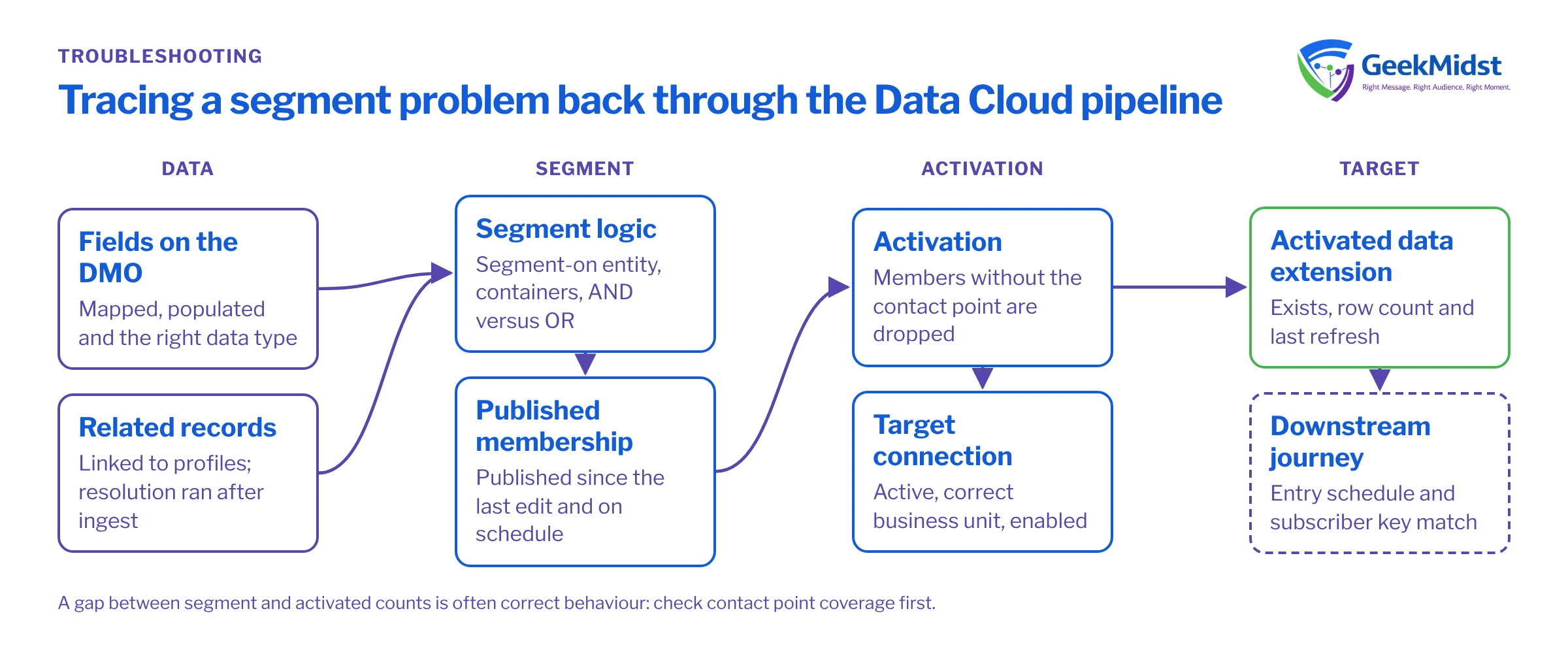
How a segment becomes an audience
It helps to hold the full chain in your head:
- Data streams ingest source data into Data Lake Objects.
- DLO fields are mapped to Data Model Objects.
- Identity resolution builds unified profiles from mapped people and contact points.
- Calculated insights aggregate measures per profile.
- A segment filters a chosen entity, usually Unified Individual, using direct attributes, related attributes and insights.
- The segment is published on a schedule or on demand.
- An activation sends the published members, a chosen contact point and selected attributes to an activation target.
- The target system, such as Marketing Cloud Engagement, receives and stores the audience.
A problem at step 2 shows up as a symptom at step 5 or 8. So start with the symptom, then walk backwards.
Symptom to first check
| Most likely layer | First check | |
|---|---|---|
| Segment counts zero | Mapping or segment-on entity | Is the segment built on the entity your filters relate to, and are the filter fields populated on the DMO? |
| Count much lower than expected | Identity resolution or related attribute paths | Does the filter use the right relationship path, and are related records linked to unified IDs? |
| Count much higher than expected | Filter logic or duplicates | Check AND versus OR groupings and whether profiles were under-merged |
| Insight not available as a filter | Calculated insight design | Does the insight have a dimension tied to the segmented profile ID, and has it processed? |
| Activation shows fewer members than segment | Contact point or consent filtering | Members without the chosen contact point, or without valid consent, are not sent |
| Nothing arrives in the target | Activation target or publish timing | Is the target connected and active, and has the segment published since the activation was set up? |
Layer 1: is the data actually there?
Open Data Explorer on the DMO your filter uses and check the field you filter on. A common surprise is a field that is populated in the DLO but was never mapped, or was mapped from the wrong source column. Another is a data type mismatch: a date ingested as text will not behave in a date filter. If counts in the DMO look wrong, fix mapping before touching the segment.
Layer 2: is it connected to the profile?
Segments on Unified Individual reach related data, such as orders or engagement, through relationships. If orders were ingested with a customer reference that does not match any mapped Individual, they float free and will never satisfy a related-attribute filter. Check that the reference field on the related DMO is populated and that the relationship is defined in the data model. Then check the identity resolution run completed after the latest ingestion.
Layer 3: is the segment logic what you meant?
Segment builder logic is easy to misread. Two things to check carefully:
- Containers and their aggregation. A related-attribute container like purchased product X with amount greater than 100 evaluates within the related records. Splitting those conditions into two separate containers asks a different question: bought product X at some point and made some purchase over 100.
- AND and OR at the top level. One misplaced OR can turn a narrow segment into most of your base.
Rebuild the segment in small steps and watch the count after each filter. The step where the count jumps or collapses is where the logic diverges from intent.
Layer 4: has it published?
Segment counts in the builder are estimates of current logic; activation uses the published membership. If the segment was edited after the last publish, or its schedule has not run, the target receives an older result or nothing at all. Check last-published time and the publish schedule. Rapid publishing options exist for some use cases; check current behaviour and limits for your org in Salesforce Help.
Layer 5: what did the activation send?
The activation chooses a contact point, such as email, and optional attributes. Members without that contact point are dropped. Depending on configuration, consent and contact point validity can also filter members. A gap between segment count and activated count is often correct behaviour, and the fix is in data capture, not configuration.
Also confirm the activation target itself: the connection to Marketing Cloud Engagement or other target is active, the correct business unit is selected, and the activation is enabled.
Layer 6: what did the target receive?
In Marketing Cloud Engagement, activated audiences arrive as data extensions created and refreshed by the activation. Check the data extension exists, its row count and its last refresh. If the rows are present but journeys do not pick them up, the problem is now in Marketing Cloud, for example a journey entry schedule or a subscriber key mismatch. Activating Data Cloud Segments to Marketing Cloud covers that hand-off in detail.
Habits that prevent most of these issues
- Document the expected count for every production segment and alert when it moves outside a range.
- Schedule publish after identity resolution and insight refreshes complete.
- Name segments and activations consistently so owners can find the chain from audience to target.
- Keep a test segment of internal seed records so you can prove end-to-end delivery in minutes.
Quick checklist
- Filter fields populated on the DMO.
- Related records linked to profiles.
- Segment logic rebuilt step by step.
- Segment published after latest changes.
- Contact point and consent gaps explained.
- Target connection and business unit confirmed.
- Rows present in the target and picked up downstream.
Related reading
Stuck on a segment that will not behave?
Send us the symptom and the segment design. We will trace it layer by layer and explain the fix.


