

Mapping Custom Sources to the Customer 360 Model
Standard connectors map themselves; custom sources do not. Here is how to map a non-Salesforce source so identity resolution and segmentation can use it.

Salesforce CRM and Marketing Cloud sources come with mapping help built in. A loyalty platform, a mobile app back end or a regional ecommerce database does not. Someone has to decide which source field goes to which Data Model Object, how keys are built, and whether a field belongs on a standard object or a custom one. Those decisions determine whether the source contributes to unified profiles at all.
This guide works through one realistic custom source end to end.
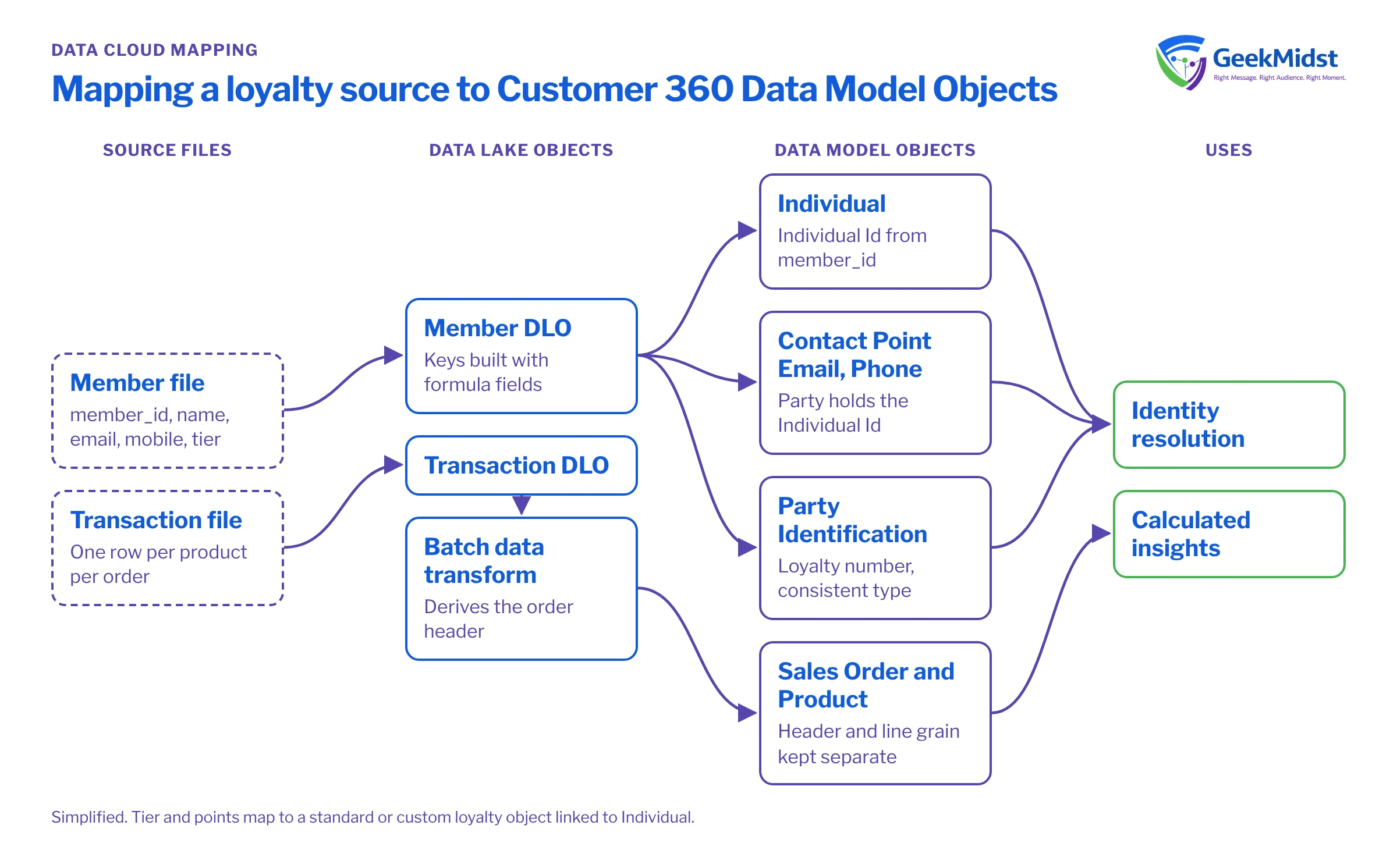
The objects that matter most
The Customer 360 Data Model in Data Cloud (now branded Data 360) has many objects, but identity resolution and most segmentation lean on a small core:
- Individual. The person, with attributes such as first name, last name and birth date. Every person-level source should map here.
- Contact Point Email, Contact Point Phone, Contact Point Address. Ways to reach the person, each linked back to the Individual through a party field.
- Party Identification. External identifiers such as loyalty numbers or national customer IDs, with an identification type and name.
- Engagement and transaction objects, such as Sales Order and Sales Order Product, or engagement objects for email and web activity, linked to the person.
For background on the difference between ingested and modelled data, see DLO vs DMO.
The example source
A loyalty platform sends a nightly member file with these columns: member_id, first_name, last_name, email, mobile, tier, points_balance and joined_at. It also sends a separate transaction file at line level.
One DLO row from the member file needs to feed several DMOs. That is normal: a single DLO can map to Individual, Contact Point Email, Contact Point Phone and Party Identification at once.
Mapping the member file
| Source field | Target DMO | Target field | |
|---|---|---|---|
| Individual key | member_id | Individual | Individual Id |
| Name | first_name, last_name | Individual | First Name, Last Name |
| Email key | member_id plus a suffix | Contact Point Email | Contact Point Email Id |
| Email value and owner | email, member_id | Contact Point Email | Email Address, Party |
| Phone value and owner | mobile, member_id | Contact Point Phone | Telephone Number, Party |
| Loyalty identifier | member_id | Party Identification | Identification Number, Party |
| Identifier type | constant such as Loyalty | Party Identification | Party Identification Type, Identification Name |
| Tier and points | tier, points_balance | Custom or standard loyalty object | Linked to Individual |
Keys: the part people get wrong
Every DMO record needs its own primary key, and the party field on contact points must hold the same value you mapped to Individual Id. Two common approaches for contact point keys:
- Build a key from the member ID and a suffix, such as
M-10293-email, using a formula field on the data stream or in the extract. - Use a hash of the normalised value plus the member ID, if a member can have several emails.
If you map member_id straight into Contact Point Email Id and also into Contact Point Phone Id, that works only because they are different objects. Problems start when two sources use the same raw IDs for different people. Prefixing keys by source, for example LOY- and WEB-, avoids collisions.
Data stream formula fields are useful for this kind of derivation. Check which functions are available in Salesforce Help.
Grain: one row means what?
The transaction file is at line level: one row per product per order. Map it to Sales Order Product, and map the order header (from a separate file or derived with a batch data transform) to Sales Order. Mapping line-level rows straight onto Sales Order inflates order counts and breaks every calculated insight built on top.
Standard object or custom object?
Before creating a custom DMO, look for a standard object that fits. Salesforce has added objects for areas such as loyalty and products, and standard objects are better understood by other features and by future team members. Create a custom DMO when:
- No standard object matches the meaning, not just the field names.
- The data is specific to your business, such as a warranty registration or a subscription box preference.
- Forcing it into a standard object would require misusing fields.
When you do create one, give it a relationship to Individual (or the right parent) so segments can reach it, and document it in your data dictionary.
Common mistakes and how to diagnose them
- Contact points with no party. The email is in Data Cloud but not linked to anyone, so it never contributes to matching. Check that the party field is populated on every contact point record.
- Mapping the identifier type inconsistently. If one source uses
Loyaltyand anotherLOYALTY_ID, Party Identification matching will not line them up. - Unused fields mapped "for later". Mapping should follow use cases. Unused attributes still need governance.
- Wrong data types. A date mapped as text cannot drive date filters. Fix the type on the data stream before mapping.
- Remapping in production without a plan. Changing mappings can affect identity resolution, insights and segments. Change in a sandbox first, then reconcile counts.
Checklist
- Each source file listed with its grain.
- Every person-level source mapped to Individual.
- Contact points mapped with keys and party populated.
- External IDs mapped to Party Identification with a consistent type.
- Transactions mapped at the correct grain.
- Standard objects considered before custom ones.
- Record counts compared between DLO and each DMO after the first load.
Related reading
Have a source that does not fit the standard model?
We can map it with you, decide where custom objects make sense and validate counts layer by layer before it feeds identity resolution.


