

Reconciliation Rules for Unified Profiles
Once records are matched, every field needs one value. Reconciliation rules decide which source wins, and the defaults are rarely right for every field.

Match rules decide who belongs together. Reconciliation rules decide what the unified profile says about them. When three sources hold three different first names, two addresses and a birth date in only one of them, something has to pick a winner for each field. In Data Cloud identity resolution, that something is the set of reconciliation rules in your ruleset.
Teams often leave these at their defaults and then wonder why a service agent sees a nickname from an old ecommerce account, or an address that was updated in billing months ago. This guide explains the options and how to choose them field by field.
What reconciliation rules do
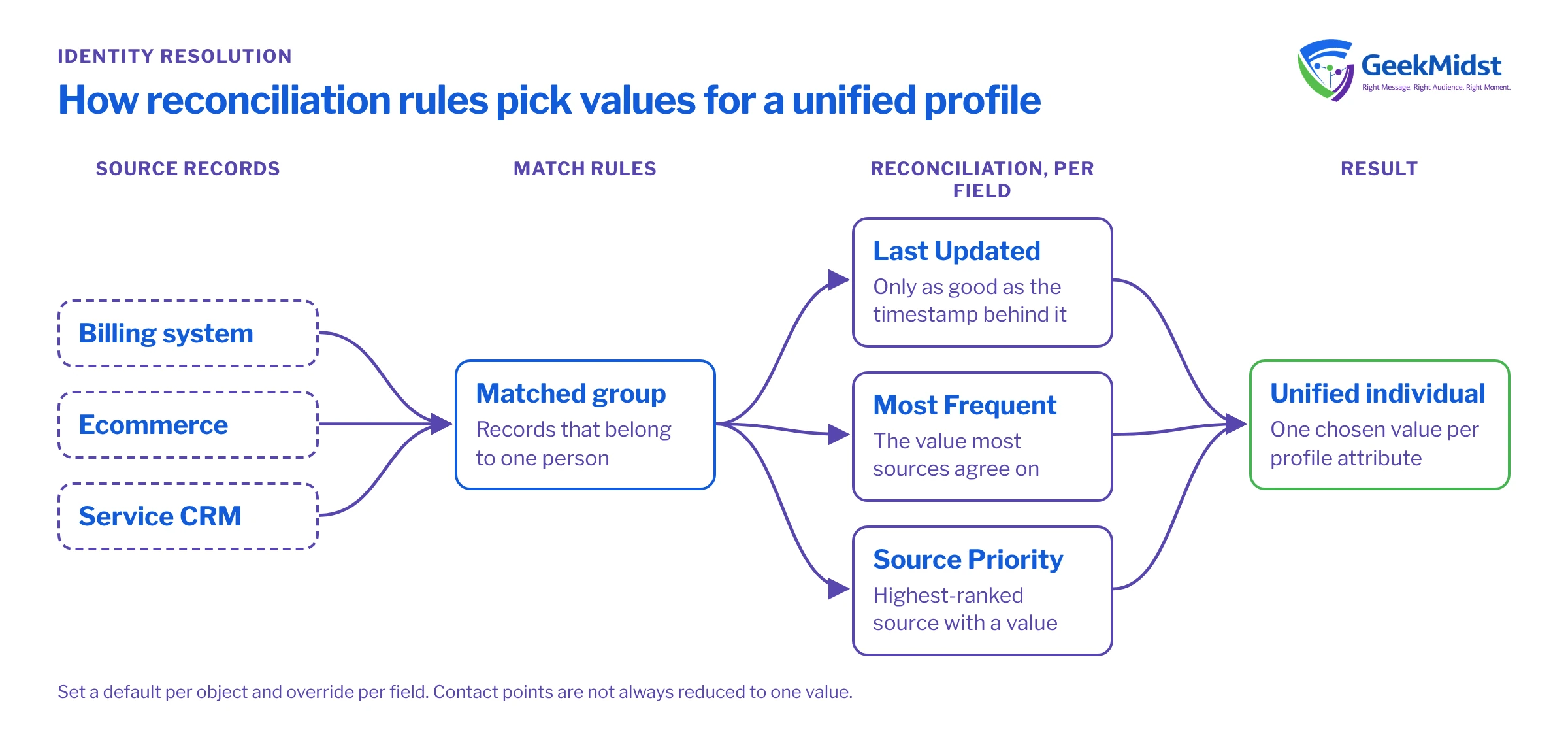
After match rules group source records into a unified individual, reconciliation rules run for the attributes on the unified profile. You can set a default rule for an object and override it for specific fields. The main rule types are:
- Last Updated. The value from the most recently updated source record wins. It depends on a reliable last-modified date being mapped for each source.
- Most Frequent. The value that appears most often across the matched records wins. Useful when many sources hold the same field and the odd one out is probably wrong.
- Source Priority. You rank data sources, and the highest-ranked source with a value wins. Best when one system is clearly authoritative for a field.
Exact rule names, options and tie-break behaviour can change between releases, so confirm current behaviour in Salesforce Help before you finalise the design.
Contact points are a different question
Contact points such as email, phone and address are separate objects. A person can legitimately have several email addresses, so unified contact points are not always forced down to one value. Think about how downstream channels will choose a contact point at activation time, which is often where the "best email" decision is really made, rather than trying to make reconciliation do it all.
A worked example: three sources disagree
| Billing system | Ecommerce | Service CRM | |
|---|---|---|---|
| First name | Venkatesh | Venky | Venkatesh |
| Last updated | 14 months ago | 2 days ago | 6 months ago |
| Postal address | Flat 4, Old Road | Flat 4, Old Road | New House, Lake Road |
| Address updated | 14 months ago | 2 days ago | 3 weeks ago |
| Date of birth | 1988-05-02 | not held | not held |
Now apply different rules and see what the unified profile would say:
- First name with Last Updated: Venky, because ecommerce changed most recently. Fine for a casual email greeting, wrong for a formal letter.
- First name with Most Frequent: Venkatesh, because two of three sources agree.
- First name with Source Priority (billing first): Venkatesh.
- Address with Last Updated: depends on what "updated" means. The ecommerce record was touched two days ago, perhaps for a password reset, so its old address wins even though the customer moved three weeks ago and told service. Record-level timestamps do not tell you when this field changed.
- Address with Source Priority (service first): New House, Lake Road, which is probably correct here.
- Date of birth: only one source holds it, so any rule returns it.
The lesson is that Last Updated is only as good as the timestamp behind it. A record-level last-modified date changes for reasons unrelated to the field you care about.
Choosing a rule per field
A practical way to set reconciliation rules
- 01
List the profile fields that matter
Start from the use cases. Name, preferred language, address, date of birth and a few segmentation attributes are usually enough to begin with.
- 02
Name the system of record for each
Ask the business which system they trust for each field and why. Billing for legal name and address is common; a preference centre for language.
- 03
Pick the rule that expresses that trust
Source Priority when one system is authoritative, Most Frequent when several sources hold equally good data, Last Updated only where timestamps reflect real changes to that field.
- 04
Check the timestamps behind Last Updated
Confirm which date field is mapped for each source and whether it changes for unrelated updates such as logins.
- 05
Walk through sample profiles
Take ten real-looking cases with conflicting values and work out by hand what each rule would produce. Show the results to the field owners.
- 06
Run, inspect and re-baseline
After a ruleset run, inspect unified profiles for those sample people and confirm the values match your expectations.
Common mistakes and how to diagnose them
- One default rule for everything. Different fields have different owners. Override per field where it matters.
- Last Updated on noisy timestamps. If the winning value is often from a source that rarely holds good data, check whether that source's timestamp changes on every sync.
- Ranking a source that is often empty. Whether Source Priority falls through to a lower-ranked source when the top one has no value depends on the rule's empty-value setting, so check that setting and what the fallback order produces.
- Ignoring formatting differences. Lake Road and Lake Rd count as different values for Most Frequent. Standardise in a data transform first.
- Treating the unified value as the truth for operations. The unified profile serves engagement and insight. If an operational system needs the corrected address, fix it at the source.
Checklist
- Key profile fields listed with use cases.
- System of record agreed per field.
- Rule chosen and documented per field, with reasons.
- Timestamp fields checked for every Last Updated rule.
- Values standardised before reconciliation.
- Sample profiles reviewed after the first run.
Related reading
Are your unified profiles showing the right values?
We can work through your key fields with the business owners, set reconciliation rules that reflect them, and check the results on real profiles.


