

Data Transforms: Batch vs Streaming
Batch transforms reshape whole data sets on a schedule; streaming transforms clean records as they arrive. Choosing the wrong one creates fragile pipelines.

Raw source data is rarely ready to map. Emails arrive in mixed case with stray spaces, order lines need rolling up, two regional customer files need combining into one. Data Cloud gives you two tools for this: batch data transforms and streaming data transforms. They overlap a little, but they are built for different jobs, and picking the wrong one leads to slow pipelines or transforms that simply cannot express what you need.
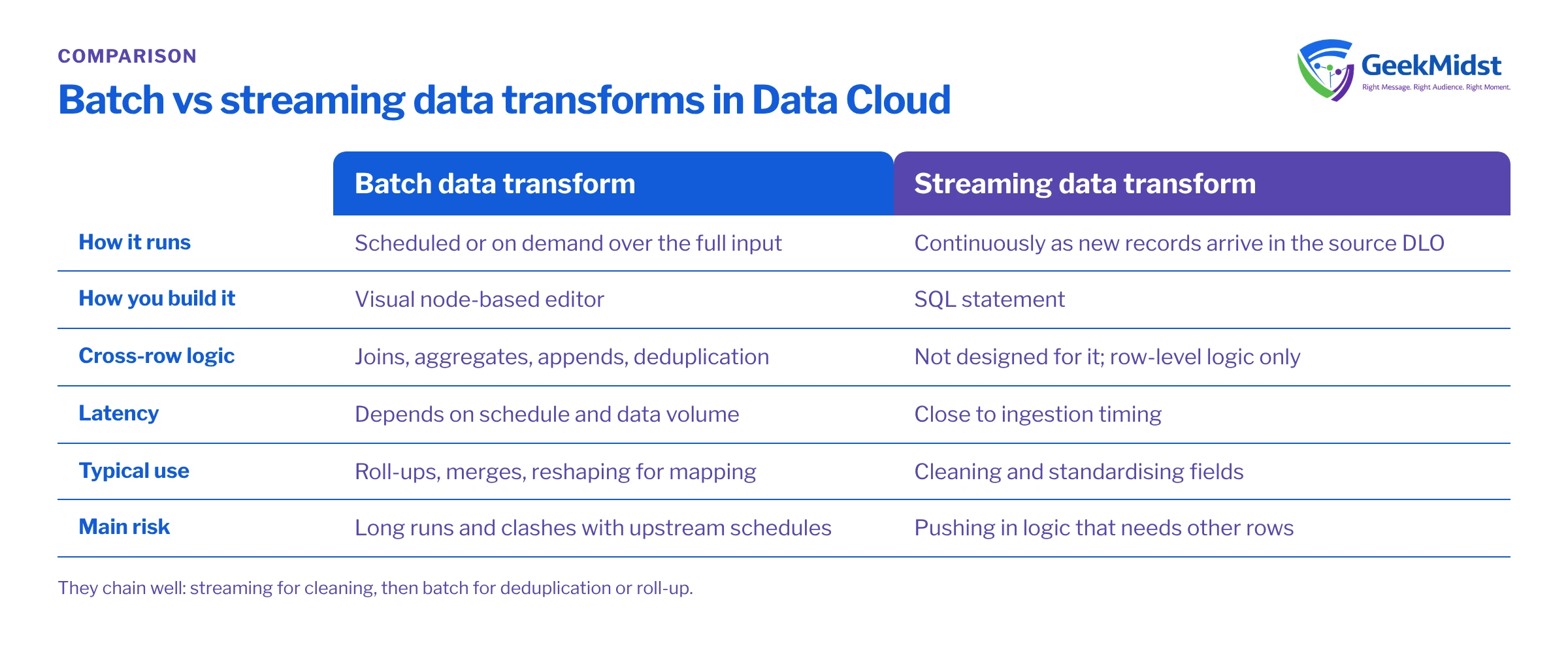
What each type is for
Batch data transforms run on a schedule or on demand over a full data set. You build them in a visual editor with nodes for joins, filters, aggregations, appends, formulas and similar operations, and write the output to a target object. They suit work that needs to see many rows at once: combining sources, deduplicating, aggregating line items to orders, or building a reshaped table for mapping.
Streaming data transforms are written in SQL and process records continuously as they land in a source Data Lake Object, writing results to a target DLO. They suit row-level work that should keep pace with ingestion: standardising formats, deriving a field, filtering out junk, or splitting a record into a cleaner shape.
The key mental model: streaming transforms look at one incoming record at a time, while batch transforms look at the whole table. Anything that needs other rows, such as aggregation, ranking or deduplication across records, belongs in batch.
Side by side
| Batch data transform | Streaming data transform | |
|---|---|---|
| How it runs | Scheduled or on demand over the full input | Continuously as new records arrive |
| How you build it | Visual node-based editor | SQL statement |
| Cross-row logic | Joins, aggregates, appends, deduplication | Not designed for it; row-level logic |
| Latency | Depends on schedule and data volume | Close to ingestion timing |
| Typical use | Roll-ups, merges, reshaping for mapping | Cleaning and standardising fields |
| Main risk | Long runs and schedule clashes upstream | Pushing logic in that needs other rows |
Check Salesforce Help for the current list of supported functions, join types and output targets for each transform type, because these have expanded over releases.
Before you start
The example below assumes a source DLO called Web_Signups__dll with fields signup_id__c, email__c, first_name__c, country__c and signup_ts__c, and a target DLO Web_Signups_Clean__dll that you have already created with matching fields. These are sample names. Confirm real API names in your org, and confirm the functions you use are supported in streaming transforms.
A worked example: cleaning sign-ups as they arrive
The goal is to standardise email and country before mapping, and to drop obvious test sign-ups, without waiting for a nightly job.
SELECT
  s.signup_id__c                    AS signup_id__c,
  LOWER(TRIM(s.email__c))           AS email__c,
  TRIM(s.first_name__c)             AS first_name__c,
  UPPER(TRIM(s.country__c))         AS country__c,
  s.signup_ts__c                    AS signup_ts__c
FROM Web_Signups__dll s
WHERE s.email__c IS NOT NULL
  AND LOWER(s.email__c) NOT LIKE '%@example.com'
AND LOWER(s.email__c) NOT LIKE 'test%'Every line operates on the current record alone. There is no GROUP BY, no window function and no join to another table. You then map Web_Signups_Clean__dll to Individual and Contact Point Email rather than mapping the raw DLO.
Now suppose the business also wants one row per email address, keeping the most recent sign-up. That needs to compare rows, so it moves to a batch transform: a node that groups or ranks by email and keeps the latest timestamp, scheduled ahead of identity resolution.
Choosing between them
Ask four questions:
- Does the logic need more than one row? If yes, batch.
- Does a downstream use case need the result within minutes? If yes, and the logic is row-level, streaming.
- Is the input large and the logic heavy? Batch, scheduled with time to finish before resolution and insights run.
- Could the source system do this better? Sometimes the cleanest fix is upstream, in the extract or the application form.
It is common, and sensible, to chain them: a streaming transform for cleaning, followed by a batch transform for deduplication or roll-up.
Common mistakes and how to diagnose them
- Forcing aggregation into streaming SQL. The editor will reject it, or the logic will not do what you think. Move it to batch.
- Mapping the raw DLO as well as the clean one. Both feed identity resolution and you get duplicates. Map only the transformed output for that source.
- Batch runs overlapping upstream refreshes. A transform that starts before ingestion completes processes partial data. Check run histories and adjust schedules.
- Silent type changes. A text date cast inconsistently becomes null. Profile the target DLO after the first run and compare counts with the source.
- No owner for transform logic. Transforms quietly encode business rules. Document each one in your data dictionary.
Monitoring transforms after go-live
A transform that worked on launch day can fail quietly months later when a source adds a column, changes a data type or sends an unexpectedly large file. Check run history for failed or unusually long batch runs, compare source and target row counts on a schedule, and alert someone when the gap moves outside an agreed range. Treat a transform failure the same way as an ingestion failure: everything downstream, including identity resolution and segment counts, is affected.
Checklist
- Transform type chosen against the four questions above.
- Source and target DLO names, fields and types confirmed.
- Only the transformed output mapped to DMOs for that source.
- Row counts compared between source and target after first run.
- Schedules sequenced: ingestion, transforms, resolution, insights, segments.
- Logic documented with an owner.
Related reading
Want a second opinion on your transform design?
We can review your transforms and schedules, move logic to the right place and document it so your team can maintain it.


