

Choosing Data Stream Ingestion Patterns
Each source can reach Data Cloud in several ways. Choosing the right pattern per source decides freshness, cost, effort and how easy failures are to spot.

Data Cloud offers several ways to bring a source in, and most programmes end up using three or four of them at once. The trouble starts when the choice is made by habit: everything through flat files because that is what the warehouse team knows, or everything through an API because it sounds modern. The right pattern depends on how fresh the data must be, how much of it there is, where it already lives, and who will support the pipe after go-live.
The main ingestion patterns
Data streams are the mechanism; connectors are the way each stream reaches its source. The common options are:
- Salesforce CRM connector. Native ingestion of objects such as Contact, Lead, Account and custom objects from connected Salesforce orgs. Usually the first stream configured, and the lowest effort for CRM data.
- Marketing Cloud Engagement connector. Brings in data extensions and engagement data from connected business units. Useful for email engagement history and subscriber data already curated in Marketing Cloud.
- Ingestion API. A REST interface with a streaming pattern for small, frequent payloads and a bulk pattern for larger files. You define the schema, and your systems or middleware push data in.
- Cloud storage connectors. Scheduled pickup of files from storage such as Amazon S3, Google Cloud Storage or Azure. A pragmatic fit for nightly extracts from systems you cannot connect to directly.
- Web and mobile SDKs. Capture behavioural events from sites and apps against device identifiers, linked to known people when they identify themselves.
- Zero copy and federation. Query data where it already lives in supported warehouses and lakehouses, rather than copying it. Supported platforms and features change, so check the current list in Salesforce Help.
- MuleSoft and other middleware. When a source needs orchestration, transformation or error handling beyond what a direct connector gives you.
Connector availability, refresh frequencies and limits vary by edition and release. Treat any number you see quoted, including here, as something to confirm for your org.
Matching pattern to need
| Freshness | Effort to build | Best for | |
|---|---|---|---|
| CRM connector | Scheduled sync, frequent | Low | Salesforce objects in connected orgs |
| Marketing Cloud connector | Scheduled | Low | Data extensions and engagement already in Marketing Cloud |
| Ingestion API (streaming) | Near real time, in micro-batches | Medium to high | Events and profile changes from apps you control |
| Ingestion API (bulk) | When you push | Medium | Large periodic loads from your own jobs |
| Cloud storage | Scheduled file pickup | Low to medium | Nightly extracts from ERP, POS or legacy systems |
| Zero copy | Queried in place | Medium | Large warehouse tables you do not want duplicated |
Decisions to make per source
What category is the data?
When you create a data stream you choose a category, such as Profile, Engagement or Other. Engagement data needs an event date-time field because it is time-series by nature: clicks, page views, orders as events. Profile data describes people and their attributes. Choosing the wrong category is awkward to undo, so decide before you build.
What is the primary key?
Every stream needs a field that uniquely identifies a row. For profile data that is usually the source customer ID. For engagement it might be an event ID. If the source has no natural key, build one before ingestion, for example by concatenating order ID and line number in your extract job. A weak key causes silent overwrites.
Upsert or full refresh?
Many file-based streams let you choose between updating changed rows and replacing the full data set. Upsert is efficient but needs reliable keys and a way to handle deletions. Full refresh is simple and self-correcting but heavier. For small reference tables, full refresh is often the safer choice.
How fresh does it really need to be?
Ask what decision depends on the data and how quickly. A browse-abandonment journey needs minutes. A monthly loyalty statement needs a nightly file. Remember the downstream chain too: data that arrives in seconds but waits hours for identity resolution and segment publishing is not real-time in practice.
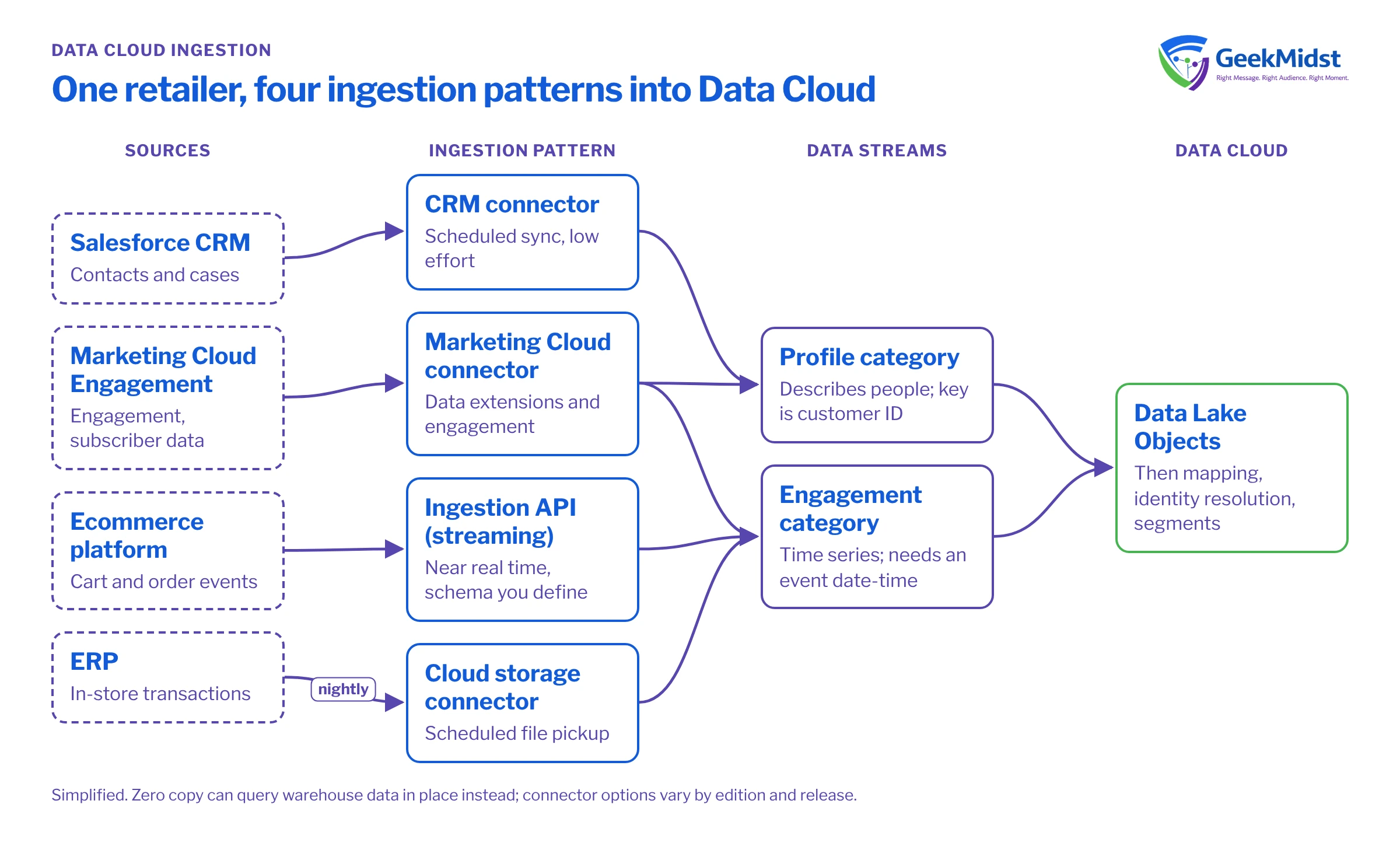
A worked example: one retailer, four patterns
Picture a retailer with Salesforce CRM for service, Marketing Cloud Engagement for email, a custom ecommerce platform, and an ERP holding store sales.
- CRM connector for Contacts and Cases.
- Marketing Cloud connector for email engagement and the master subscriber data extension.
- Ingestion API streaming from the ecommerce platform for cart and order events, so abandoned-cart journeys can act quickly.
- Cloud storage for a nightly ERP extract of in-store transactions.
The ecommerce team defines a schema for the Ingestion API connector, then posts events. A streaming payload is a JSON object with a data array of records that match the schema.
{
  "data": [
    {
      "event_id": "evt-000184",
      "customer_id": "C-102938",
      "email": "shopper@example.com",
      "event_type": "cart_updated",
      "cart_value": 2450.00,
      "currency": "INR",
      "event_datetime": "2026-10-12T09:41:22Z"
    }
  ]
}Note the explicit event ID as the primary key, the UTC timestamp for the engagement event time, and a customer ID that matches the identifier the ecommerce platform uses elsewhere, so the event can be linked to a person after mapping.
Common mistakes
- Ingesting everything. Bringing every column "in case" adds cost, slows mapping and spreads personal data further than needed. Ingest what a use case needs.
- Time zones left implicit. Store and send timestamps in UTC with an explicit offset. Mixed local times break recency logic.
- No plan for deletions. If a customer is deleted in the source, decide how that reaches Data Cloud. Upsert-only streams will keep the record.
- Schema drift. A source team renames a column and the stream fails or nulls a field. Agree change control with source owners.
- Assuming streaming means instant activation. Check the whole chain, including resolution and segment publish timing.
Checklist per source
- Use case and freshness requirement written down.
- Category chosen (profile, engagement or other) with an event time where needed.
- Primary key confirmed unique.
- Refresh mode and deletion handling agreed.
- Field list trimmed to what is used.
- Owner and monitoring in place for failures.
Related reading
Planning how your sources reach Data Cloud?
We can review each source, recommend an ingestion pattern with the trade-offs spelt out, and build the streams with monitoring from day one.


