

Calculated Insights: Build and Troubleshoot
Calculated insights turn raw orders and engagement into lifetime value, recency and frequency. This guide covers how to build them and why they fail.

A marketing team wants a segment of customers who have spent more than a set amount in the last year and bought at least twice. The data is all in Data Cloud, yet the attribute they need does not exist anywhere. That is the job of a calculated insight: a SQL definition that aggregates data in your data model into reusable measures, keyed to a profile, that segmentation and activation can use.
This guide covers how calculated insights are structured, a worked example, and the problems we see most often when they are first implemented.
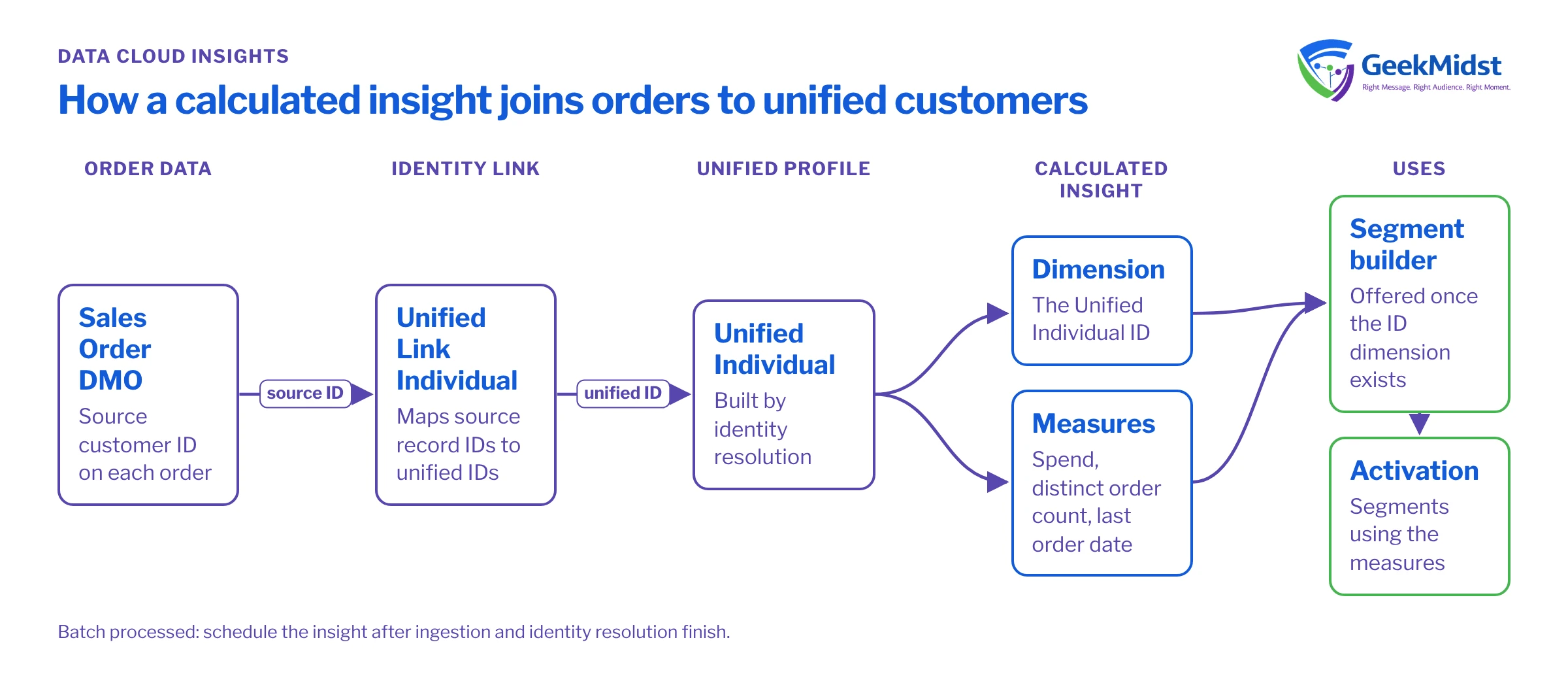
What a calculated insight is
A calculated insight is defined in SQL over Data Model Objects. It produces a result set made of:
- Dimensions, the fields you group by. For segmentation on people, one dimension must be the identifier of the profile you segment on, typically the Unified Individual ID.
- Measures, the aggregated values, such as total spend, order count or most recent order date. Measures must be aggregates (
SUM,COUNT,MAX,MIN,AVGand so on).
Calculated insights are processed in batch on a schedule you set. They are different from streaming insights, which work on near real-time data within time windows and are aimed at triggering actions rather than long-term metrics. If you need lifetime value or twelve-month frequency, a calculated insight is the right tool.
Before you start
The example below assumes:
- Identity resolution has run, so a Unified Individual DMO and its link object exist. See How Identity Resolution Match Rules Work.
- Orders are mapped to the standard Sales Order DMO, with the customer reference populated on each order.
- You have looked up the exact DMO and field API names in Data Explorer. The names below follow common conventions but are samples; the unified objects in particular can carry a suffix specific to your ruleset.
A worked example: spend and frequency per unified customer
The insight below joins orders to unified individuals through the link object, then aggregates spend and order count over roughly the last year.
SELECT
  ui.ssot__Id__c                       AS unified_individual_id__c,
  SUM(so.ssot__GrandTotalAmount__c)    AS spend_12m__c,
  COUNT(DISTINCT so.ssot__Id__c)       AS orders_12m__c,
  MAX(so.ssot__OrderStartDate__c)      AS last_order_date__c
FROM ssot__SalesOrder__dlm so
JOIN UnifiedLinkIndividual__dlm ul
  ON so.ssot__SoldToCustomerId__c = ul.SourceRecordId__c
JOIN UnifiedIndividual__dlm ui
  ON ul.UnifiedRecordId__c = ui.ssot__Id__c
WHERE so.ssot__OrderStartDate__c >= DATE_ADD(CURRENT_DATE, -365)
GROUP BY ui.ssot__Id__cA few things to notice:
- Output names end in
__c. Calculated insight dimensions and measures are named with this suffix; the editor will flag names it does not accept. - The join goes through the link object. Orders reference source customer IDs, not unified IDs. Joining orders straight to Unified Individual on the source ID returns nothing, which is one of the most common first-build errors.
COUNT(DISTINCT ...)on the order ID. If you join to order lines anywhere, a plainCOUNTinflates frequency.- The date filter. Date function support differs between SQL dialects. Check the supported function list in the Data Cloud SQL reference and validate the result against a known customer before publishing.
MAX of a date is a valid measure, but for segmentation you may find "days since last order" easier to use. Derive it carefully: a value calculated against the current date at processing time drifts until the next refresh, so make sure the refresh schedule matches how the segment is used.
Troubleshooting by symptom
What goes wrong and where to look
| Likely cause | How to check | |
|---|---|---|
| Insight saves but returns no rows | Join on the wrong ID, often source ID to unified ID | Run each join separately and count rows at every step |
| Values far higher than finance reports | Join fan-out from order lines or duplicate link rows | Compare spend per customer against the source system for five known customers |
| Insight not offered in segment builder | No dimension tied to the segmented profile's ID | Confirm one dimension is the Unified Individual ID and the insight has processed |
| Figures look stale | Refresh ran before identity resolution or ingestion completed | Compare job timestamps for ingestion, resolution and the insight |
| Validation error on save | Non-aggregated measure, unsupported function or bad alias | Read the error, simplify the query, and add clauses back one at a time |
| Numbers change after a ruleset edit | Unified IDs were rebuilt | Expected; re-baseline and tell segment owners |
Sequencing refreshes
Calculated insights depend on everything upstream: ingestion, mapping, identity resolution and sometimes other insights. If the insight runs before the resolution job finishes, new customers are missing and recently merged customers can be counted against stale IDs. Write the order down, check job completion times for a week after go-live, and adjust schedules so each layer finishes before the next begins. Monitoring Data Cloud Jobs and Refresh Schedules covers this in more depth.
Design tips that save rework
- Agree definitions with finance or analytics first. Does spend include tax, shipping, cancelled orders and returns? Write the rule down before writing SQL.
- Keep one insight per business concept. A single huge insight with twenty measures is harder to debug and to change.
- Choose grain deliberately. Most marketing measures belong at the unified individual level. Account-level measures for B2B need their own design.
- Name measures for humans. Marketers will see these in the segment builder.
spend_12m__cis clearer thanm1__c. - Reconcile before launch. Pick five to ten customers, calculate their values by hand from the source system, and compare.
Checklist
- Upstream objects mapped, populated and resolved.
- Business definitions written and agreed.
- API names confirmed in Data Explorer.
- Each join validated with row counts.
- Results reconciled against the source for sample customers.
- Refresh schedule set after resolution, and before segment publish.
- Segment owners told what the measure means and how often it updates.
Related reading
- Data Cloud Segmentation and Activation Troubleshooting
- Data Cloud Calculated Insights and Segmentation service
- SQL reference for Data Cloud on Salesforce Developers
Need insights your marketers can trust?
We can help define measures with your analytics team, build and reconcile the SQL, and set refresh schedules that line up with resolution and segment publishing.


