

How Identity Resolution Match Rules Work
Match rules decide which source records become one person. Here is how criteria, match methods and transitive matching combine, and how to test them safely.

Your team has switched on identity resolution in Data Cloud (now branded Data 360), the unified profile count looks plausible, and then someone in customer service notices two different people sharing one profile. Or the reverse: one loyal customer appears as four unified individuals. Both problems usually trace back to how match rules were written, not to a fault in the platform.
This guide explains what a match rule actually evaluates, how several rules interact, and how to test a ruleset before you trust it with segmentation and activation.
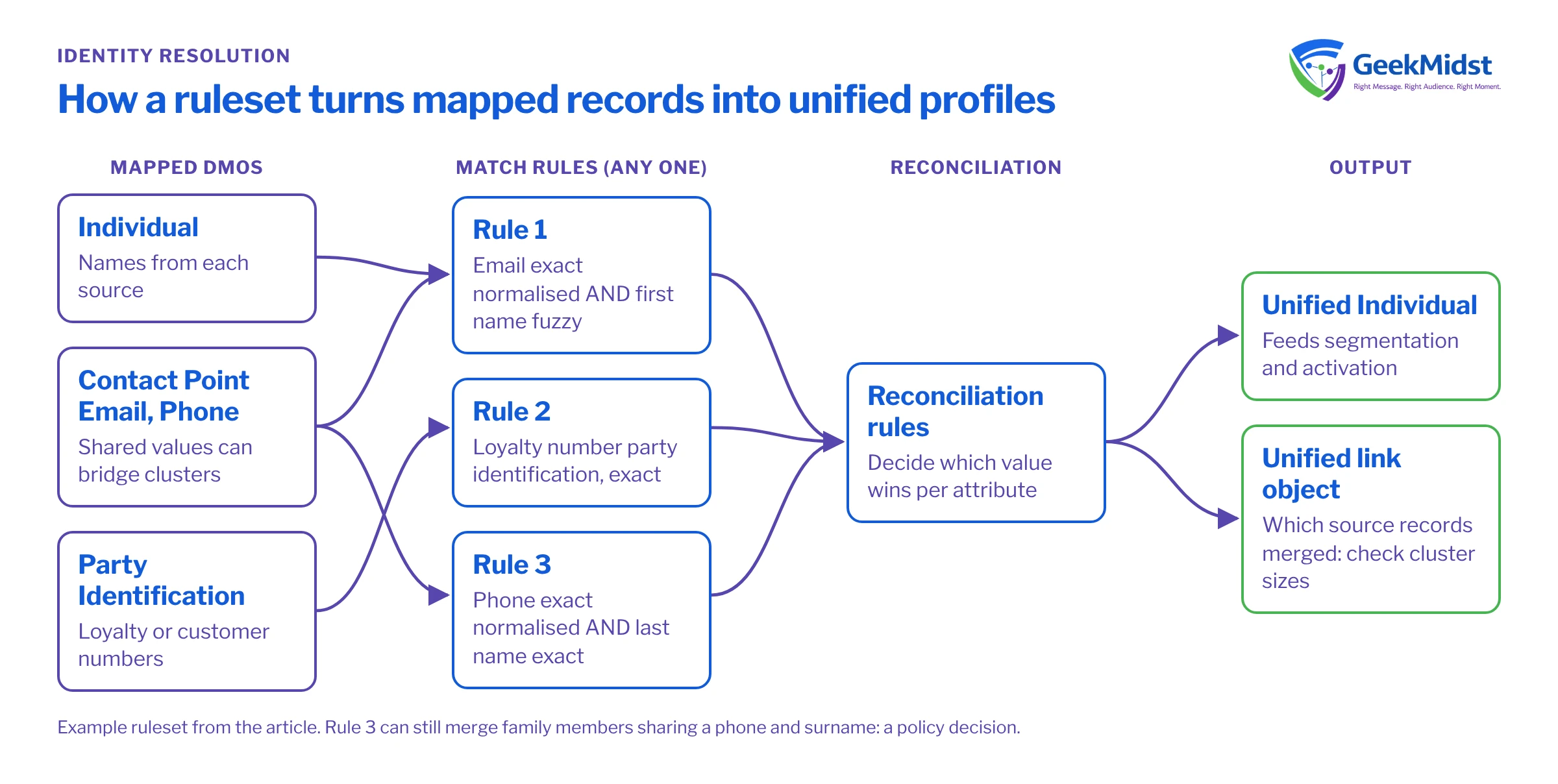
Where match rules sit in the pipeline
Identity resolution runs on Data Model Objects, not on raw ingested data. Records arrive through data streams into Data Lake Objects, are mapped to DMOs such as Individual, Contact Point Email, Contact Point Phone, Contact Point Address and Party Identification, and only then does a ruleset process them. If you are unsure of that layering, read DLO vs DMO in Data Cloud first.
A ruleset has two parts:
- Match rules, which decide which source Individual records refer to the same person.
- Reconciliation rules, which decide which value wins for each attribute once records are grouped. These are covered in Reconciliation Rules for Unified Profiles.
The output is a set of Unified Individual records plus a link object that records which source records were merged into which unified record. That link object is your best diagnostic tool, so remember it.
Criteria, rules and the logic between them
A match rule is a list of criteria. Each criterion compares one field, such as email address, phone number, first name or a party identifier, using a match method. Within a single rule, every criterion must be true for two records to match. Across rules, any rule that matches is enough. In other words, criteria are combined with AND, and rules are combined with OR.
That simple logic has big consequences. A rule of email exact on its own is permissive: anyone who shares an email address is merged. A rule of email exact AND first name fuzzy is stricter. Adding a third rule of phone exact widens matching again, because it gives records a second route to merge.
Match methods and party identifiers at a glance
| What it does | Typical fields | Watch out for | |
|---|---|---|---|
| Exact | Values must be identical after basic handling | Party identifiers, external customer IDs | Leading zeros, prefixes and casing differences between sources |
| Exact normalised | Values are standardised first, then compared | Email, phone, address | Normalisation cannot fix wrong or placeholder data |
| Fuzzy | Allows small spelling and variant differences | First name, where supported | Fuzzy is only available on certain fields; check current options in Salesforce Help |
| Party identification | A criterion type rather than a method: compares an identifier together with its type and name, typically with exact matching | Loyalty number, account number | The identification type must be populated consistently across sources |
Transitive matching: why profiles grow larger than expected
Identity resolution is transitive. If record A matches record B on email, and record B matches record C on phone, then A, B and C all end up in one unified individual, even if A and C share nothing at all. This is how a ruleset can quietly chain dozens of people together.
The usual culprits are shared or placeholder values:
- A household landline used by several adults.
- A shop's own phone number typed into the till when a customer refuses to give one.
- Role addresses such as
info@oraccounts@on B2B records. - Test values such as
test@example.comor0000000000left in a source system.
One bad value can act as a bridge between otherwise unrelated clusters. Clean these out before resolution runs; Data Quality Checks Before Identity Resolution lists the checks we run.
A worked example
Consider three sources feeding one ruleset: an ecommerce platform (email, phone, customer ID), a store loyalty system (loyalty number, phone, first name, last name) and Salesforce CRM contacts (email, first name, last name).
A reasonable starting ruleset might be:
- Rule 1: email address exact normalised AND first name fuzzy.
- Rule 2: party identification (loyalty number) exact.
- Rule 3: phone exact normalised AND last name exact.
Notice what is not there: a rule on phone alone. Store data often contains shared and placeholder phones, so phone only becomes a match key when paired with a surname. Email gets a first-name guard for the same reason, because families and small businesses share inboxes.
Now walk through a few pairs by hand before you build anything. Priya Shah, priya@example.com in ecommerce and Priya Shah, priya@example.com in CRM match on Rule 1. A loyalty record with the same loyalty number as an ecommerce customer matches on Rule 2. Rohan Shah and Priya Shah on the same family phone share a surname, so Rule 3 merges them even though they are different people. Is that what the business wants? Probably not, which suggests Rule 3 needs first name as well, or should only use mobile numbers verified by one-time passcode. That is a policy decision, and it should be made deliberately and written down.
Checking what the ruleset actually did
After a run, count how many source records sit behind each unified individual. A long tail of very large clusters almost always means a bridging value. The query below is a sketch for Data Cloud's query tooling; the object and field names are placeholders, because the unified link object's API name depends on your org and ruleset, so look up the real names in Data Explorer first.
-- Placeholder API names: confirm them in Data Explorer for your ruleset
SELECT
  ul.UnifiedRecordId__c AS unified_id,
  COUNT(*)              AS source_records
FROM UnifiedLinkIndividual__dlm ul
GROUP BY ul.UnifiedRecordId__c
HAVING COUNT(*) > 10
ORDER BY source_records DESC
LIMIT 50For each oversized cluster, pull the source records and look for the shared value that joined them. It is usually obvious within a minute: the same phone, the same role email, or a test address.
Common mistakes and how to diagnose them
- Over-merging after adding a rule. Compare the unified individual count before and after. A sharp fall in count after a new rule means it is too permissive or a bridging value exists.
- Under-merging across sources. If CRM and ecommerce records for the same person stay separate, check that both sources map to Contact Point Email and that the email field is actually populated on the DMO, not just the DLO.
- Identifiers that never match. Party identifiers fail when one source sends
LOY-00123and another sends123. Standardise in a data transform before mapping. - Expecting instant updates. Rulesets run on a schedule or on demand, not on every record change. Plan segment refreshes around the resolution run.
- Changing rules in production first. Rule changes rebuild unified profiles, which can shift segment membership and activation audiences. Test in a sandbox or a separate ruleset where your licence allows it.
Checklist before you rely on a ruleset
- Each source maps contact points to the right DMOs, with the Individual relationship populated.
- Placeholder, test and role values are removed or excluded.
- Every rule has been walked through with real-looking sample pairs, including edge cases like households.
- Cluster size distribution has been reviewed after the first run.
- The business has signed off on the merge policy for shared emails and phones.
- Downstream owners know when resolution runs and how segment counts may move.
Related reading
- Designing Unified Individual Profiles
- Data Cloud Identity Resolution service
- Salesforce's own documentation on rulesets in Salesforce Help
Not sure your match rules are merging the right people?
We can review your ruleset, cluster distribution and source mappings, and tell you what to change before profiles feed live journeys.


