

Sending Data Cloud Segments to Marketing Cloud
Getting a Data Cloud segment into a Marketing Cloud journey takes more than a published audience. Here is the full hand-off and where it usually breaks.

You have a well-built segment in Data Cloud and a journey waiting in Marketing Cloud Engagement. Connecting the two is the point where many programmes stall: the audience lands with the wrong subscriber keys, personalisation fields are missing, or the journey sends to people who unsubscribed last week. The configuration is not difficult, but each step carries a design decision that is easy to skip.
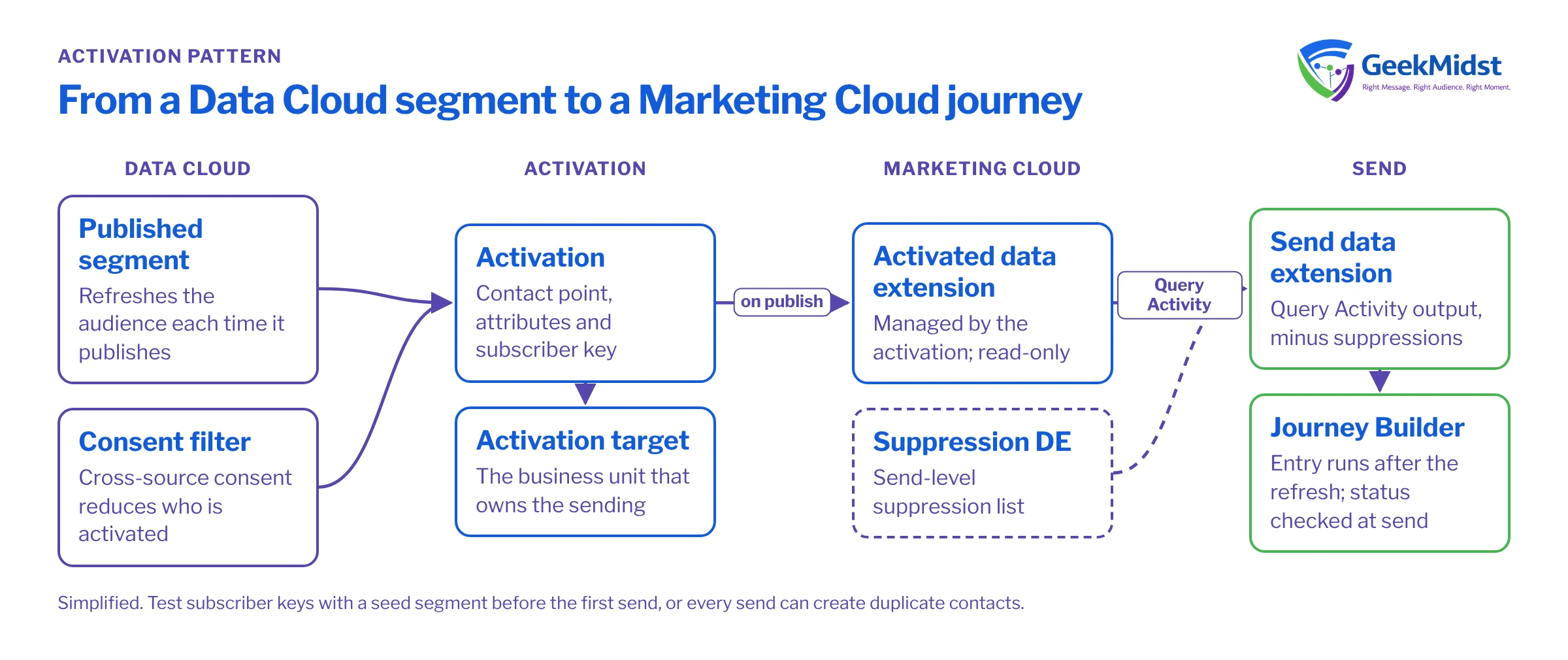
How the hand-off works
At a high level:
- Marketing Cloud Engagement is connected to Data Cloud, and a business unit is set up as an activation target.
- You create an activation that links a published segment to that target.
- The activation chooses a contact point, such as email or mobile, and the attributes to send with each member.
- Each time the segment publishes, the activation refreshes the audience in Marketing Cloud, where it appears as a data extension managed by the activation.
- Journey Builder or Automation Studio uses that data extension like any other audience source.
Setup screens and options change between releases. Check the current steps for connecting Marketing Cloud Engagement and creating activation targets in Salesforce Help.
Decisions to make before you click Activate
Which business unit
Activate to the business unit that owns the sending, its sender profiles and its subscriber data. Activating to the wrong one creates audiences no journey can use safely.
Which contact point
Choose email, SMS or both, and how to pick one when a profile has several. This decides who is reachable.
Which attributes
Send only the fields the email or journey needs: first name, tier, last product category. Everything else stays in Data Cloud.
Which subscriber key
The key on activated rows must match the contact key strategy already used in Marketing Cloud, or you create duplicate contacts.
Which consent rules
Decide which consent is checked in Data Cloud and which Marketing Cloud continues to enforce at send time.
Getting subscriber keys right
This is the decision with the biggest long-term impact. Marketing Cloud identifies contacts by contact key (subscriber key). If your existing contacts use the CRM Contact ID, and activated audiences arrive keyed by a different identifier, every send creates new contacts. That inflates contact counts, splits engagement history and makes unsubscribes harder to honour.
Before your first activation, confirm which identifier the activation will use as the key for each member, and test it with a small seed segment of internal records. Look up the resulting rows in Marketing Cloud and compare the keys with existing contacts for the same people. How the key is resolved depends on your sources and configuration, so verify it in your own org rather than assuming.
Using the audience in Marketing Cloud
The activated data extension is managed by the activation and refreshed on publish, so treat it as read-only. Do not add columns or edit rows by hand. If you need to combine the audience with Marketing Cloud data, such as a send-level suppression list or a product feed, copy it into a working data extension with a Query Activity.
Before you start
The query below assumes an activated data extension named DC_HighValue_Lapsed (yours will follow your activation's naming) with SubscriberKey, EmailAddress, FirstName and Tier columns, a suppression data extension Global_Suppression_DE keyed by SubscriberKey, and a target data extension Send_HighValue_Lapsed_DE with matching columns. Column names on activated data extensions depend on the attributes you selected, so check yours first.
SELECT
  a.SubscriberKey,
  a.EmailAddress,
  a.FirstName,
  a.Tier
FROM DC_HighValue_Lapsed a
LEFT JOIN Global_Suppression_DE s
  ON s.SubscriberKey = a.SubscriberKey
WHERE s.SubscriberKey IS NULL
AND a.EmailAddress IS NOT NULLSchedule this in Automation Studio after the segment's publish time, then use the send data extension as a journey entry source. If the journey reads the activated data extension directly instead, set the entry schedule to run after each refresh, and decide whether contacts can re-enter. Journey Builder Decision Splits vs Engagement Splits and Testing Journeys Before Activation cover the journey side.
Consent at two layers
Filtering by consent in Data Cloud reduces who is activated. Marketing Cloud still applies its own subscriber status and publication or list unsubscribes at send time. Both layers matter: Data Cloud is where cross-source consent can be combined, while Marketing Cloud is the last check before a message leaves. Make sure unsubscribes captured in Marketing Cloud flow back into the sources Data Cloud uses, or the next activation may reintroduce people the business should not contact.
Common problems and how to diagnose them
- Audience is smaller than the segment. Members without the chosen contact point are not activated. Check contact point coverage before changing segment logic.
- Data extension never appears. Check the activation target is connected to the right business unit, the activation is active, and the segment has published since it was created.
- Rows present but personalisation blank. The attribute was not added to the activation, or the related attribute path returned nothing for that member.
- Contact count jumps after first send. Subscriber key mismatch. Stop and fix the key before further sends.
- Journey enters nobody. Entry schedule runs before the refresh, or re-entry settings block returning contacts.
- Timing drift. Ingestion, identity resolution, insights, segment publish, query and journey entry all need to run in order. See Monitoring Data Cloud Jobs and Refresh Schedules.
Checklist
- Target business unit confirmed with the sending team.
- Contact point and selection logic agreed.
- Attributes limited to what the content needs.
- Subscriber keys tested with a seed segment.
- Activated data extension treated as read-only.
- Suppressions and consent applied at both layers.
- Schedules sequenced from ingestion through to journey entry.
For the wider pattern, see the Activating Data Cloud Segments in Journeys blueprint.
Connecting Data Cloud to Marketing Cloud?
We can design the activation, test subscriber keys and consent end to end, and wire the audience into journeys your team can maintain.


