

Audience Building on a Unified Data Foundation
Segments are only as good as the data under them. Learn how unified profiles, calculated insights and segment design fit together, and how to check counts you can trust.

The segment says 40,000 people. The CRM report says 65,000 customers. The marketing lead wants to know which number is right before approving a send. In Marketing Cloud Next, audiences are built on Data Cloud (now branded Data 360), and the answer depends on how data moves from sources to unified profiles. Understanding those layers is what turns segment counts from a guess into something you can explain.
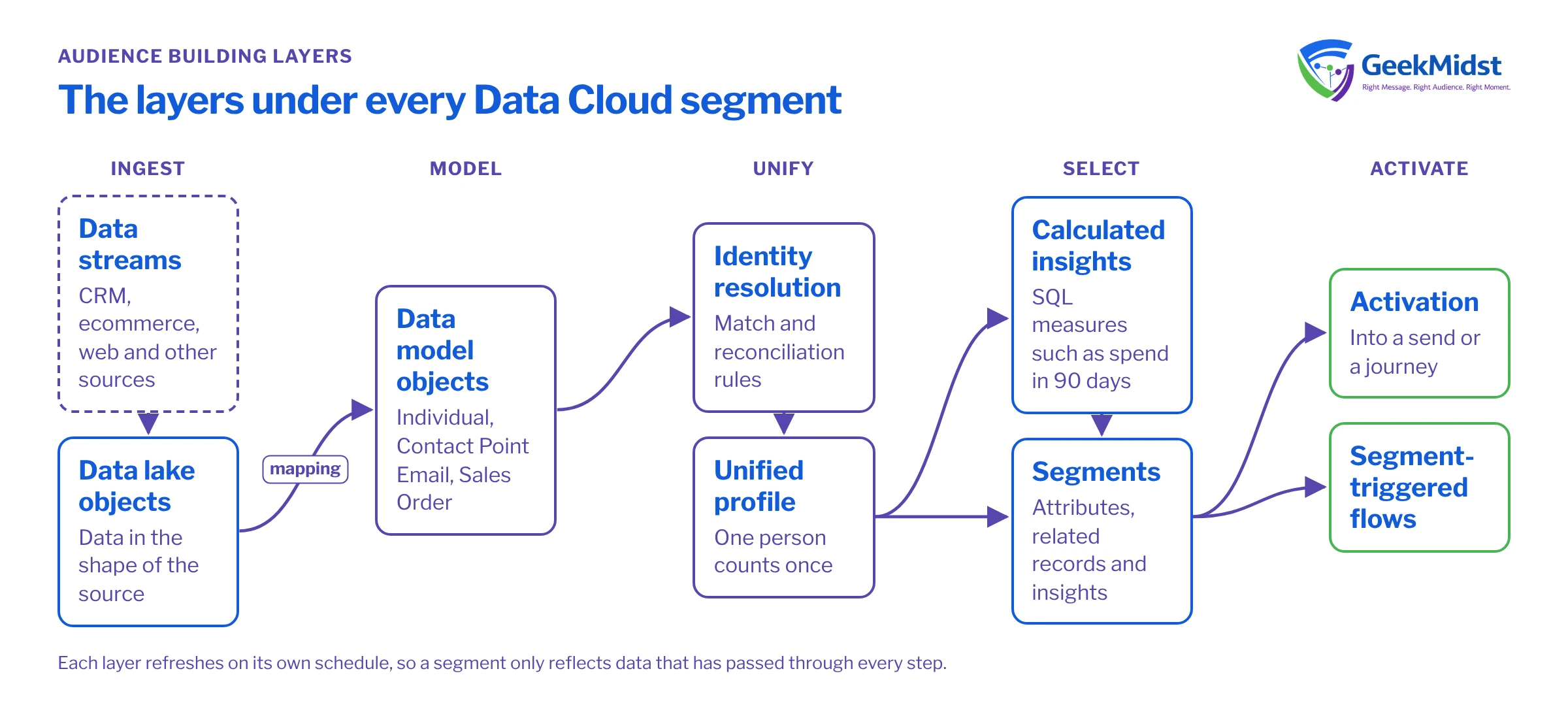
The layers under every segment
Audience building sits at the end of a chain:
- Data streams bring data in from CRM, ecommerce, web and other sources.
- Data lake objects hold that data in the shape of the source.
- Data model objects give it a shared, harmonised shape, such as Individual, Contact Point Email or Sales Order. Our explainer on DLO vs DMO covers this step.
- Identity resolution links records that belong to the same person into a unified profile, using match and reconciliation rules.
- Calculated insights turn raw activity into measures such as total spend or days since last purchase.
- Segments select unified profiles using attributes, related records and insights.
- Activation or segment-triggered flows take the segment into a send or a journey.
A count that looks wrong is nearly always explained by a decision at one of these layers.
Segment on the unified profile, deliberately
Segments are normally built on the unified individual so that one person counts once, even if they exist as a Lead, a Contact and an ecommerce customer. That is why the segment count is often lower than a CRM report: duplicates collapse into one profile. It can also be higher, if Data Cloud includes people who are not in CRM at all. Both are correct, provided you know which population you are counting.
Use calculated insights for behaviour
Filtering directly on raw order or event records works for simple rules, but behaviour such as "spent over a threshold in the last 90 days" is clearer and more reusable as a calculated insight. Insights are written in SQL against data model objects, and they are refreshed on a schedule, which matters for timing.
Assumptions for the example
- A custom data model object
Order_Header__dlmholds one row per order. - It has
Individual_Id__c,Order_Id__c,Order_Total__candOrder_Date__cfields. - Names are samples. Look up the real API names in your org's data model, and in a real build aggregate to the unified individual through its link object.
SELECT
    o.Individual_Id__c        AS customer_id__c,
    COUNT(o.Order_Id__c)      AS orders_90d__c,
    SUM(o.Order_Total__c)     AS spend_90d__c
FROM Order_Header__dlm o
WHERE o.Order_Date__c >= DATE_SUB(CURRENT_DATE(), 90)
GROUP BY o.Individual_Id__cWhere to apply common audience rules
| Usually best applied in | Why | |
|---|---|---|
| Consent and subscriptions | Segment filter and again at send | A safety net in case consent changed after the segment refreshed |
| Purchase behaviour | Calculated insight | Reusable, testable and easier to explain |
| Recent web activity | Streaming data or a short-window insight | Batch refresh may be too slow for timely messages |
| Lifecycle stage | Profile attribute or insight | One definition used across all segments |
| Exclusions such as staff or test records | A shared exclusion segment | Applied consistently rather than rebuilt each time |
Timing: when a segment is out of date
Every layer has its own refresh: data streams on their schedule, identity resolution after new data arrives, insights on theirs, segments on publish. A segment published at 06:00 does not know about a purchase that streamed in at 06:05 unless that data has been through each step. When a message must react within minutes, use a streaming or event-driven pattern rather than a batch segment. When it can wait until tomorrow, batch is simpler and cheaper to run. Check current refresh options and limits for your org in Salesforce Help rather than assuming a schedule.
Common mistakes and how to diagnose them
- Segment count is zero or tiny. Check whether identity resolution has run since the data was loaded, and whether a key field such as email is mapped. Then remove filters one at a time to find the one that removes everyone.
- Count is much larger than expected. Test or internal records are included, or a join to related records has multiplied rows. Inspect a sample of profiles.
- Insight values look wrong. The source is at a different grain than you assumed, for example order lines mapped as orders, so totals are inflated.
- People who just bought still get the offer. A refresh timing gap. Add a send-time check, or move the rule to a faster pattern.
- Different teams get different numbers. Each built its own definition. Agree shared insights and exclusion segments.
Data Cloud Segmentation and Activation Troubleshooting goes deeper on these.
Checklist before approving a segment
- The population is described in one sentence everyone agrees with.
- Consent is filtered and re-checked at send.
- Test and staff records are excluded.
- A sample of 20 profiles has been inspected by someone who knows the customers.
- Refresh timing suits the message.
- The count has been compared with a reference report and the difference explained.
If you are building these foundations, our Data Cloud Calculated Insights and Segmentation service can help.
Segment counts you cannot explain?
We can trace your audiences back through insights, identity resolution and mapping, and help you build definitions your teams can trust.


