

Designing Consent in Marketing Cloud Next
A practical guide to modelling consent and subscriptions on the Salesforce consent data model, so unsubscribes, preferences and legal basis all behave the way you expect.

A customer unsubscribes from your newsletter but still receives event invitations. Another asks to stop all email and gets a product update a week later. Both problems usually trace back to a consent model that was designed as a single opt-in checkbox when the business actually needed several layers. Marketing Cloud Next gives you the objects to model those layers properly, but you still have to design them.
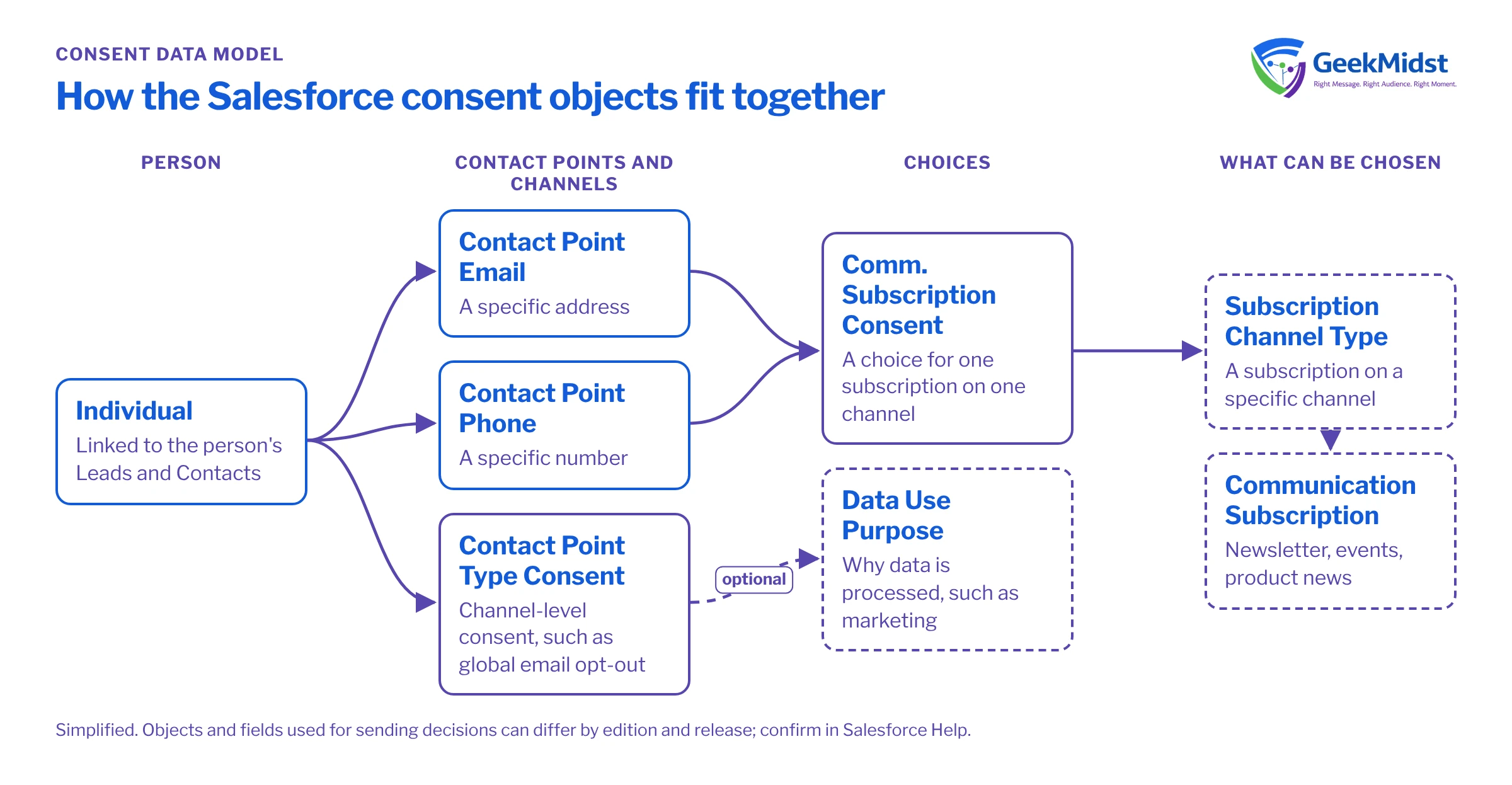
How consent is represented on the platform
Marketing Cloud Next uses the Salesforce consent data model rather than a separate subscriber list. The model separates four ideas that are often blurred together:
- The person. The Individual record represents the person whose consent you hold, linked to their Lead or Contact records.
- The contact point. An email address or phone number. One person can have several, and consent can differ between them.
- The purpose or subscription. Why you are contacting them: a named subscription such as a monthly newsletter, or a broader data use purpose such as marketing.
- The consent status. Whether they opted in, opted out or have not been asked, with when and where that was captured.
Marketing Cloud Next also uses Data Cloud, where consent data can be ingested and mapped so segments can respect it. The exact objects and fields used for sending decisions can differ by edition and release, so confirm the current behaviour in Salesforce Help before finalising your design.
Core consent objects at a glance
| What it records | Typical use | |
|---|---|---|
| Individual | The person behind one or more Leads or Contacts | Anchor for privacy preferences across records |
| Contact Point Email or Phone | A specific address or number | Consent that differs by address |
| Contact Point Type Consent | Consent for a channel type, optionally for a data use purpose | Global email or SMS opt-out |
| Communication Subscription | A named thing someone can subscribe to | Newsletter, events, product news |
| Communication Subscription Channel Type | That subscription on a specific channel | Newsletter by email versus by SMS |
| Communication Subscription Consent | A person's choice for a subscription on a channel | Unsubscribe from one newsletter only |
| Data Use Purpose | Why data is processed | Marketing, service, research |
Design decisions to make first
1. Which subscriptions really exist
List what people can choose, in the words they would see on a preference centre. Keep it short. Five clear subscriptions are easier to honour than fifteen overlapping ones. For each, note the channel, the expected frequency and the team that owns the content.
2. How global opt-out interacts with subscriptions
Decide, and document, that a channel-level opt-out overrides every subscription on that channel. Then decide what happens if that person later opts back in to one subscription: does that lift the global opt-out, or only record the subscription choice? Both are defensible, but the rule must be consistent across forms, preference centres and integrations.
3. Where legal basis and region fit
If you market across regions, consent rules may differ. GDPR in the EU and UK, and India's Digital Personal Data Protection Act, both expect you to be able to show what someone agreed to and when. Record the capture date, the source (form name, import, call centre) and the wording version where you can. This guide is not legal advice; involve your privacy or legal team in the rules themselves.
4. Transactional versus commercial messages
Order confirmations, password resets and service notices are usually treated differently from marketing. Model them as separate purposes or send them through a path that is not governed by marketing subscriptions, and make sure the content of a transactional message does not drift into promotion.
5. How legacy consent is migrated
If you are coming from another platform, map each legacy status to the new objects. Do not upgrade unknown consent to opt-in. Where the source or date is missing, record it as missing rather than inventing a value.
Inspecting consent records for one person
When something looks wrong, start with a single known test person and read their consent records directly. The query below is a starting point for the Developer Console or a SOQL tool.
Assumptions
- Your org has the standard consent objects enabled and populated.
- You know the Id of the test person's Individual record (the sample Id below is a placeholder).
- You have read access to the consent objects; field availability can differ, so confirm names in Object Manager.
SELECT Id, PartyId, ContactPointType, DataUsePurposeId,
       PrivacyConsentStatus, CaptureDate, CaptureSource,
       EffectiveFrom, EffectiveTo
FROM ContactPointTypeConsent
WHERE PartyId = '0PKxx0000000001'
ORDER BY CaptureDate DESCCommon mistakes and how to diagnose them
- Consent written to a custom checkbox on Contact. It looks simpler, but sends and segments may not read it, and it cannot hold history. Move it to the consent objects and retire the field.
- No Individual record. If Leads and Contacts are not linked to an Individual, consent created for one record may not apply to the person's other records. Check how Individuals are created by forms and integrations.
- Segments that ignore consent. Some teams filter consent in the segment, others rely on the send. Pick one primary control, then add the other as a safety net, and test both.
- Preference centre writes but nothing reads. Submit a change on the preference centre, then query the records it should have created. If nothing appears, the form flow is failing silently.
- Data Cloud is out of date. If consent changes in CRM but segments are refreshed from Data Cloud, the gap between those refreshes matters. Understand the timing and suppress at send time where possible.
Consent test cases worth keeping
- New person subscribes to one subscription only. They receive that, and nothing else.
- Existing subscriber unsubscribes from one subscription. Other subscriptions continue.
- Person opts out of email globally. No marketing email reaches them, whatever their subscriptions say.
- Person opts out by email but remains opted in to SMS. Channels behave independently.
- Two Contacts share one Individual. An opt-out on one is honoured for both.
- Legacy record with unknown consent. Not included in marketing sends.
For a structured way to gather these rules with stakeholders, use the Consent Requirements Worksheet. A wider reference design is in Consent Synchronisation Across CRM and Marketing, and implementation help is covered under Marketing Cloud Next Consent and Preferences.
Want a second opinion on your consent model?
We can review how consent and subscriptions are modelled in your org, trace real test cases end to end and recommend changes before your next campaign.


