

Journey Patterns for Marketing Cloud Next
Five reusable journey patterns for Marketing Cloud Next, how to choose the right trigger for each, and the design rules for waits, decisions, exits and frequency.

Journey sprawl starts small. One team builds a welcome series, another adds a promotion, a third adds a re-engagement flow, and soon a new customer receives four messages in two days from journeys that each looked sensible on their own. In Marketing Cloud Next, journeys are built with Flow, which makes it easy to build quickly and just as easy to build inconsistently. Agreeing a small set of patterns keeps journeys predictable and makes them easier to test.
Start with the trigger
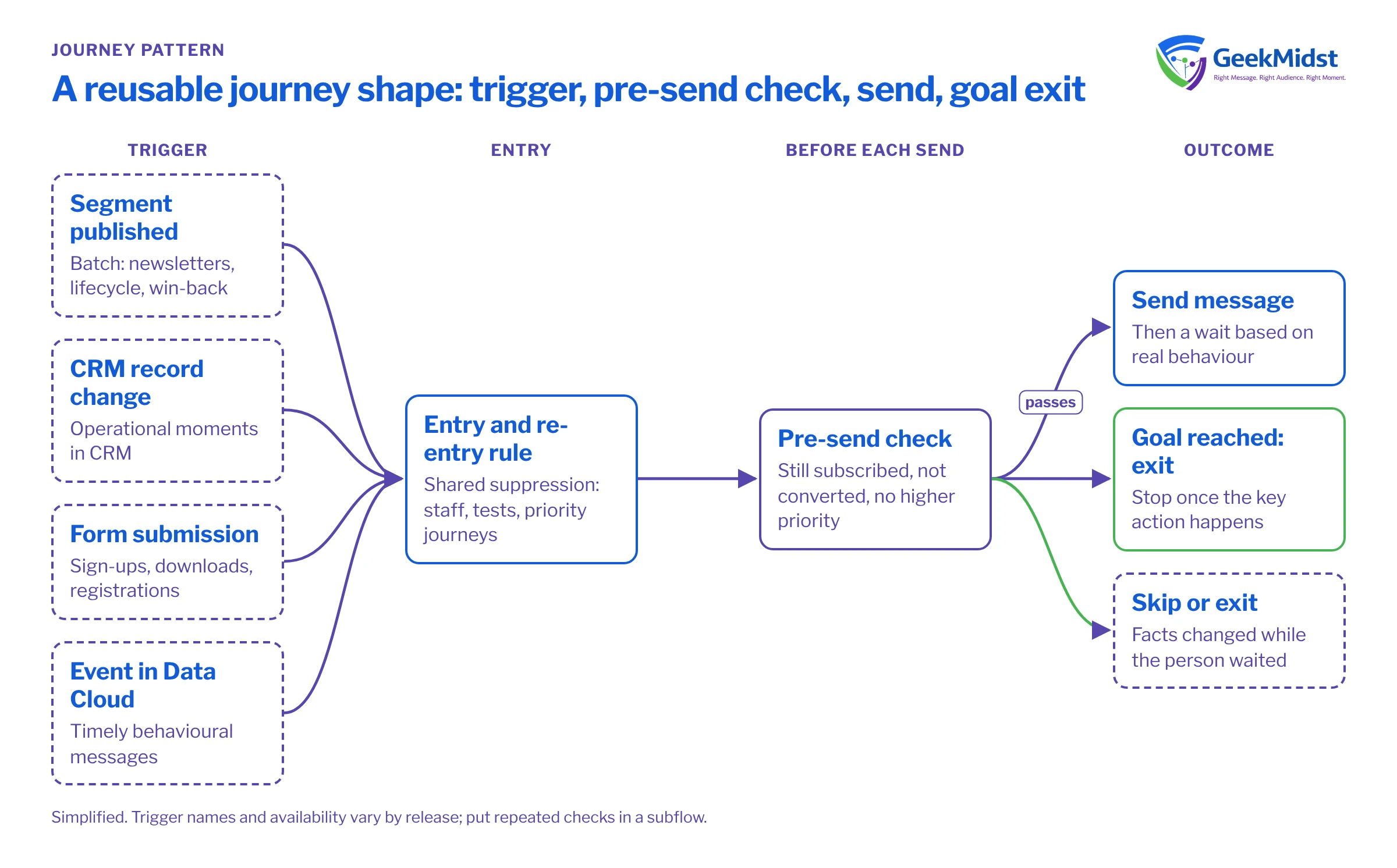
The trigger decides who enters and when, and most later problems trace back to choosing the wrong one. Marketing Cloud Next offers several ways to start a marketing flow. Names and availability vary by release, so check what your org supports in Salesforce Help, but the choices generally fall into these groups:
- Segment-triggered. People enter when a Data Cloud segment is published. Suited to batch programmes such as newsletters, win-back or lifecycle stages.
- Record-triggered. Entry follows a change to a CRM record, such as a new Contact or a closed case. Suited to operational moments that live in CRM.
- Form-triggered. Entry follows a form submission. Suited to downloads, sign-ups and event registrations.
- Event or data-change triggered. Entry follows activity that reaches Data Cloud, such as a purchase or a product event. Suited to timely, behavioural messages.
The rule of thumb: if the message must react within minutes to something a person did, use an event or record trigger. If it can wait for the next scheduled refresh, a segment trigger is simpler to control.
Five patterns worth standardising
Welcome and onboarding
Entry on sign-up or first purchase, a short series with waits, and an exit when the person completes the key action.
→Behavioural nudge
Entry on a specific event, one or two messages, and a check before each send that the person has not already acted.
→Lifecycle stage
Segment-triggered entry when someone moves into a stage, with content matched to that stage and an exit when they move on.
→Re-engagement
Entry from a segment of inactive people, a short sequence with a clear final step, then suppression or a reduced cadence.
→Event or deadline
Entry on registration, messages timed relative to a date, and branches for attended or missed.
→Design rules that apply to every pattern
One clear goal and one exit
Write the goal of the journey in one sentence, then make reaching that goal an exit. A welcome journey whose goal is a first purchase should stop sending welcome offers once the purchase happens. Without a goal exit, people keep receiving messages that no longer fit.
Check before every send, not just at entry
Conditions change while people wait. Before each message, re-check the facts that matter: still subscribed, not already converted, not in a higher-priority journey. A decision element just before the send is cheap and prevents the most embarrassing errors.
Waits that reflect real behaviour
Base waits on how people actually behave, not on a round number. A replenishment reminder for a product that lasts 30 days should not go at day 7. If you do not know the right interval, test two and measure.
Shared suppression and frequency
Build exclusions once and reuse them: staff, test records, people with open complaints, people already in a priority journey. If you cap marketing frequency, the cap has to be checked across journeys, not inside each one. Agree how this is enforced in your org before the third journey goes live.
Decide on re-entry
Can someone enter the same journey twice? For a welcome journey, usually not. For an abandoned basket, perhaps, but not within a few days. Make the rule explicit and test it.
Keeping flows readable
Large flows become hard to review. Keep each journey focused on one goal, use subflows for repeated logic such as the pre-send checks, and name elements in plain words ("Still subscribed to newsletter?") so a reviewer can follow the path without opening every element. Where logic becomes complex, such as ranking offers or calling an external service, a small, well-tested Apex action is often clearer than a sprawling flow.
Common mistakes and how to diagnose them
- Someone received a message they should not have. Trace their path: which trigger admitted them, which decisions they passed and what their data said at that moment. The cause is usually a missing pre-send check or a refresh timing gap.
- Fewer people entered than expected. For segment triggers, check the segment count and publish time. For record triggers, check the entry conditions and whether the triggering field actually changed.
- Two journeys compete. No priority rule exists. Decide which journey wins and add a check to the other.
- Nobody knows if it works. Measurement was not designed in. Hold out a small random group from the journey where it is appropriate, and compare their behaviour with those who received it.
Pattern review checklist
- Trigger chosen for the speed the message needs.
- Goal written down and used as an exit.
- Pre-send checks for consent, conversion and priority.
- Re-entry rule defined and tested.
- Shared suppression applied.
- Holdout or baseline agreed before launch.
For hands-on help designing journeys, see our Journey Builder Consulting service, which covers journey design on both Marketing Cloud platforms.
Journeys getting hard to manage?
We can review your existing journeys, agree a small set of patterns with your team and rebuild the ones that matter most.


