

Testing and Deploying Marketing Cloud Next Work
Marketing Cloud Next lives in your Salesforce org, so releases follow platform discipline. Here is how to test flows, data and content, and move them safely to production.

Teams coming from Marketing Cloud Engagement are used to building directly in one production business unit and testing with seed lists. Marketing Cloud Next sits inside your Salesforce org, alongside sales and service, so a marketing change can break a sales process and a sales release can break a journey. That calls for the same release discipline as any other platform change, adapted to the parts of marketing that are data and content rather than metadata.
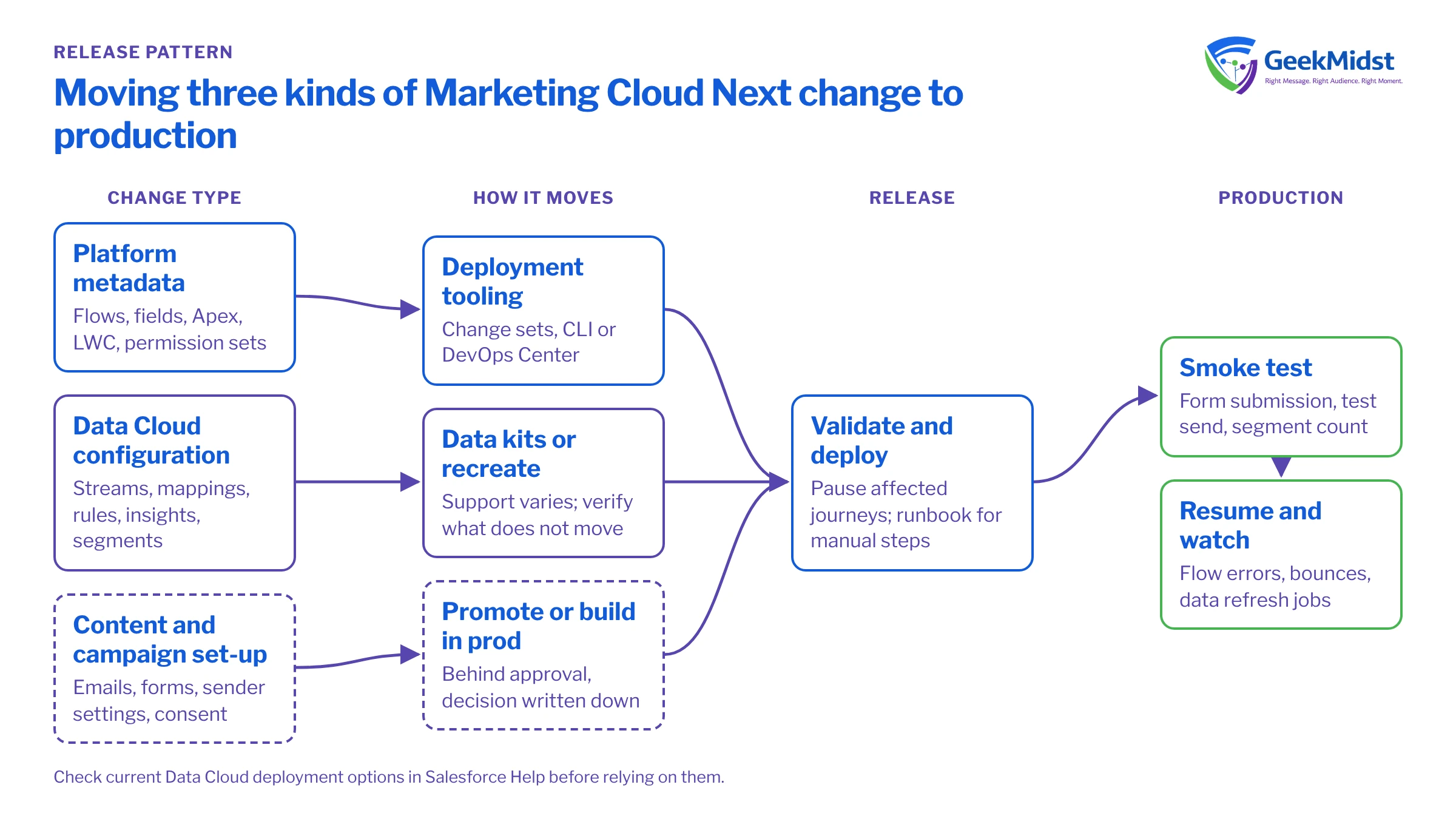
Three kinds of change, three ways to move them
It helps to sort every change into one of three groups before planning a release.
- Platform metadata. Flows, custom fields, permission sets, Apex, Lightning web components and page layouts. These move between orgs using your normal deployment tooling: change sets, Salesforce CLI with source control, or DevOps Center. See Salesforce Deployment Strategies for the trade-offs.
- Data Cloud configuration. Data streams, mappings, identity resolution rules, calculated insights and segments. Some of this can be packaged and deployed, for example with data kits, but support varies by component and release. Check the current deployment options in Salesforce Help before relying on them, and plan to recreate or verify anything that does not move.
- Content and campaign set-up. Emails, landing pages, forms, sender settings and consent records. Some of this is closer to data than metadata. Decide whether it is built in a sandbox and promoted, or built in production behind approval, and write that decision down.
Choosing environments
A typical pattern is a developer sandbox per builder, a shared integration or QA sandbox, and production. The difficulty is that a sandbox needs realistic data for audience testing, and Data Cloud features in sandboxes may need separate provisioning. Confirm what your licences provide before designing the pipeline, and avoid copying real customer data into lower environments unless it has been masked or approved.
Test layers and what each one catches
| What it covers | Where it runs | |
|---|---|---|
| Unit tests | Apex actions used by flows, with assertions | Developer sandbox, then every deployment |
| Flow debug | Individual paths through a flow with chosen inputs | Sandbox, using test records |
| Data checks | Record counts and sample profiles after ingestion and identity resolution | Sandbox with representative data |
| Content tests | Rendering, links, personalisation defaults, accessibility | Test sends to internal inboxes |
| Journey tests | Entry, waits, decisions, exits and suppression end to end | QA sandbox or production with test contacts |
| User acceptance | Business owners confirm behaviour against requirements | QA sandbox |
| Smoke tests | A short set of checks that the release worked | Production, straight after deployment |
Testing flows that send
Marketing flows add waits and sends to ordinary flow logic, which makes them slower to test end to end. A few habits help.
- Build with short test waits in a sandbox, then set the real durations as a reviewed change before release. Note the change in the release record so nobody ships a five-minute wait by mistake.
- Keep a set of named test people with known consent, subscriptions and attributes. Use addresses on a domain you control.
- Test the negative cases as hard as the positive ones: a person who should be suppressed, a person who exits mid-journey, a person who matches two branches.
- Check send limits and any frequency rules so a test does not count against real sends or trigger warnings.
Before you start: smoke checks
After a release that touches forms or consent, submit a test form in production and confirm the expected records were created. The SOQL below is an example check, assuming test submissions use a recognisable email pattern.
SELECT Id, Email, LeadSource, CreatedDate
FROM Lead
WHERE Email LIKE 'release-test+%@example.com'
AND CreatedDate = TODAY
ORDER BY CreatedDate DESCA release routine that works
- 01
Freeze scope
Agree the exact list of components in the release, including any Data Cloud configuration that has to be created by hand.
- 02
Validate first
Run a validation deployment against production with tests, so failures appear before the release window.
- 03
Pause what is affected
Pause or schedule around any live journey whose flow or content is changing. Know how in-flight people will behave.
- 04
Deploy and configure
Deploy metadata, then complete manual steps from a written runbook in the agreed order.
- 05
Smoke test
Run the short production checks: a form submission, a test send, a segment count compared with the sandbox.
- 06
Resume and watch
Reactivate journeys and monitor flow errors, bounces and data refresh jobs closely for the next few days.
Common mistakes and how to spot them
- Segment counts differ wildly between sandbox and production. Expected, if sandbox data is a sample. Compare proportions, not totals, and check that identity resolution has run in both.
- Deployment succeeds but the flow fails in production. A referenced field, permission or record is missing in production. Check flow error emails and compare permission sets.
- Manual steps forgotten. Anything not deployable must be in the runbook with an owner. The Release Readiness Checklist gives a template.
- No one owns the post-release watch. Name a person and a period, and agree in advance what would make them pause a journey or roll back a change.
- Test data left behind. Test Leads, consent records and campaign members created in production should be identifiable and cleaned up, so they do not distort reports or segment counts.
For broader QA support, including test plans and regression packs, see our Salesforce Testing and QA service.
Need a safer release process?
We can help you define environments, test layers and a release runbook that suits how your marketing and platform teams actually work.


