

How Forms and Flows Connect to CRM Records
Follow a form submission from the browser to a Lead or Contact, and learn how to design matching, consent capture and error handling so records stay clean.

A marketing form looks like the simplest part of a campaign. Then sales reports three duplicate leads for the same person, a consent checkbox seems to have no effect, and a validation rule quietly blocks submissions from one country. In Marketing Cloud Next, forms write to the same CRM org that sales and service use, so the path from form to record deserves proper design.
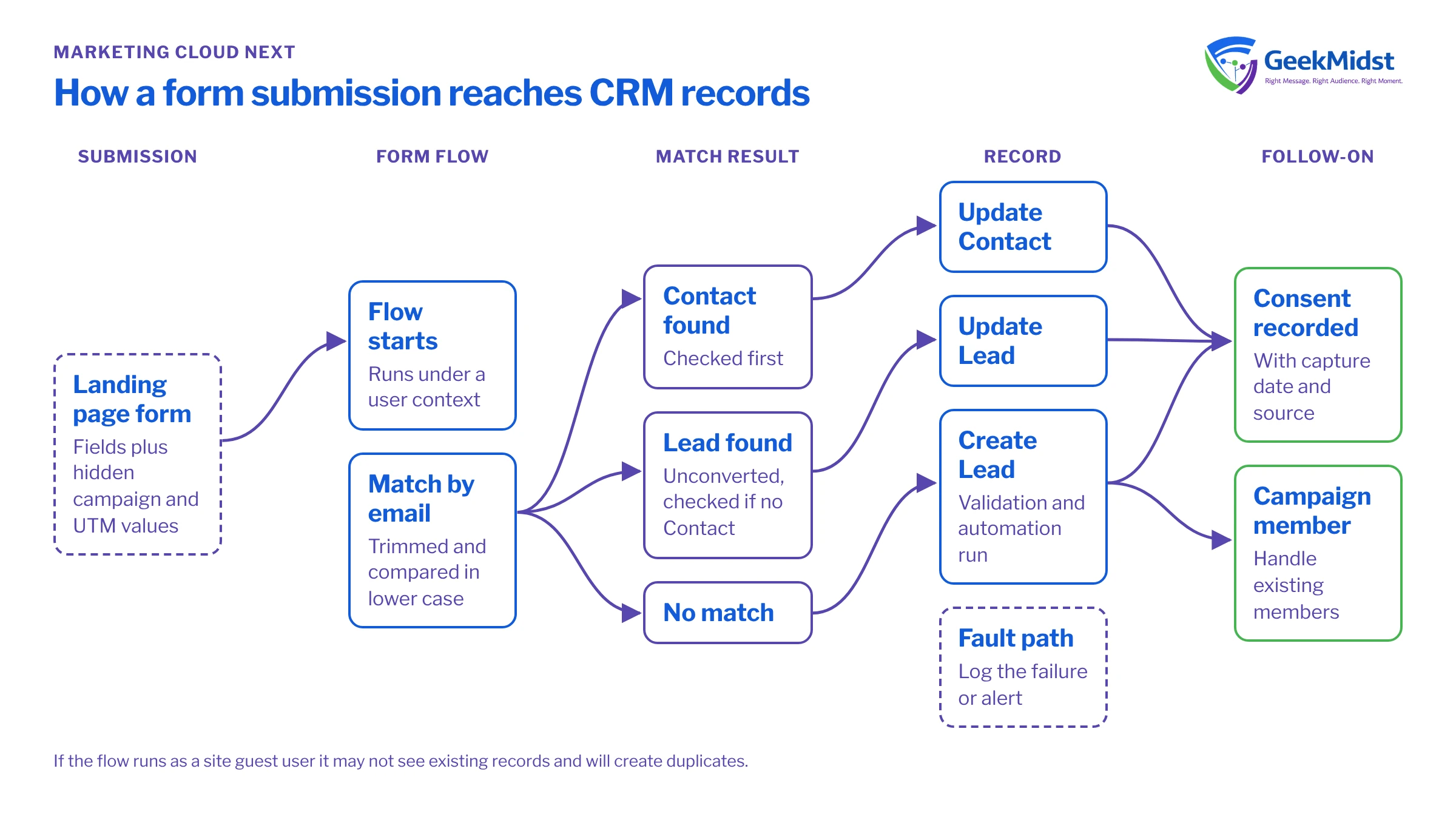
The basic chain
In Marketing Cloud Next, a form on a landing page is typically connected to a flow that runs when someone submits it. That flow decides what to do with the submitted values: find an existing person, create or update a Lead or Contact, record consent and, optionally, add the person to a campaign. The default behaviour supplied by Salesforce is a reasonable start, but most organisations need to adjust it to their own matching and data rules. Check which flow your forms use, and what it does today, before you change anything.
What happens when someone submits a form
- 01
Browser submits values
The landing page sends the field values. Hidden fields such as campaign or UTM values travel with them if the page populated them.
- 02
Flow starts
The form's flow runs with the submitted values as inputs. It runs under a user context that controls which records it can see and create.
- 03
Matching
The flow looks for an existing Contact or Lead, usually by email. This is where most duplicate problems start.
- 04
Create or update
A new Lead is created, or the matched record is updated. Validation rules, required fields and other automation on the object all run here.
- 05
Consent captured
Opt-in choices are written to the consent objects, ideally with capture date and source.
- 06
Follow-on actions
The person may be added to a campaign, routed to an owner or entered into a journey.
Designing the matching rule
Decide in plain words which records a submission should update. A common rule is: match on email to a Contact first; if there is none, match to an unconverted Lead; otherwise create a new Lead. Then decide what to do when there are several matches. Choosing the most recently modified record is simple and predictable, but some businesses prefer the record owned by an active sales user.
Normalise before you compare. Trim spaces and compare in lower case. If you also capture phone numbers, decide on one stored format.
Agree the rule with sales operations as well as marketing, because it decides which owner sees the new activity and whether a converted customer is treated as a fresh lead. Flow can do this matching with Get Records elements. When logic gets more involved, for example ranking several matches or checking multiple identifiers, a small invocable Apex action keeps the flow readable and is easier to unit test.
Assumptions for the example
- The org uses standard Lead and Contact objects with the standard Email field.
- The flow passes in one email per submission, but the method is written to handle a batch, as invocable methods must.
- It returns only record Ids to the flow, never record data to the page.
public inherited sharing class FindPersonByEmail {

    public class Request {
        @InvocableVariable(required=true label='Email')
        public String email;
    }

    public class Result {
        @InvocableVariable(label='Matched Contact Id')
        public Id contactId;
        @InvocableVariable(label='Matched Lead Id')
        public Id leadId;
    }

    @InvocableMethod(label='Find Contact or Lead by Email')
    public static List<Result> find(List<Request> requests) {
        Set<String> emails = new Set<String>();
        for (Request r : requests) {
            if (String.isNotBlank(r.email)) {
                emails.add(r.email.trim().toLowerCase());
            }
        }

        Map<String, Id> contactByEmail = new Map<String, Id>();
        for (Contact c : [SELECT Id, Email FROM Contact
                          WHERE Email IN :emails
                          ORDER BY LastModifiedDate DESC]) {
            String key = c.Email.toLowerCase();
            if (!contactByEmail.containsKey(key)) {
                contactByEmail.put(key, c.Id);
            }
        }

        Map<String, Id> leadByEmail = new Map<String, Id>();
        for (Lead l : [SELECT Id, Email FROM Lead
                       WHERE Email IN :emails AND IsConverted = false
                       ORDER BY LastModifiedDate DESC]) {
            String key = l.Email.toLowerCase();
            if (!leadByEmail.containsKey(key)) {
                leadByEmail.put(key, l.Id);
            }
        }

        List<Result> results = new List<Result>();
        for (Request r : requests) {
            Result res = new Result();
            if (String.isNotBlank(r.email)) {
                String key = r.email.trim().toLowerCase();
                res.contactId = contactByEmail.get(key);
                if (res.contactId == null) {
                    res.leadId = leadByEmail.get(key);
                }
            }
            results.add(res);
        }
        return results;
    }
}Common failures and how to diagnose them
Duplicates despite matching. Check whether the flow actually reaches the matching step for every submission, whether the running user can see existing records, and whether existing data has stray spaces or mixed case. A quick SOQL count of Leads by email shows how widespread the problem is.
Submissions disappear. A validation rule or required field on Lead is rejecting the record. Flow fault emails and the flow's error handling are your first stop. Add a fault path that logs the failure to a custom object or sends an alert, so failures are visible rather than silent.
Consent not recorded. The flow creates the Lead but the consent step is on a branch that only runs for new records, or it fails because no Individual exists yet. Make sure the Individual is created or found before consent is written.
Campaign membership missing. The hidden campaign field was not populated by the page, or the flow tries to add a Lead that is already a member. Handle the existing member case.
Other automation fires unexpectedly. Record-triggered flows and Apex triggers on Lead or Contact run for form-created records too. Review what is already in the org; Record-Triggered Flow Best Practices covers how to keep that predictable.
Quick checklist
- Matching rule written down and agreed with sales operations.
- Running context of the form flow known and tested.
- Fault path on every create and update element.
- Consent written with capture date and source.
- A test submission for new person, existing Lead, existing Contact and converted Lead.
If the page itself is misbehaving rather than the flow, see Troubleshooting Published Landing Pages. For wider help with flow design, see our Salesforce Flow Automation Services.
Forms creating more problems than leads?
We can trace your form submissions end to end, fix matching and consent capture, and add error handling so failures are visible to the right people.


