

LWC Data Patterns: LDS or Apex
Lightning Web Components can read and write data in several ways. Choosing the right one decides whether your component stays fast, secure and in step with the page.

A component shows an account's tier, a user edits the tier in the record detail panel next to it, and the component still shows the old value. Or a list of cases refuses to refresh after a button closes one. These bugs come from mixing data access patterns in Lightning Web Components without understanding how each one caches and refreshes.
This guide sets out the main options, when to use each, and how to keep components in step with the rest of the page.
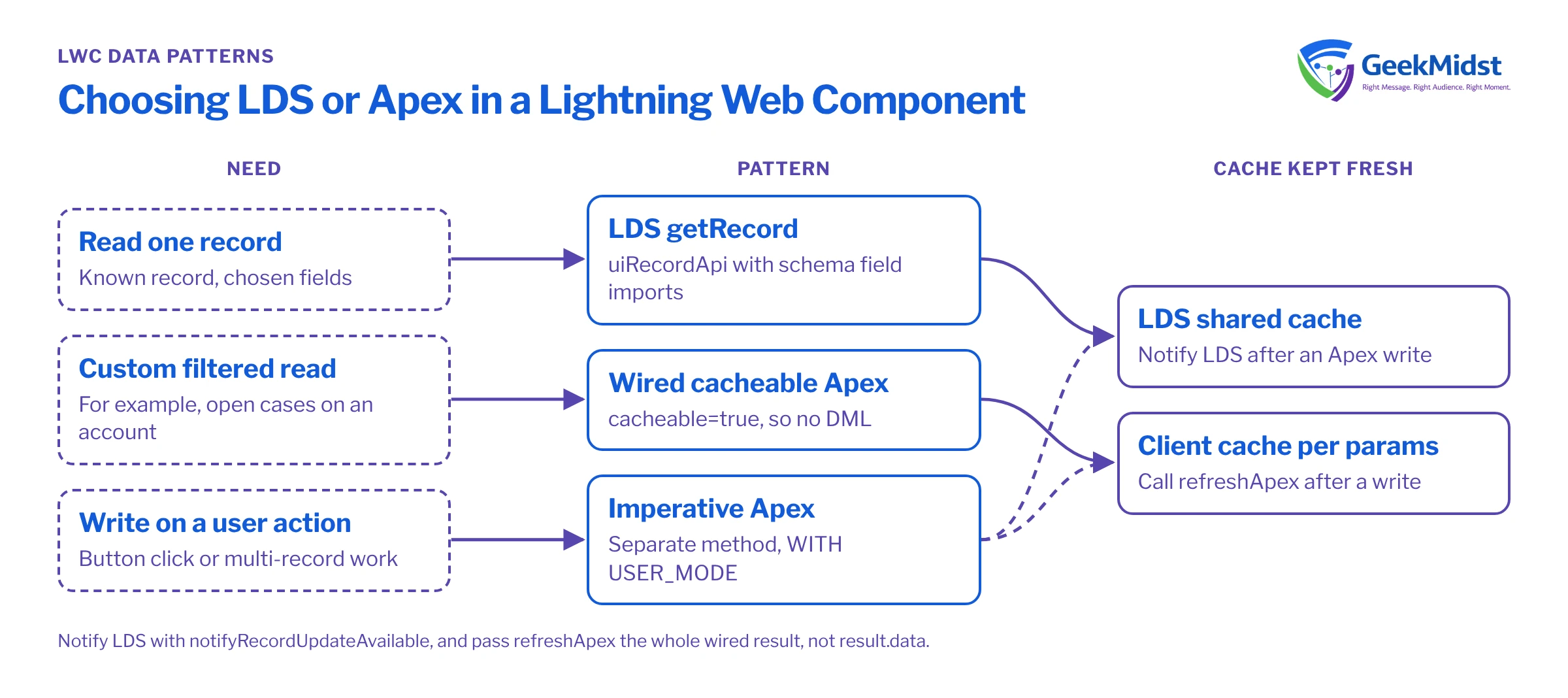
The three main patterns
Lightning Data Service (LDS). Base components such as lightning-record-form and lightning-record-edit-form, and the wire adapters and functions in lightning/uiRecordApi (getRecord, createRecord, updateRecord, deleteRecord). LDS works through the User Interface API, respects field-level security and sharing, and keeps a shared cache. When one component updates a record through LDS, other components on the page that display that record get the new value.
Wired Apex. An Apex method marked @AuraEnabled(cacheable=true) and connected with @wire. Use it for reads LDS cannot express, such as a filtered list of related records with custom logic. Results are cached on the client, and cacheable methods cannot perform DML.
Imperative Apex. Calling an Apex method from JavaScript when something happens, such as a button click. Use it for writes, for multi-record operations and for any server work that should run on demand rather than reactively.
There are other wire adapters worth knowing, including list views, related lists, object and picklist metadata, and a GraphQL wire adapter for querying several records and objects in one request. Check the LWC developer guide for the current set.
Choosing a pattern
| Best for | Caching | Watch out for | |
|---|---|---|---|
| Base record components | Simple view or edit forms | LDS shared cache | Limited layout control |
| getRecord and uiRecordApi | One record, chosen fields | LDS shared cache | Import fields with schema references |
| Wired cacheable Apex | Custom read queries | Client cache per parameters | Needs refreshApex after changes |
| Imperative Apex | Writes and on-demand work | None unless cacheable | You must notify LDS of record changes |
Pattern 1: read a record with LDS
Use LDS whenever you are reading or editing fields on known records. Import fields with @salesforce/schema references rather than strings, so the platform knows about the dependency and stops someone deleting a field your component uses.
import { LightningElement, api, wire } from 'lwc';
import { getRecord, getFieldValue } from 'lightning/uiRecordApi';
import NAME_FIELD from '@salesforce/schema/Account.Name';
import TIER_FIELD from '@salesforce/schema/Account.Tier__c';

export default class AccountTierBadge extends LightningElement {
    @api recordId;

    @wire(getRecord, { recordId: '$recordId', fields: [NAME_FIELD, TIER_FIELD] })
    account;

    get name() {
        return this.account.data ? getFieldValue(this.account.data, NAME_FIELD) : '';
    }

    get tier() {
        return this.account.data ? getFieldValue(this.account.data, TIER_FIELD) : '';
    }
}The $recordId syntax makes the parameter reactive: when the record page supplies or changes recordId, the wire runs again. If the user does not have access to a field, LDS returns an error for it rather than leaking the value, so handle account.error in the template.
Pattern 2: custom reads with wired Apex, writes with imperative Apex
When you need a filtered list, such as open cases on an account, use a cacheable Apex method for the read and a separate non-cacheable method for the write. Enforce the user's permissions in Apex explicitly; Apex runs in system mode by default for object and field access, so use WITH USER_MODE on queries and as user on DML where the operation should respect the user's access.
public with sharing class OpenCasesController {

    @AuraEnabled(cacheable=true)
    public static List<Case> getOpenCases(Id accountId) {
        return [
            SELECT Id, CaseNumber, Subject, Status, Priority
            FROM Case
            WHERE AccountId = :accountId AND IsClosed = false
            WITH USER_MODE
            ORDER BY CreatedDate DESC
            LIMIT 50
        ];
    }

    @AuraEnabled
    public static void closeCase(Id caseId) {
        update as user new Case(Id = caseId, Status = 'Closed');
    }
}import { LightningElement, api, wire } from 'lwc';
import { refreshApex } from '@salesforce/apex';
import { notifyRecordUpdateAvailable } from 'lightning/uiRecordApi';
import getOpenCases from '@salesforce/apex/OpenCasesController.getOpenCases';
import closeCase from '@salesforce/apex/OpenCasesController.closeCase';
export default class OpenCasesList extends LightningElement {
@api recordId;
cases = [];
error;
wiredResult;
@wire(getOpenCases, { accountId: '$recordId' })
handleCases(result) {
this.wiredResult = result;
if (result.data) {
this.cases = result.data;
this.error = undefined;
} else if (result.error) {
this.error = result.error;
this.cases = [];
}
}
async handleClose(event) {
const caseId = event.target.dataset.id;
try {
await closeCase({ caseId });
await notifyRecordUpdateAvailable([{ recordId: caseId }]);
await refreshApex(this.wiredResult);
} catch (e) {
this.error = e;
}
}
}Two calls after the write do different jobs. refreshApex re-runs the cached Apex wire, so this list updates. notifyRecordUpdateAvailable tells LDS the record changed outside its knowledge, so any other component showing that case (the record detail panel, a highlights panel) fetches fresh data. Older code uses getRecordNotifyChange for the second job; prefer the newer function in new work.
Common mistakes and how to diagnose them
- Component shows stale data after a save. The write went through imperative Apex and nobody notified LDS or called
refreshApex. Add the missing call. refreshApexdoes nothing. You passedresult.datainstead of the whole object the wire provided. Store the full result.- "Cacheable methods cannot perform DML" errors. A method marked
cacheable=truetries to insert or update. Split reads and writes. - Users see fields they should not. The Apex method queries in system mode. Add
WITH USER_MODEor check access explicitly, and keep classeswith sharingunless there is a documented reason not to. - Too many server calls. Several components on one page each call their own Apex method for the same record. Use LDS for record data so they share the cache.
- Field names as strings. A typo fails silently and admins can delete fields without warning. Use schema imports.
A note on Experience Cloud and guest users
Components on Experience Cloud sites follow the same patterns, but the running user may be an external or guest user with very limited access. LDS will simply return errors for records and fields those users cannot see, which is usually what you want. Apex needs more care: a without sharing controller exposed to a guest user can leak data to anyone on the internet. Keep controllers with sharing, enforce user mode, and test as the actual site user profile, not as an administrator.
Checklist for a new component
- Can LDS or a base component do this? If yes, start there.
- Are custom reads in cacheable methods and writes in separate methods?
- Does Apex enforce user access with
WITH USER_MODE,as useror explicit checks? - After every imperative write, are LDS and wired Apex refreshed?
- Does the template handle loading, empty and error states?
- Are there Jest tests for the JavaScript and Apex tests for the controller?
Related reading
Building or fixing custom components?
We design and review Lightning Web Components with clear data patterns, proper access checks and tests, so they stay fast as your org grows.


