

When to Use Apex Instead of Flow
Flow can do a lot, but not everything well. These are the signals that a requirement belongs in Apex, and how to combine the two so admins stay in control.

"Clicks before code" is good advice that gets applied too literally. Teams build flows with forty elements, nested loops and formula workarounds because writing Apex felt like breaking a rule, and then they cannot test or debug what they built. The opposite also happens: developers write Apex for a field default that a before-save flow would handle in two minutes.
The useful question is not "can Flow do this?" (it often can) but "who will maintain this, how will we test it, and how will it behave under load?" This guide gives practical criteria for that decision.
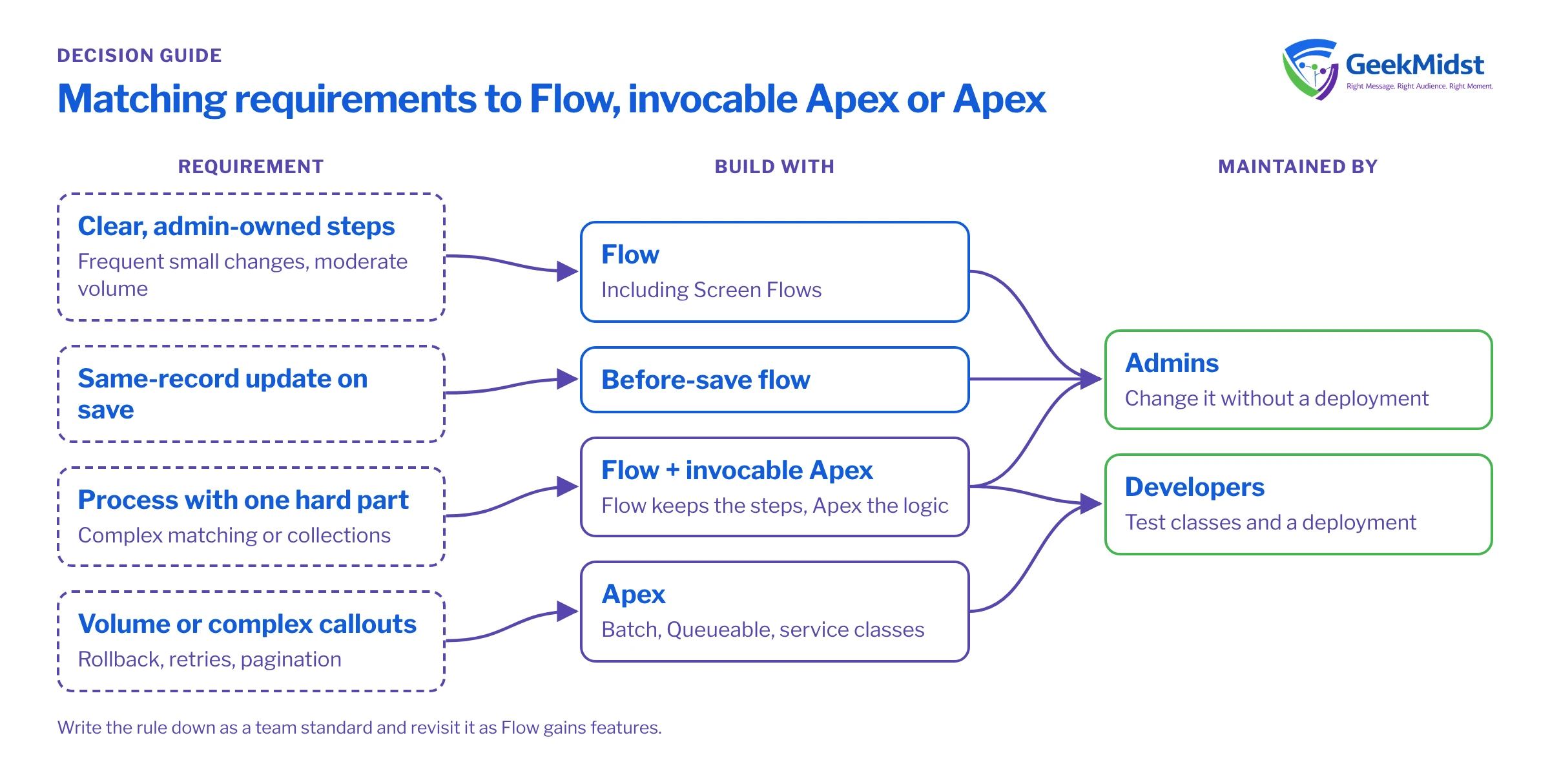
Flow is usually the right default when
- The logic is a sequence of clear steps a business analyst could describe on a whiteboard.
- The people maintaining it are admins, and changes are frequent and small.
- Data volumes per transaction are moderate and the logic does not need complex collections.
- The requirement is a screen-based process for users, where Screen Flows give you a UI without custom components.
- Same-record field updates on save, where before-save flows are fast and simple.
Signals that point to Apex
Complex data handling. If you need maps keyed by several fields, grouping, sorting by custom rules or matching two large collections against each other, Apex expresses it in a few lines that Flow needs dozens of elements to mimic.
High or unpredictable volume. Processing that may handle thousands of records belongs in Batch Apex or Queueable Apex, where you control chunking and limits. Flow has scheduled paths and scheduled flows, but you have less control over how work is split.
Transaction control. Apex lets you set savepoints, roll back part of a transaction and handle partial success per record with Database methods. Flow's options are coarser.
Complex integrations. Flow can call HTTP callout actions and External Services, which suit simple, well-described APIs. Multi-step calls, pagination, custom authentication flows, response parsing and retry logic are easier to build and test in Apex.
Rigorous testing. Apex tests can assert precise outcomes for many scenarios, including negative and bulk cases, and they run in every deployment. Flow tests exist and are improving, but complex branching logic is still easier to cover thoroughly in Apex.
Reuse. If the same business rule is needed by a trigger, an API, an LWC and a flow, put it in one Apex service class and call it from each.
Quick comparison
| Flow | Apex | |
|---|---|---|
| Who maintains it | Admins and analysts | Developers |
| Complex collections and maps | Possible but verbose | Natural |
| Large data volumes | Limited control | Batch and Queueable Apex |
| Partial success and rollback | Basic | Fine-grained |
| Unit testing depth | Flow tests, debug runs | Full test classes with assertions |
| Speed of small changes | Fast | Needs a developer and a deployment |
Use both: invocable Apex in a flow
You rarely have to choose all or nothing. An @InvocableMethod exposes an Apex action that admins can drop into any flow. The flow keeps the process steps, decisions and user screens; Apex does the one part that needs code. Invocable methods receive a list of requests and must return results in the same order, which means they are bulk-safe by design if you write them that way.
Assumptions
The example assumes an Opportunity with a related Account that has a custom picklist Tier__c. Discount caps are hard-coded for clarity; in a real org you would store them in custom metadata so admins can change them.
public with sharing class DiscountCapAction {

    public class Request {
        @InvocableVariable(required=true label='Opportunity ID')
        public Id opportunityId;
        @InvocableVariable(label='Requested discount (%)')
        public Decimal requestedDiscount;
    }

    public class Result {
        @InvocableVariable(label='Approved discount (%)')
        public Decimal approvedDiscount;
        @InvocableVariable(label='Reason')
        public String reason;
    }

    @InvocableMethod(label='Cap Discount by Account Tier' category='Pricing')
    public static List<Result> capDiscounts(List<Request> requests) {
        Set<Id> oppIds = new Set<Id>();
        for (Request r : requests) {
            oppIds.add(r.opportunityId);
        }
        Map<Id, Opportunity> opps = new Map<Id, Opportunity>([
            SELECT Id, Account.Tier__c FROM Opportunity WHERE Id IN :oppIds
        ]);

        List<Result> results = new List<Result>();
        for (Request r : requests) {
            Opportunity opp = opps.get(r.opportunityId);
            Boolean strategic = opp != null && opp.Account.Tier__c == 'Strategic';
            Decimal cap = strategic ? 20 : 10;
            Decimal asked = r.requestedDiscount == null ? 0 : r.requestedDiscount;

            Result res = new Result();
            res.approvedDiscount = Math.min(asked, cap);
            res.reason = asked > cap ? 'Capped at tier limit' : 'Within tier limit';
            results.add(res);
        }
        return results;
    }
}Notice that the method queries once for every request in the batch. If a flow calls this action for 200 records in one transaction, Salesforce can batch the requests from those interviews into one call rather than 200 separate calls, and the single query keeps it inside limits.
Questions to ask before deciding
- Who will change this next year? If the answer is an admin, lean towards Flow, or a flow that calls a small, stable Apex action.
- What is the worst-case volume? Ask about data loads and integrations, not only user edits.
- What happens on failure? If you need per-record handling or rollback, that is a point for Apex.
- How will we prove it works? If the logic has many branches, consider whether a test class is the only realistic way to cover them.
- Is there already code on this object? Mixing a complex trigger framework and several flows on one object makes ordering harder. Pick a primary home for automation per object.
Mistakes we see
- Building a "flow that behaves like code": loops within loops, formula fields used as variables, and Apex-style error handling simulated with decisions.
- Writing Apex for simple field defaults or notifications that admins then cannot change without a developer.
- Invocable methods that query inside a loop over requests, which fails as soon as a flow runs in bulk.
- No documented rule for the team, so each person decides differently and objects end up with both.
Write the rule down
The best outcome is a short team standard: what goes in before-save flows, what goes in after-save flows, when Apex is required and how invocable actions are named and documented. Revisit it as Flow gains features; the line moves with every release.
Related reading
Not sure where the line should be in your org?
We can review your automation, recommend a Flow and Apex standard for your team and help refactor the pieces that are causing trouble.


