

Salesforce Flow vs Apex: Choosing Per Use Case
Flow first is a sensible default, but it needs limits. This guide sets out when Flow is right, when Apex earns its place, and how to combine the two cleanly.

"Use Flow first, Apex when you have to" is good advice that rarely tells a team what to do on a specific requirement. The result is either flows stretched far beyond what anyone can maintain, or developers writing triggers for field updates an admin could own. This guide gives you criteria for each case and a clean way to use both.
Where Flow is the right tool
Flow covers most day-to-day automation on the platform:
- Record-triggered flows. Before-save flows for updating fields on the record being saved, which are efficient because they avoid an extra DML operation. After-save flows for creating or updating related records, sending notifications or calling subflows.
- Screen flows for guided processes inside Lightning pages, utility bars and Experience Cloud sites.
- Scheduled and autolaunched flows for periodic tasks and reusable logic called from other automation.
- Platform event-triggered flows for reacting to events published by integrations.
The advantages are speed of change and ownership. Admins can read, test and adjust a flow without a development cycle, and versioning makes rollback straightforward.
Where Apex earns its place
- Complex logic with nested conditions, maps of related records, or calculations that would need dozens of Flow elements.
- High data volumes where you need precise control over queries, collections and governor limit consumption.
- Integrations that need structured error handling, retries, response parsing and logging.
- Asynchronous heavy lifting with Queueable, Batch or Schedulable Apex.
- Shared services that several flows, Lightning Web Components and integrations call in the same way.
- Logic that must be covered by unit tests with precise assertions as part of your release process.
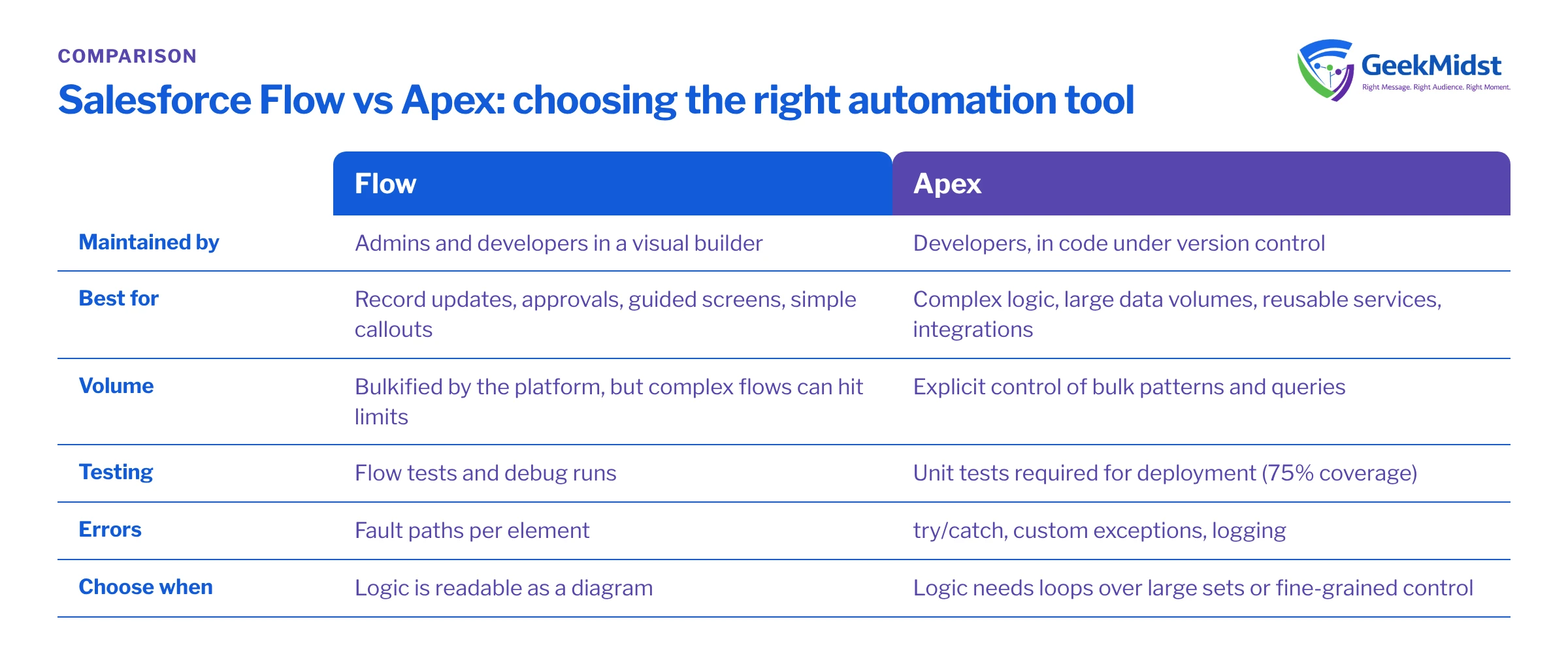
Flow and Apex compared
| Flow | Apex | |
|---|---|---|
| Who maintains it | Admins and developers | Developers |
| Best for | Standard record automation, guided screens | Complex logic, volume, integrations |
| Bulk handling | Platform handles many patterns, but queries or DML inside loops still hurt | Your responsibility, fully controllable |
| Error handling | Fault paths | try and catch, custom exceptions, partial success |
| Testing | Flow tests and the debugger | Test classes with assertions; coverage required for production deployment |
| Asynchronous work | Scheduled and asynchronous paths | Queueable, Batch, Schedulable |
| Governor limits | Shared with the transaction | Shared with the transaction |
| Pace of change | Fast for simple changes | Slower, more predictable |
Decision criteria
Choose Apex when two or more of these are true for a requirement. Otherwise start in Flow.
- The logic needs more than a handful of decisions and loops to express clearly.
- The automation must process large batches, such as data loads or integrations that update thousands of records at once.
- It calls an external system and must handle failures in a controlled way.
- Several entry points (flows, components, APIs) need exactly the same behaviour.
- A defect would have serious consequences and you need tight automated test coverage.
Also decide per object, not just per requirement. An object with a trigger framework, three record-triggered flows and a legacy Process Builder is hard to reason about, because the order of execution decides the outcome. Salesforce has ended support for Workflow Rules and Process Builder and recommends moving that automation to Flow, which is a good moment to rationalise.
Combining both: invocable Apex
The cleanest hybrid keeps orchestration in Flow and puts complex or reusable logic in an invocable Apex method. The flow stays readable and the hard part is tested code.
Assumptions
Invoice__c is a sample custom object with a lookup Account__c and a picklist Status__c. The class respects sharing. This is an illustration of the pattern, not production code.
public with sharing class OverdueInvoiceCheck {
    public class Request {
        @InvocableVariable(required=true)
        public Id accountId;
    }

    public class Result {
        @InvocableVariable
        public Boolean hasOverdueInvoices;
    }

    @InvocableMethod(label='Check Overdue Invoices' description='Returns whether each account has overdue invoices')
    public static List<Result> check(List<Request> requests) {
        Set<Id> accountIds = new Set<Id>();
        for (Request r : requests) {
            accountIds.add(r.accountId);
        }

        Set<Id> overdue = new Set<Id>();
        for (Invoice__c inv : [
            SELECT Account__c
            FROM Invoice__c
            WHERE Account__c IN :accountIds
            AND Status__c = 'Overdue'
        ]) {
            overdue.add(inv.Account__c);
        }

        List<Result> results = new List<Result>();
        for (Request r : requests) {
            Result res = new Result();
            res.hasOverdueInvoices = overdue.contains(r.accountId);
            results.add(res);
        }
        return results;
    }
}Flow passes requests to an invocable method in bulk when many records trigger the flow together, so the method must handle a list and return results in the same order. One query outside the loop keeps it within limits. For more depth, see when to use Apex instead of Flow, record-triggered flow best practices and bulkifying Apex triggers. The Salesforce Developers documentation covers invocable methods in full.
Common mistakes
- Queries or record updates inside Flow loops. Collect records in a loop, then update them once after it.
- No fault paths. Unhandled flow errors surface as unfriendly messages and generic error emails. Add fault paths and log meaningful information.
- A trigger and several flows on one object with no agreed order. Use the flow trigger order setting, document what runs when, and consolidate where you can.
- Apex for simple same-record field updates. A before-save flow is usually simpler and efficient.
- Giant flows. Split them into subflows with clear inputs and outputs, as you would split code into methods.
Our view: it depends on complexity and ownership
For most organisations, Flow should handle the majority of automation, with Apex reserved for the complex, high-volume and integration-heavy parts. The right balance depends on who will maintain the system after go-live: an organisation without in-house developers should be cautious about Apex it cannot support, and one with a strong development team should not force complex logic into Flow just to follow a rule.
Questions we hear
Is Flow slower than Apex?
Can a trigger and a record-triggered flow run on the same object?
Should we migrate Workflow Rules and Process Builder?
How do we test flows properly?
Who should own automation decisions?
Get a second opinion on your automation
We can review the automation on your key objects, recommend what should be Flow and what should be Apex, and help you consolidate. See our Flow automation services.


