

Record-Triggered Flow Best Practices
Record-triggered flows run on every matching save, including bulk loads and integrations. These practices keep them fast, predictable and easy to debug.

Record-triggered flows have become the default way to automate Salesforce. That is mostly good news, but it means a single org can end up with a dozen flows on Opportunity, each written by a different person, each firing on every save. When something goes wrong, the error message points at an interview that touched a record that triggered another flow, and nobody is sure which ran first.
These practices are aimed at exactly that kind of automation. They apply whether you are writing your first flow or cleaning up an org that has outgrown its automation.
Pick the right flow type for the job
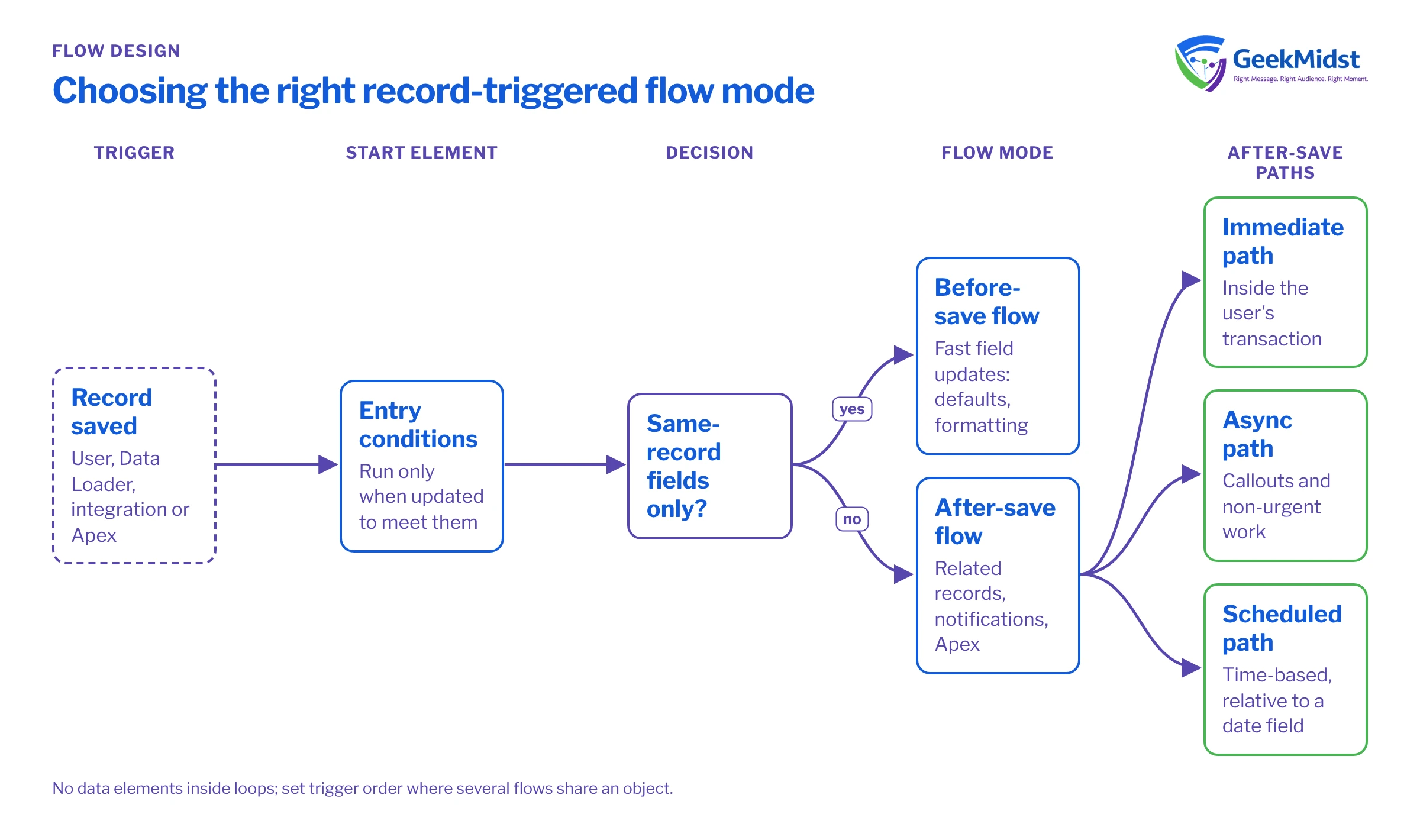
Record-triggered flows run in one of two broad modes:
- Fast field updates (before-save). Runs before the record is written. It can only change fields on the triggering record, but it does so without an extra save, which makes it much faster. Use it for defaulting, formatting and deriving fields on the same record.
- Actions and related records (after-save). Runs after the record is saved, so the record has an ID and you can create or update related records, send notifications, call subflows and invoke Apex actions.
A common anti-pattern is using an after-save flow to update a field on the triggering record. That causes a second save of the same record, which re-runs automation and costs performance. If the update only touches the triggering record, move it to a before-save flow.
After-save flows can also include a Run Asynchronously path for work that does not need to happen inside the user's transaction, such as callouts, and scheduled paths for time-based actions relative to a date field.
Be strict with entry conditions
Entry conditions are the cheapest performance tool you have. A flow that starts on every update and then checks a Decision element still creates an interview for every record. Put the filter in the start element instead.
When the logic should run only when something changes, choose the option to run only when a record is updated to meet the condition requirements, or compare $Record with $Record__Prior in a formula condition. Without that, an Opportunity that is already Closed Won triggers the "closed won" logic again every time someone edits its description.
Design for bulk from the start
Your flow will not only run when a user clicks Save. Data Loader, integrations, mass updates and Apex can save hundreds of records in one transaction, and all of them share the same governor limits. Rules that keep flows bulk-safe:
- Query once, outside any loop, and filter collections in memory with Collection Filter or Decision elements.
- Build a collection of records to update inside the loop with Assignment elements, then do one Update Records after the loop.
- Avoid cross-object updates that cascade into other objects' flows unless you know what those flows do.
- Push heavy or non-urgent work to an asynchronous or scheduled path.
Control the order and the count
If several flows run on the same object and trigger, use Flow Trigger Explorer to see them together and set a trigger order value on each, so the sequence is deliberate. Better still, keep the count low. A widely used approach is one before-save flow and a small number of after-save flows per object, each with a clear purpose, rather than one flow per requirement. Do not try to put everything into one giant flow either; that becomes hard to read and test.
Remember that flows are not alone. Apex triggers, validation rules, duplicate rules and assignment rules all run in the same save. Check the order of execution in the Apex Developer Guide when a flow and a trigger both touch the same field.
Handle faults on purpose
Any element that touches data or calls an action can fail. Add a fault path to those elements. At a minimum, write a record to an error log object with the flow name, record ID and $Flow.FaultMessage, and decide whether the user should see a friendly message or the save should fail. In Process Automation Settings, choose whether unhandled flow error emails go to the last modifier or to the Apex exception email recipients, and make sure those recipients include a monitored mailbox.
Test with 200 records
Flow debug in Flow Builder is useful for one record. For bulk behaviour, write an Apex test that saves 200 records and asserts the result. The example assumes a flow that sets a custom checkbox Handover_Required__c when an Opportunity moves to Closed Won, and that your org uses the standard Closed Won stage name.
@IsTest
private class OpportunityHandoverFlowTest {
    @IsTest
    static void flagsEveryClosedWonOpportunity() {
        Account acc = new Account(Name = 'Bulk Test Account');
        insert acc;

        List<Opportunity> opps = new List<Opportunity>();
        for (Integer i = 0; i < 200; i++) {
            opps.add(new Opportunity(
                Name = 'Bulk Opp ' + i,
                AccountId = acc.Id,
                StageName = 'Prospecting',
                CloseDate = Date.today().addDays(30)
            ));
        }
        insert opps;

        for (Opportunity o : opps) {
            o.StageName = 'Closed Won';
        }
        Test.startTest();
        update opps;
        Test.stopTest();

        Integer flagged = [
            SELECT COUNT() FROM Opportunity
            WHERE Id IN :opps AND Handover_Required__c = true
        ];
        Assert.areEqual(200, flagged, 'Flow should flag all 200 closed-won opportunities');
    }
}Naming and documentation
Name flows so the list view explains itself, for example Opportunity - Before Save - Defaults and Opportunity - After Save - Handover. Fill in the description with what the flow does, who asked for it and what it must not do. Add descriptions to complex elements too. When someone needs to debug it in a year, this is what they will read first.
Diagnosing a misbehaving flow
- Limit errors on bulk loads: look for data elements inside loops, and for flows on other objects triggered by this one.
- Logic runs when it should not: check whether entry conditions use "only when updated to meet the condition".
- Field value overwritten: another flow, trigger or workflow is setting the same field later in the save. Flow Trigger Explorer and debug logs will show the sequence.
- Works for admins, fails for users: check the flow's run context and the user's field and object access.
Checklist
- Same-record updates are in before-save flows.
- Entry conditions filter as much as possible in the start element.
- No data elements inside loops.
- Trigger order is set where several flows share an object.
- Data and action elements have fault paths.
- A bulk Apex test exists for each critical flow.
Related reading
Automation that has grown out of control?
We review record-triggered flows and triggers object by object, consolidate where it helps and leave you with automation your admins can maintain.


