

Throttling and Send Windows in Journey Builder
How to control the pace and timing of Journey Builder sends with throttling, send windows, wait activities and staged entry, without losing contacts along the way.

A journey that admits two hundred thousand people at once will try to email them at once. That can overwhelm the landing page the email links to, flood a call centre, trip rate limits at mailbox providers, or undo the careful warm-up of a new dedicated IP. It can also land messages at 3am local time. Journey Builder gives you several ways to control both the pace and the timing of sends. They work at different points in the journey, and they combine.
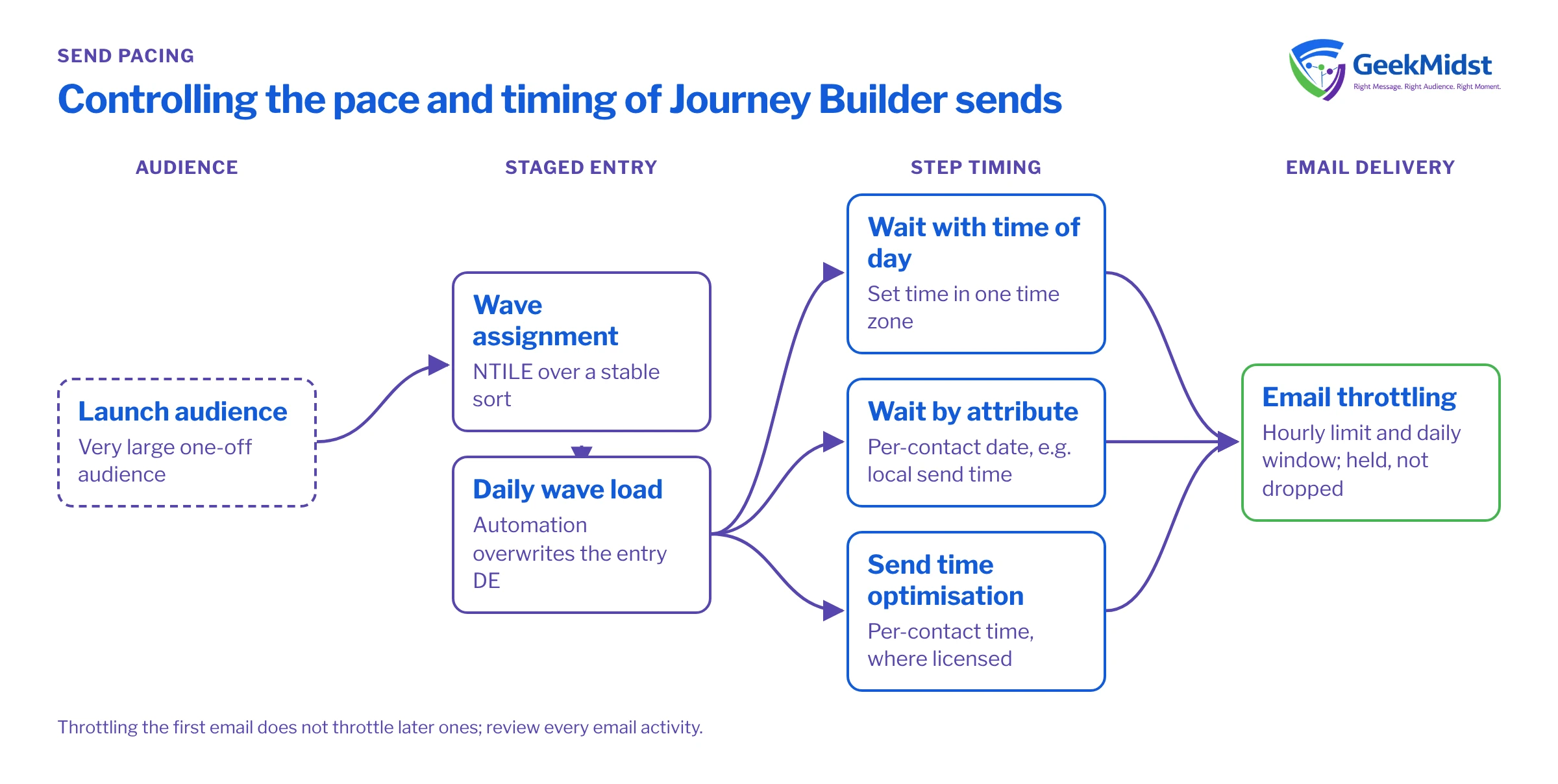
Why pace and timing matter
- Downstream capacity. Websites, booking systems and support teams have a finite rate at which they can handle responses.
- Sender reputation. Sudden volume spikes from a sending IP or domain look suspicious to mailbox providers, especially during IP warming.
- Customer experience. Messages that arrive during sleeping hours get buried or annoy people. Some channels and countries also have rules about contact times; check what applies to you.
- Operational control. A slower start gives you time to spot a broken link or wrong segment before it reaches everyone.
The tools available
Throttling on the email activity. The email activity's delivery options can limit how many emails are sent per hour and restrict sending to a daily time window. Contacts beyond the limit, or arriving outside the window, are held and sent later rather than dropped. The exact options can vary by account and release, so confirm what you see in your org against Salesforce Help before relying on it.
Wait activities with a time of day. A wait by duration can be extended until a specific time of day in a chosen time zone, so "wait two days, then send at 10:00" is possible. A wait until date or wait by attribute holds contacts until a fixed date or a date stored on the contact.
Send time optimisation. Where licensed, Einstein Send Time Optimization chooses a send time per contact based on past engagement. It changes when each person receives the message, which also spreads volume.
Controlling entry. For data extension entry, you decide how many rows go into the entry data extension each run and how often the journey picks them up. Loading the audience in waves is the most predictable way to protect downstream systems.
Which technique controls what
| Controls | Best for | Watch out for | |
|---|---|---|---|
| Email activity throttling | Sends per hour and daily window | IP warming, protecting web or call-centre capacity | Large audiences can take days to clear |
| Wait with time of day | Time of day for a step | Business-hours messages in one region | One time zone for everyone unless you model local time |
| Wait by attribute | A date per contact | Renewals, bookings, local send times you calculate | Empty or past dates |
| Send time optimisation | Individual send time | Engagement-led timing at scale | Less useful for time-critical messages |
| Staged entry | How many people start each day | Very large launches and migrations | Needs an automation and clear wave tracking |
Worked example: a large launch in four waves
A product launch email goes to 400,000 people, and the web team asks for responses to be spread over four days. One approach:
- A query assigns every contact to a wave number from 1 to 4.
- An automation loads one wave per day into the entry data extension using the Overwrite action.
- The journey's email activity uses a daily send window of 09:00 to 18:00 in the main audience's time zone, plus an hourly limit agreed with the web team.
- Day one's wave doubles as a canary: someone checks clicks, errors and the landing page before day two is loaded.
The wave assignment below uses NTILE() over a stable sort so that the same contact always lands in the same wave if the query is rerun.
SELECT
    a.SubscriberKey,
    a.EmailAddress,
    a.FirstName,
    NTILE(4) OVER (ORDER BY a.SubscriberKey) AS WaveNumber
FROM Launch_Audience_DE a
WHERE a.EmailAddress IS NOT NULLSorting by subscriber key is deterministic but not random. If your keys carry meaning (for example, older customers have lower IDs), each wave will differ in composition. If waves need to be comparable, order by a value that is effectively random but stable, such as a hash of the key.
Handling time zones
Journey Builder waits and send windows are set in one time zone per activity. If your audience spans regions, you have three options:
- Separate paths per region. A decision split on a region or time zone attribute, with each path's wait or window set to that region's time zone. Simple and easy to test.
- A calculated local send time. A query computes each contact's intended send time into a date field, and a wait by attribute holds them until it. Test how the stored value is interpreted with a few seed contacts in different zones before trusting it.
- Send time optimisation, where available and where exact timing is not critical.
Remember that GETDATE() in Marketing Cloud SQL returns US Central Standard Time without daylight saving adjustment, so any query that calculates send times needs to account for that.
Common mistakes
- Throttling without enough hours. A limit that cannot clear the audience inside the window means sends spill over into following days. Calculate audience size divided by hourly limit and compare it with the window length.
- Throttle plus a short goal window. If the journey's goal or exit criteria assume a send happened on day one, a throttled send that lands on day three breaks the logic.
- One time zone for a global list. A 09:00 send in one region is the middle of the night in another.
- Forgetting the follow-up steps. Throttling the first email does not throttle later ones automatically. Review every email activity.
- No canary. Sending everything in one go removes your chance to catch errors early.
Checklist
- Downstream capacity agreed with the teams who handle responses
- Hourly limit and window calculated against audience size
- Time zone strategy chosen and tested with seed contacts
- Waves or staged entry used for very large audiences
- Every email activity's delivery settings reviewed, not just the first
- Goal and exit timing checked against the slowest likely send
- A canary review step built into the launch plan
Related reading
Planning a high-volume send?
We can help you size throttles, design send windows across time zones and build a staged launch plan with checkpoints your team can follow.


