

Designing Multi-Step Journey Builder Journeys
A design-first approach to multi-step journeys in Marketing Cloud Engagement, from entry rules and timing to splits, goals and a worked post-purchase example.

Multi-step journeys usually go wrong before anyone opens the canvas. The entry data is loaded the wrong way, re-entry rules let people in twice, a split depends on a field nobody updates, and the goal measures something that never changes. Designing the journey on paper first, with the data each step depends on, avoids most of that rework.
This guide uses Journey Builder in Marketing Cloud Engagement. The same thinking applies to other orchestration tools, but activity names and behaviour here are Journey Builder's.
The decisions that shape every journey
Before choosing activities, answer five questions in writing:
- What is the one conversion this journey exists for? A second purchase, a completed profile, a booked demo. One primary goal keeps the design honest.
- Who enters, and how? A scheduled data extension, an API event, or a Salesforce data event. This decides how fresh entry data is and how volume arrives.
- Can someone be in the journey twice? Journey settings offer no re-entry, re-entry at any time, or re-entry only after exiting. Pick based on what a duplicate would mean for the customer.
- What data does each step need, and when is it read? Journey data is a snapshot taken at entry. Contact data in attribute groups is read when the contact reaches the activity.
- What removes someone early? Unsubscribes, a return, a support complaint, a conversion. These become exit criteria and the goal.
Journey building blocks and what to watch
| Use it for | Watch out for | |
|---|---|---|
| Data extension entry | Scheduled daily or hourly batches | Each run evaluates the rows in the entry data extension, so load only new rows |
| API event entry | Real-time triggers from another system | Payload must match the event data extension schema |
| Wait by duration | Fixed delays between messages | The clock starts when each contact arrives, not at a calendar time |
| Wait until date or by attribute | Timing relative to a booking or renewal date | Empty or past dates need a planned fallback |
| Decision split | Branching on data | Paths are evaluated in order and the first match wins |
| Engagement split | Branching on opens or clicks of an earlier email | Needs a wait before it; opens are inflated by privacy features |
| Update Contact | Writing journey status back to a data extension | Useful for reporting and for suppression elsewhere |
| Goal and exit criteria | Measuring conversion and removing people early | Not continuous checks, so place waits with this in mind |
Design process, in order
- 01
Write the brief
One paragraph: audience, conversion, timeframe, channels and what a successful customer experience looks like.
- 02
Define entry and re-entry
Choose the entry source, its schedule and the re-entry rule. Decide what happens if someone qualifies again while still in the journey.
- 03
Sketch the path with timings
On paper or a whiteboard, list each message, wait and split with the day it happens. Read it back from the customer's point of view.
- 04
Specify the data behind every split
For each decision, name the field, the data extension it lives in, who updates it and how often.
- 05
Set the goal and exit criteria
Base them on data that genuinely updates while the contact is in the journey, such as an orders data extension refreshed daily.
- 06
Build a test version
Copy the journey with waits shortened to minutes and send to seed contacts only. Keep it separate from the production version.
- 07
Plan monitoring and versioning
Decide who checks entry counts and errors, and how changes will be released as new journey versions.
Worked example: a three-message post-purchase journey
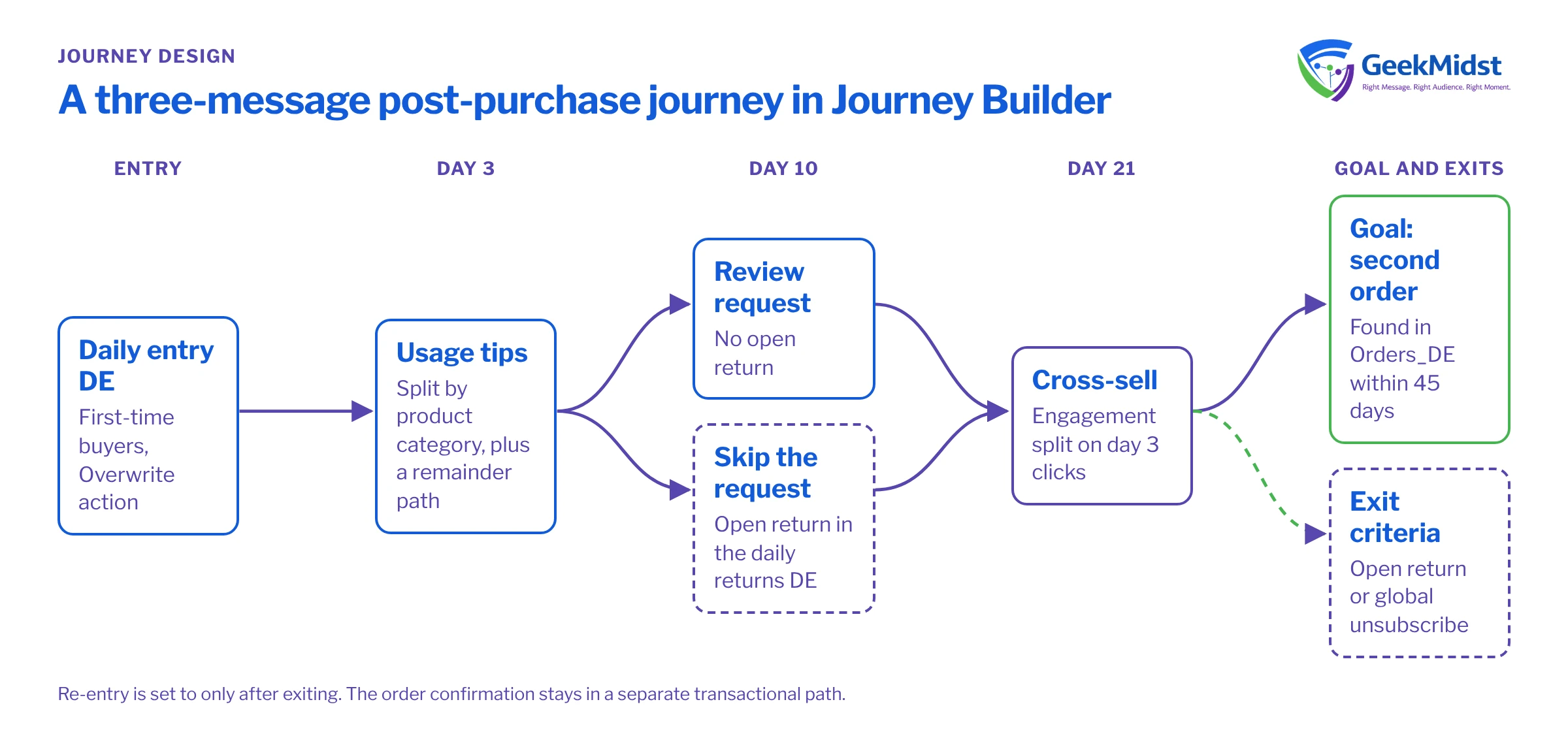
The objective is a second purchase within 45 days. The design, step by step:
- Entry. A daily automation loads yesterday's first-time buyers into
PostPurchase_Entry_DE. Re-entry is set to "only after exiting", so a customer who buys again later can come back, but never runs twice in parallel. - Day 3: getting started. A decision split on the journey data field
ProductCategorysends category-specific usage tips. A remainder path catches anything unmapped with a general message. - Day 10: review request. A decision split checks a contact attribute,
HasOpenReturn, read from a returns data extension that is refreshed daily. People with an open return skip the request. - Day 21: cross-sell. An engagement split on clicks from the day 3 email: clickers get a product-led message, non-clickers a lighter "inspiration" message.
- Goal and exits. The goal is a second order in
Orders_DE. Exit criteria remove anyone with an open return or a global unsubscribe.
The order confirmation itself is not part of this journey. Transactional messages belong in a separate, faster path; see Triggered Sends vs Journey API entry events.
The entry query below runs in Automation Studio with the Overwrite data action, so each journey run only sees one day's buyers.
SELECT
    o.SubscriberKey,
    o.EmailAddress,
    o.OrderNumber,
    o.OrderDate,
    o.ProductCategory
FROM Orders_DE o
WHERE o.IsFirstOrder = 1
  AND o.OrderDate >= DATEADD(DAY, -1, CAST(GETDATE() AS DATE))
AND o.OrderDate < CAST(GETDATE() AS DATE)Notes on the entry query
GETDATE()in Marketing Cloud SQL returns server time, which is US Central Standard Time and does not shift for daylight saving. IfOrderDateis stored in another time zone, convert one side so "yesterday" means the same thing for both.- If the automation fails for a day, that day's buyers are missed. A safer variant uses a three-day window and relies on the re-entry rule plus a
JourneyEnteredDatestamp in a log data extension to avoid duplicates. - Keep the entry data extension's primary key aligned to what one journey entry means here: one row per subscriber.
Common design mistakes
- Appending to the entry data extension. With a scheduled data extension entry, old rows can be evaluated again on every run. Overwrite it, or filter on a load date.
- Splitting on journey data that is stale by day 21. If a value can change after entry, read it from contact data instead.
- Engagement splits straight after a send. The split checks engagement when the contact arrives, so put a wait before it.
- Goals nobody can hit. If the orders data extension refreshes weekly, a daily goal check is meaningless. Align refresh schedules first.
- Editing in production. An active journey cannot be changed in place; you publish a new version and people already inside continue on the old one. Plan copy and timing changes accordingly.
Quick checklist
- One documented conversion and a written brief
- Entry source, schedule, data action and re-entry rule agreed
- Every split mapped to a field, owner and refresh schedule
- Remainder paths handled on every decision split
- Goal and exit criteria based on data that updates in time
- A test version with short waits, run against seed contacts
- Owners for monitoring entry counts, errors and versions
For testing detail, see Testing journeys before activation. For split choice, read Decision splits vs engagement splits.
Questions we hear
Can I change a journey once it is running?
How many steps is too many?
Should the goal and exit criteria be the same?
Should this be a journey or an Automation Studio programme?
Planning a lifecycle journey?
We can help you turn a journey idea into a written design, with the data model, entry rules and test plan worked out before anything is built.


