

Marketing Cloud Deliverability Audit Checklist
A working checklist for auditing deliverability in Marketing Cloud Engagement, covering authentication, sender configuration, bounce and complaint data, list hygiene and content.

Open rates drift down, a mailbox provider starts deferring mail, or a new compliance requirement lands and nobody is sure whether the account meets it. A deliverability audit answers one question: is anything in our setup, data or sending behaviour giving mailbox providers a reason to distrust us? This checklist walks through the areas to review in Marketing Cloud Engagement and where to find the evidence.
How to run the audit
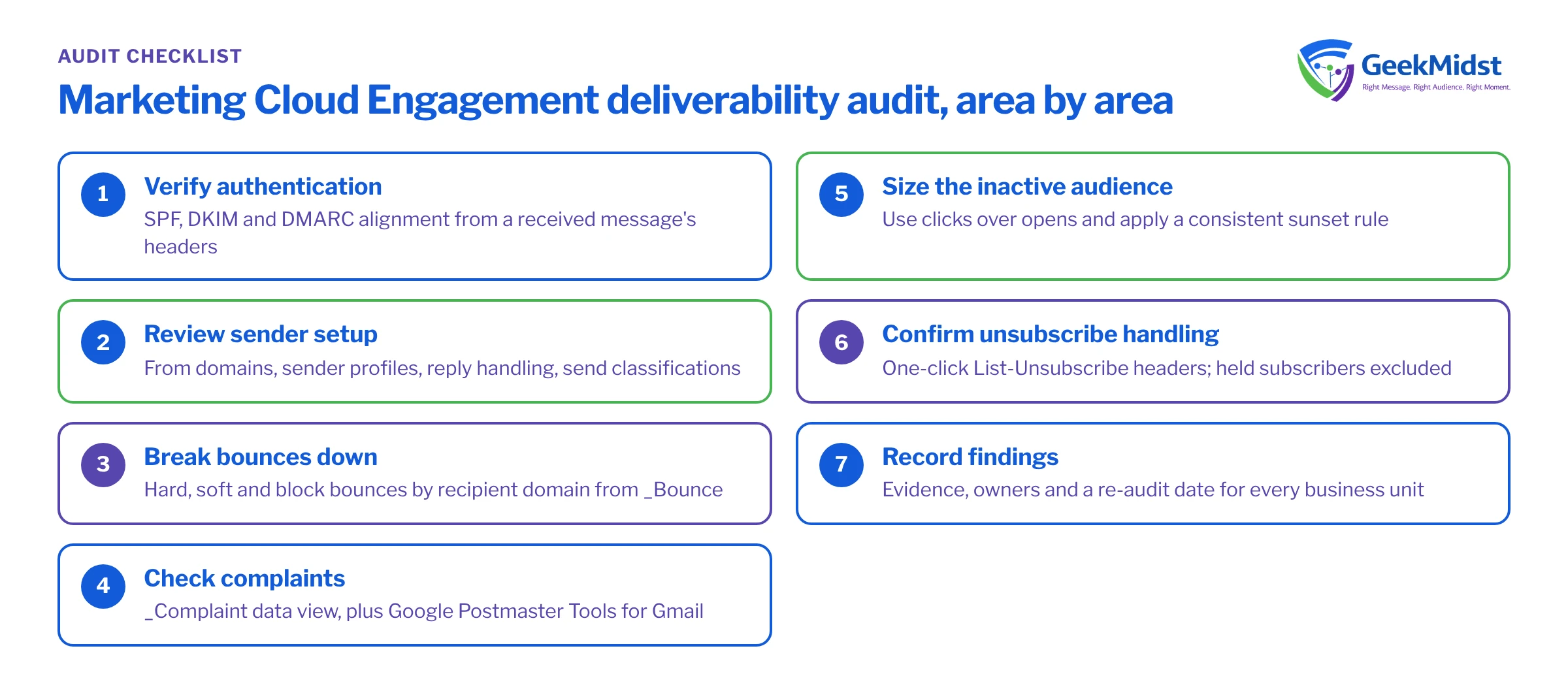
Work through the areas in order. Authentication and sender configuration are binary checks that take an afternoon. Bounce, complaint and engagement data take longer because you need at least a few weeks of history to see patterns. Write down what you find as you go, with a screenshot or query result for each item, so the audit can be repeated in six months and compared.
You will need admin access to Setup in the relevant business units, access to Automation Studio to run queries against data views, and access to the DNS records for your sending domains (usually through IT).
Audit areas at a glance
| What to check | Where to look | Red flag | |
|---|---|---|---|
| Authentication | SPF, DKIM and DMARC on every sending and link domain | DNS records, raw headers of a received email | DKIM not aligned with the From domain |
| Sender setup | From domains, sender profiles, reply handling | Setup, Sender Profiles, Reply Mail Management | Free-mail From addresses or unmonitored replies |
| Bounces | Hard, soft and block bounce rates by domain | _Bounce data view, send tracking | Block bounces rising at one provider |
| Complaints | Complaint rate by provider | _Complaint data view, Google Postmaster Tools | Gmail spam rate creeping toward provider thresholds |
| List hygiene | Source of addresses, inactive volume, held subscribers | Import history, All Subscribers status, engagement queries | Large sends to people with no engagement for a year or more |
| Unsubscribe handling | Header and in-email unsubscribe, processing | Raw headers, publication lists, preference centre | Missing one-click unsubscribe header |
| Content and links | Link domains, tracking domain, HTML weight | Email source, link tracking settings | Link shorteners or mismatched link domains |
1. Authentication and domains
Most accounts send through a Sender Authentication Package (SAP) or an equivalent private domain setup, which gives you a branded sending domain, DKIM signing and a branded link domain. Check, for each From domain in use:
- SPF includes the Marketing Cloud sending infrastructure for the return-path domain actually used.
- DKIM signatures are present and aligned with the visible From domain. Look at a received message's raw headers rather than trusting configuration screens.
- DMARC is published for the organisational domain. A policy of
p=nonewith reporting is the minimum many large providers now expect from bulk senders; move towardquarantineonce reports are clean. - Link and image domains are branded and resolve over HTTPS.
The SPF, DKIM and DMARC guide explains alignment in more depth.
2. Sender configuration
Review sender profiles and delivery profiles in each business unit. Every From address should be on a domain you authenticate, replies should go to a monitored mailbox or be handled by Reply Mail Management, and send classifications should correctly separate commercial from transactional mail. Transactional classification should be reserved for genuinely transactional messages.
3. Bounces by provider
Account-wide bounce rates hide problems. A provider-level view shows whether one mailbox provider is rejecting you while others accept. The query below counts sends and bounces by recipient domain for the last 30 days.
SELECT
    s.Domain,
    COUNT(*) AS Sent,
    SUM(CASE WHEN b.SubscriberID IS NOT NULL THEN 1 ELSE 0 END) AS Bounced,
    SUM(CASE WHEN b.BounceCategory = 'Block bounce' THEN 1 ELSE 0 END) AS BlockBounces
FROM _Sent s
LEFT JOIN _Bounce b
    ON  b.JobID = s.JobID
    AND b.ListID = s.ListID
    AND b.BatchID = s.BatchID
    AND b.SubscriberID = s.SubscriberID
    AND b.IsUnique = 1
WHERE s.EventDate >= DATEADD(DAY, -30, GETDATE())
GROUP BY s.DomainSort the result by volume and look at the top ten domains. A provider with a block bounce share well above the others usually points to a reputation or authentication issue specific to that provider. Read the SMTPBounceReason values for those rows; they often name the cause directly.
4. Complaints and engagement
The _Complaint data view only includes complaints that providers report back through feedback loops. Gmail does not send individual complaint reports, so for Gmail use Google Postmaster Tools to see the domain spam rate. Review both monthly.
Then size your inactive audience: subscribers who have received mail for months with no opens or clicks. Because privacy features in some mail clients generate automatic opens, clicks are the more reliable signal. Decide on a sunset rule, for example a re-engagement attempt followed by suppression, and apply it consistently.
5. List sources and unsubscribe handling
Confirm where each list comes from and that consent was captured for it. Check that held and unsubscribed subscribers are excluded from every send path, including journeys and API sends. Inspect the raw source of a received commercial email for the List-Unsubscribe and List-Unsubscribe-Post headers, which large providers require for one-click unsubscribe from bulk senders.
Common mistakes
- Auditing one business unit and assuming the others match.
- Checking DNS records but never the headers of a real received message.
- Treating a low account-wide bounce rate as healthy when one provider is blocking.
- Relying on opens to define "active" subscribers.
- Fixing issues without recording a baseline, so improvement cannot be shown later.
Short checklist
- SPF, DKIM and DMARC verified from received headers for every From domain
- Sender profiles, reply handling and send classifications reviewed per business unit
- Bounces and block bounces reviewed by provider for 30 and 90 days
- Complaint data reviewed from data views and Postmaster Tools
- Sunset rule defined and applied to inactive subscribers
- One-click unsubscribe headers confirmed on commercial mail
- Findings, owners and a re-audit date recorded
Related reading
A condensed version lives in the Marketing Cloud deliverability checklist. For reporting queries, see Using data views for engagement reporting. If you want help running the audit, our email deliverability consulting service covers it.
Want a second pair of eyes on deliverability?
We can run this audit with your team, interpret the provider-level data and give you a prioritised list of fixes with owners.


