

SPF, DKIM and DMARC for Marketing Cloud Senders
How SPF, DKIM and DMARC fit together, what alignment means for Marketing Cloud Engagement private domains, and a safe path from p=none to p=reject.

Mailbox providers now expect bulk senders to authenticate their mail properly, and Google and Yahoo have published requirements for high-volume senders that include SPF, DKIM and a DMARC record. If your Marketing Cloud Engagement emails are landing in spam, or you are planning a new sending domain, SPF, DKIM and DMARC are the first things to get right.
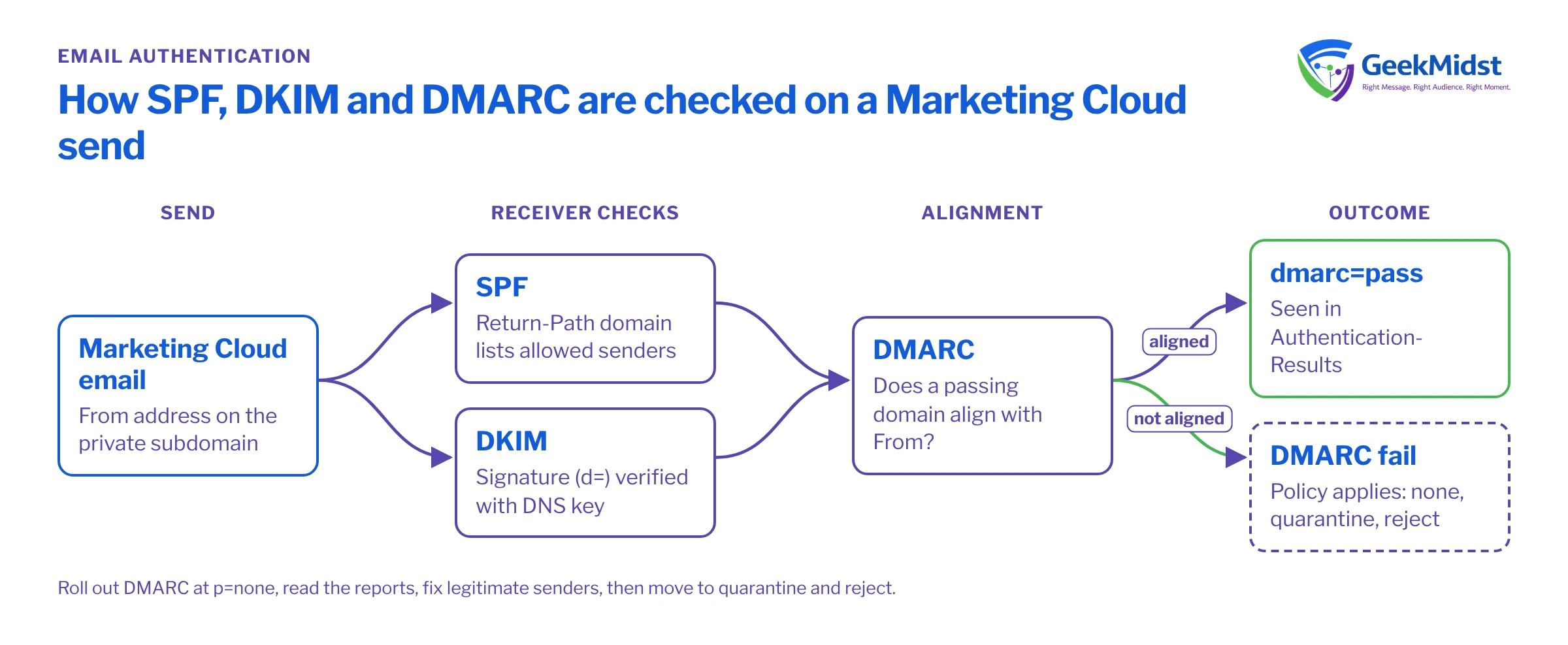
What each standard does
- SPF (Sender Policy Framework) lists the servers allowed to send mail for a domain. Receivers check it against the envelope sender, also called the Return-Path or bounce domain, not the From address the reader sees.
- DKIM (DomainKeys Identified Mail) adds a cryptographic signature to each message. The signing domain appears in the
d=tag of the signature header, and receivers fetch the public key from DNS to verify it. - DMARC ties both to the visible From domain. A message passes DMARC when SPF or DKIM passes and the domain that passed aligns with the From domain. The DMARC record also tells receivers what to do with failures and where to send reports.
Alignment is the part most people miss. A message can pass SPF and DKIM for a sending platform's own domain and still fail DMARC, because neither of those domains matches your From address.
The records at a glance
| Where it is published | Example value (illustrative) | |
|---|---|---|
| SPF | TXT record on the domain used as the Return-Path | v=spf1 include:VALUE_FROM_SALESFORCE -all |
| DKIM | TXT or CNAME record at selector._domainkey on the signing domain | Public key or CNAME target supplied during setup |
| DMARC | TXT record at _dmarc on the From domain | v=DMARC1; p=none; rua=mailto:dmarc-reports@example.com |
How this works in Marketing Cloud Engagement
Marketing Cloud Engagement handles authentication through its sending domain setup. Most organisations send from a private domain, typically a subdomain such as email.example.com, often as part of the Sender Authentication Package (SAP), which also covers a dedicated IP, branded links and reply handling. Depending on how the domain is set up, Salesforce either manages the DNS records for a delegated subdomain or gives you records to publish in your own DNS.
A few practical points:
- Use a subdomain for marketing mail. It separates marketing reputation from corporate mail and lets you set a policy for it without disturbing the main domain's mail flow.
- Use the exact values Salesforce provides. SPF includes, DKIM selectors and keys come from the setup for your account. Do not copy them from another organisation's records or an old article.
- Make sure From addresses use the authenticated domain. A sender profile that uses a different From domain will not align, whatever the DNS says.
- Mind the SPF lookup limit. SPF allows at most ten DNS lookups when a record is evaluated. A corporate record with many includes can exceed it, which is another reason to send marketing mail from its own subdomain.
Exact setup steps, and what Salesforce configures for you, depend on your account and package, so confirm them in Salesforce Help or with your Salesforce account team.
Rolling out DMARC safely
- 01
Publish a monitoring policy
Start with p=none and a rua address that collects aggregate reports. Nothing is blocked yet; you are gathering evidence.
- 02
Read the reports
Aggregate reports show which sources send as your domain and whether they pass and align. A DMARC reporting tool makes the XML readable.
- 03
Fix legitimate senders
Every system sending as the domain, such as Marketing Cloud, CRM, the support desk and billing, needs aligned SPF or DKIM. Fix or move the ones that fail.
- 04
Move to quarantine gradually
Change to p=quarantine, and if you want a slower rollout, use the pct tag to apply it to a share of failing mail first.
- 05
Move to reject
When reports show only unauthorised mail failing, set p=reject. Keep reading reports afterwards, because new tools get added over time.
Checking that it works
Send a test email from Marketing Cloud to a mailbox you control, open the full message headers and find the Authentication-Results header. You want spf=pass, dkim=pass and dmarc=pass, with the domains involved matching your From domain or sharing its organisational domain, which is what relaxed alignment allows. Check more than one mailbox provider, because each reports slightly differently.
Common mistakes
- Two SPF records on one domain. Only one SPF record is allowed per domain, so merge them.
- Jumping straight to p=reject. Legitimate mail from a forgotten system disappears without warning.
- Nobody reads the DMARC reports. The rua mailbox fills up and problems go unnoticed. Give it an owner.
- Treating authentication as the whole of deliverability. It is required, but reputation still depends on list quality, consent, complaint rates and easy unsubscribes. Google and Yahoo also expect one-click unsubscribe for bulk mail, and a clear preference centre helps people opt down instead of complaining.
- Forgetting link and image domains. Branded links should be set up so tracked links point to your domain rather than an unfamiliar one.
Checklist
- A dedicated subdomain for marketing mail, set up as a private domain.
- SPF and DKIM pass and align on test sends.
- DMARC published, starting at p=none, with reports going to a monitored address.
- Every other sender on the domain identified from reports.
- A dated plan for moving to quarantine and then reject.
- Sender profiles and From addresses use the authenticated domain.
Related: the Marketing Cloud email deliverability audit checklist, the deliverability checklist and our email deliverability consulting service.
Questions we hear
Do we also need a dedicated IP?
What DMARC policy do Google and Yahoo require?
Will DMARC stop phishing that uses our brand?
Why does DKIM pass but DMARC fail?
Should we set up BIMI?
Get your sender authentication checked
We can review your DNS records, Marketing Cloud sending setup and DMARC reports, and plan a safe path to an enforced policy.


