

Marketing Cloud Connect Sync Patterns
Synchronised data extensions, CRM entry events and write-back: how Marketing Cloud Connect works, which pattern fits, and how to fix the problems it commonly causes.

Marketing Cloud Connect links Salesforce CRM with Marketing Cloud Engagement. It is simple to switch on and surprisingly easy to misuse: journeys fire twice, people appear under two contact keys, and fields that changed in CRM never reach the email. Most Marketing Cloud Connect sync patterns and pitfalls come back to one question: which system owns which data, and how fresh does it need to be?
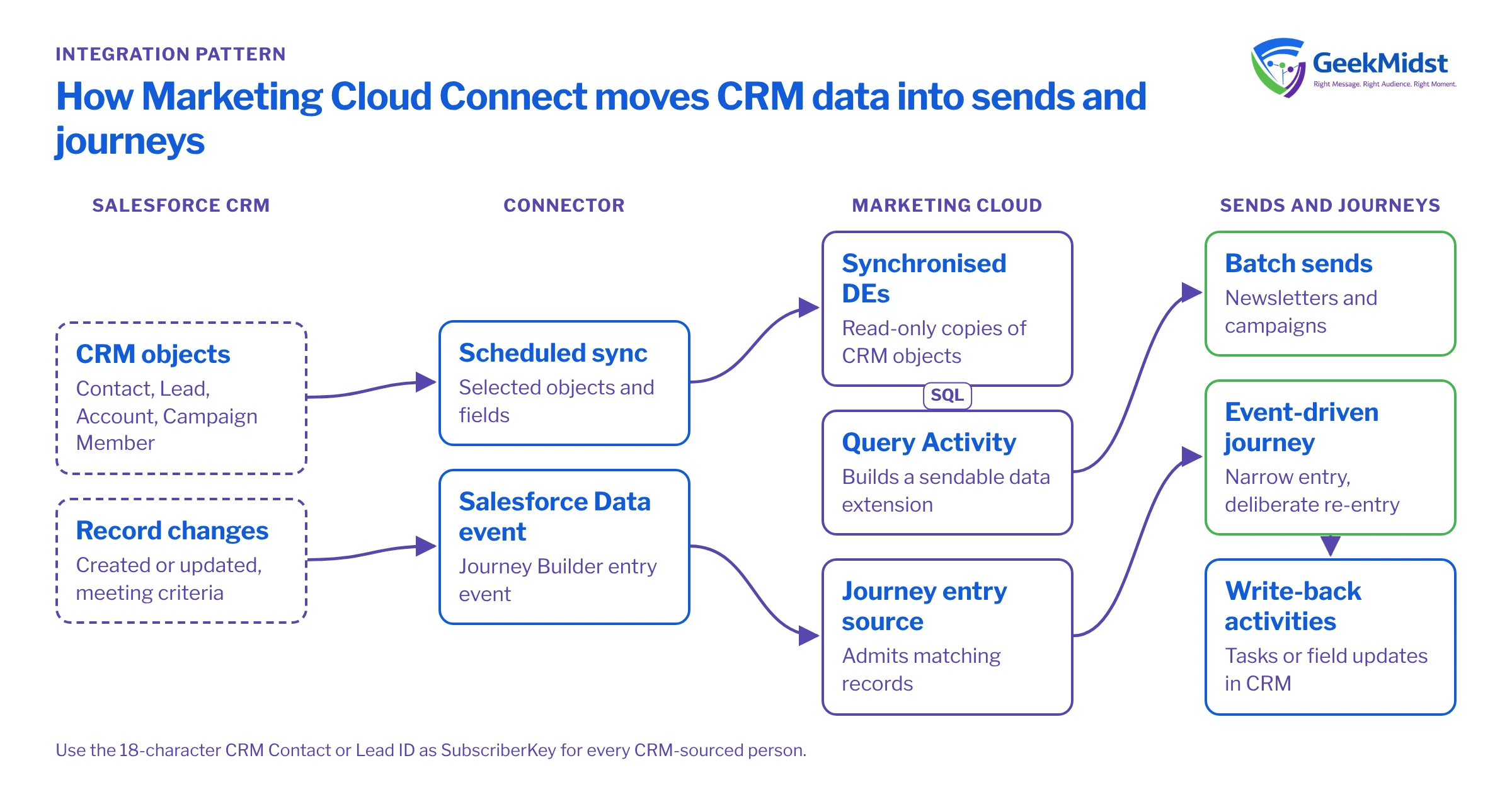
What the connector actually does
At a high level, the connector gives you:
- Synchronised data sources. Selected CRM objects, such as Contact, Lead, Account, Campaign Member and custom objects, and selected fields are copied into read-only synchronised data extensions on a schedule you set in Contact Builder.
- Salesforce Data entry events in Journey Builder, which admit records when they are created or updated in CRM and meet your criteria.
- Sends to Salesforce reports and campaigns, with tracking results written back to CRM where you request them.
- Sales and Service Cloud activities in journeys, which create or update CRM records.
Synchronised data extensions are one way, into Marketing Cloud. Anything written back to CRM goes through tracking, the connector's unsubscribe handling, journey activities or your own integration, so check your connector settings for which of these applies. The connector can also only see the objects and fields its CRM user can see, so field-level security changes in CRM can quietly break the sync.
The most important design decision is the contact key. Use the 18-character Salesforce Contact or Lead ID as SubscriberKey for CRM-sourced people, consistently and everywhere. Mixing email addresses and IDs as keys is the root of most duplicate contact problems.
Four common sync patterns
Synchronised data extensions plus SQL
Copy the objects you need, then use Query Activities to build sendable audiences on a schedule. Suits batch campaigns and newsletters.
→Salesforce Data entry source
Admit people to a journey when a CRM record changes, such as a case closing or an opportunity reaching a stage. Suits event-driven messages that can tolerate a short delay.
→Reports and campaigns as audiences
Let CRM users choose recipients through a report or campaign. Useful for sales-led sends, but harder to govern at scale.
→Write-back through journey activities
Create tasks or update fields from a journey so sales and service teams see marketing context. Keep write-backs few and purposeful.
→Building audiences from synchronised data
Synchronised data extensions are read-only and named after their source objects, so the usual pattern is a Query Activity that joins them into a sendable data extension. This example assumes the default names Contact_Salesforce and Account_Salesforce, a target data extension Customer_Newsletter_DE with SubscriberKey as its primary key, and that HasOptedOutOfEmail and Account.Type are synchronised. Check how boolean fields are stored in your synchronised data extensions before relying on the comparison.
SELECT
    c.Id AS SubscriberKey,
    c.Email AS EmailAddress,
    c.FirstName,
    a.Name AS AccountName
FROM Contact_Salesforce c
INNER JOIN Account_Salesforce a
    ON a.Id = c.AccountId
WHERE c.Email IS NOT NULL
  AND c.HasOptedOutOfEmail = 0
AND a.Type = 'Customer'Pitfalls and how to fix them
| Symptom | Cause and fix | |
|---|---|---|
| Duplicate contacts | The same person appears once by ID and once by email | Mixed contact key strategies. Standardise on the CRM ID and plan a key migration. |
| Lead conversion | A converted lead starts again under a new key and history splits | Lead and Contact IDs differ. Decide how converted leads are handled and test it. |
| Stale formula values | Calculated CRM values are out of date in Marketing Cloud | Formula changes may not update the record's modification time, so incremental sync can miss them. Store the value in a field updated by Flow. |
| Fields suddenly empty | A field stops populating after a CRM change | Field-level security for the connector user. Include it in CRM release testing. |
| Journeys firing twice | People enter an event-driven journey on every update | Entry criteria too broad or re-entry allowed. Narrow the criteria to the change you care about. |
| Opt-outs out of step | Unsubscribed in one system, mailable in the other | No agreed consent master. Define one and synchronise status deliberately. |
| CRM storage growth | Tracking records pile up in CRM | Tracking write-back enabled for every send. Decide what CRM users really need. |
Diagnosing sync problems
When a value in Marketing Cloud does not match CRM, check in this order. Is the field selected in the synchronised data source? Can the connector user see it? When did the last sync run, and did it succeed? Does the record's modification timestamp in CRM change when the value changes? Most issues are found by the second question.
Sync frequency is configurable per object, so choose it for the use case. Faster is not automatically better: objects with heavy update volume add load on both platforms, and a journey that needs near real-time behaviour may be better served by an API entry event. See Triggered sends vs Journey API entry events.
Checklist
- SubscriberKey is the 18-character CRM ID for every CRM-sourced person.
- Only fields with a named use are synchronised, and each has an owner.
- The connector user's field access is part of CRM release testing.
- Lead conversion behaviour is documented and tested.
- One system is the master for consent and the other follows it.
- Event-driven journeys have narrow entry criteria and deliberate re-entry settings.
- Tracking write-back is limited to what CRM users actually use.
Questions we hear
Can we synchronise Person Accounts?
Should we synchronise every field just in case?
Can several business units share one CRM org?
Is the connector enough, or do we need middleware?
Fix your CRM to Marketing Cloud sync
We can audit your Marketing Cloud Connect setup, contact keys and CRM-driven journeys, and give you a plan to remove duplicates and stale data.


