

Keeping CRM and Marketing Data in Sync
Most sync problems are design problems. Decide who owns each field, which identifier joins the systems and how consent and deletes travel before you switch anything on.

A sales rep updates a phone number in Salesforce, a customer unsubscribes from an email, and a week later the two systems disagree about who that person is and whether you may contact them. Sync between CRM and marketing platforms rarely fails because a connector is broken. It fails because nobody decided which system owns which data, which identifier joins the records, or what should happen when a record is deleted.
This guide sets out the design decisions that make Salesforce CRM and marketing data synchronisation predictable, whether you use Marketing Cloud Connect, the Account Engagement connector, Data Cloud or middleware.
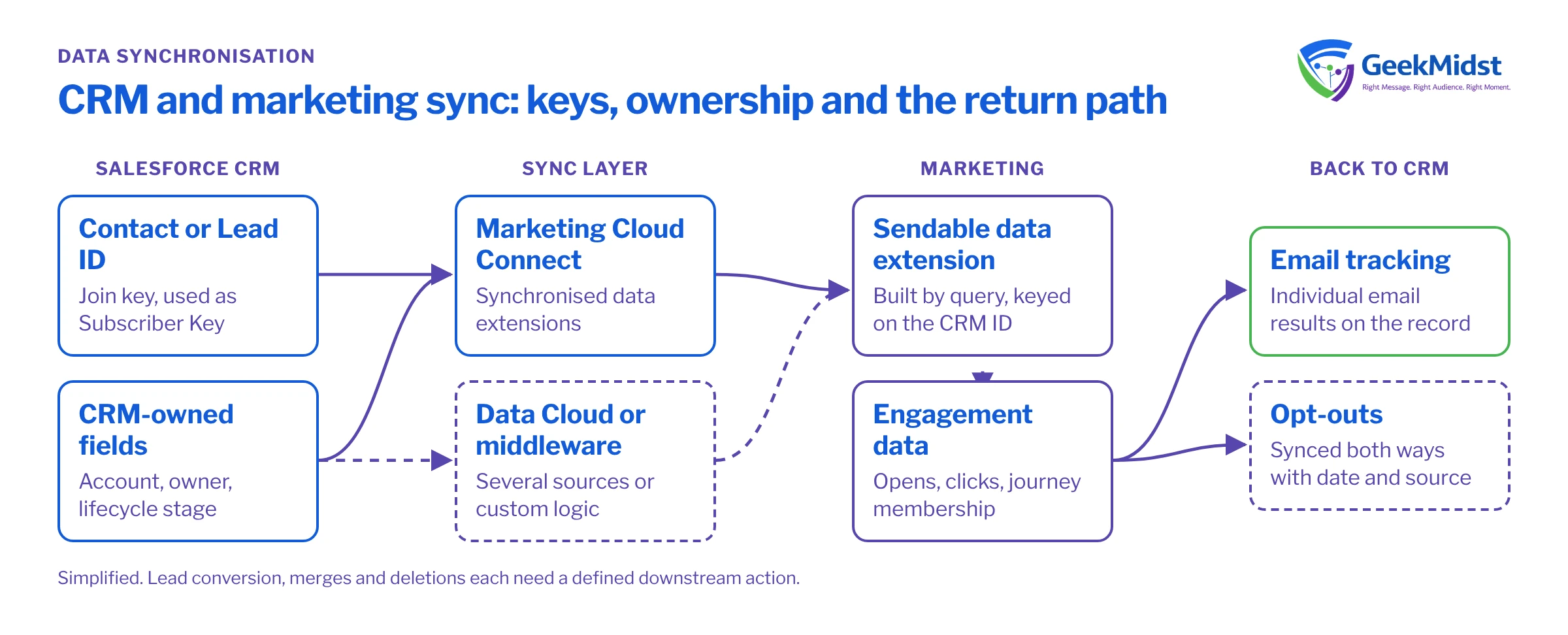
Start with ownership, not with the connector
Every synchronised field needs one system of record. "Both systems can edit it" is not an ownership model; it is a future argument about which value is correct. For each field, write down:
- Owner: the system where the value is created or authoritatively changed.
- Direction: one-way from owner to consumer, or two-way with an explicit conflict rule.
- Latency: how stale the value may be before it causes harm. A first name can lag; an opt-out cannot.
- Transformation: any mapping, formatting or derivation applied on the way across.
In most B2C and B2B orgs, CRM owns identity and commercial fields (account, owner, lifecycle stage, product holdings), while the marketing platform owns engagement data (opens, clicks, journey membership). Consent is the hard one, covered below.
Choose the identifier before anything else
The join key decides whether sync works at all. In Marketing Cloud Engagement, the usual and recommended pattern is to use the Salesforce Contact or Lead ID as the Subscriber Key, so one CRM person maps to one marketing contact. Using email address as the key looks simpler at the start but breaks when people change address, share a family inbox, or exist as both a Lead and a Contact.
If your marketing contacts come from several sources (ecommerce, events, a legacy ESP), you need a plan for people who are not yet in CRM. Either create them in CRM first and let the ID flow down, or hold a separate key and reconcile later in a profile layer such as Data Cloud (now branded Data 360), which uses identity resolution rules rather than a single shared key.
Example field ownership register
| Owner | Direction | Acceptable lag | |
|---|---|---|---|
| Email address | CRM | CRM to marketing | Hours |
| Lifecycle stage | CRM | CRM to marketing | Hours |
| Email opt-out | Whichever captured it | Both ways, latest wins | As short as possible |
| Last email click date | Marketing | Marketing to CRM | A day |
| Journey membership | Marketing | Stays in marketing | Not synced |
Sync options in the Salesforce ecosystem
Marketing Cloud Connect creates synchronised data extensions for selected CRM objects and fields, refreshed on a schedule you configure. You then build sendable audiences from those data extensions with SQL or filters. Engagement tracking can be written back to CRM as individual email result records. Check current sync interval options and object support for your account in Salesforce Help, as they have changed over time.
Account Engagement (formerly Pardot) syncs prospects with Leads and Contacts through its connector, with per-field sync behaviour you can set to use the Salesforce value, the Account Engagement value or the most recently updated value.
Data Cloud ingests CRM and marketing data into a harmonised model, resolves identities and activates segments back out. It suits organisations with several sources, but it is a profile and activation layer, not a replacement for clean CRM ownership.
Middleware or custom APIs make sense when non-Salesforce systems are involved or you need transformation logic the native connectors cannot express. They also bring their own monitoring and error handling burden.
Worked example: a sendable audience from synchronised data
Assume Marketing Cloud Connect synchronises the Contact object into a data extension named Contact_Salesforce, including Id, Email, FirstName, HasOptedOutOfEmail and a custom Lifecycle_Stage__c field. A Query Activity builds a sendable data extension Active_Customers_DE with SubscriberKey as the primary key.
SELECT
    c.Id                AS SubscriberKey,
    c.Email             AS EmailAddress,
    c.FirstName         AS FirstName,
    c.Lifecycle_Stage__c AS LifecycleStage
FROM Contact_Salesforce c
WHERE c.Email IS NOT NULL
  AND c.Email LIKE '%_@_%._%'
  AND c.HasOptedOutOfEmail = 0
AND c.Lifecycle_Stage__c = 'Customer'Two points matter here. The Subscriber Key is the CRM ID, so the send ties back to the CRM record and tracking can sync back to it. And the query respects the CRM opt-out field, but Marketing Cloud also holds its own subscription status in All Subscribers. A contact who unsubscribed through a Marketing Cloud link may still show HasOptedOutOfEmail = 0 in CRM until something copies that status back. That is the consent problem in miniature.
Consent: design it as its own flow
Opt-outs can be captured in CRM (a rep records a request), in the marketing platform (an unsubscribe link or preference centre) or on a web form. Each capture point must update the others, quickly, and a later sync must never silently re-subscribe someone. Practical rules:
- Treat opt-out as "most restrictive wins" unless you have a timestamped, auditable consent model that allows true latest-wins logic.
- Store the date and source of each consent change, not just a boolean.
- If you run a preference centre, write changes to one consent store and push from there.
- Test the unsubscribe path end to end in both directions before launch.
For the full pattern, see the consent synchronisation blueprint.
Deletes, merges and record type changes
Sync designs usually forget what happens when records disappear. A Lead converted to a Contact gets a new ID; if your Subscriber Key was the Lead ID, you now have two marketing contacts for one person unless you handle conversion. A CRM merge keeps one ID and deletes the others. A privacy deletion request must reach every system that holds the person. Decide, for each case, which process detects the event and what it does downstream, and write it into the runbook.
Common mistakes and how to spot them
- Two-way sync on the same field without a conflict rule. Symptom: values flip back and forth. Check field history in CRM and the last modified source.
- Email as the join key. Symptom: duplicate contacts and tracking attached to the wrong person. Count Subscriber Keys per email address.
- Syncing everything. Symptom: slow syncs and data extensions full of fields nobody uses. Sync only fields with a named consumer.
- Formula and rollup fields assumed to be real time. Their values sync when the record syncs, which may not be when the underlying data changed.
- No monitoring. Symptom: a sync stops and nobody notices for weeks. Alert on record counts and last successful sync time.
Checklist before go-live
- A field ownership register signed off by sales, marketing and the platform owner.
- One documented join key and a rule for Lead conversion and merges.
- A consent flow tested in both directions, with dates and sources stored.
- A deletion and privacy request path that reaches every system.
- Monitoring on sync failures and record count drift.
Related reading
Get your sync design reviewed
If your CRM and marketing platforms disagree about who your customers are or what they consented to, we can review the ownership model, keys and consent flow and propose a fix.


