

Consent Synchronisation Across CRM and Marketing
How to keep opt-outs and subscription preferences consistent across Salesforce CRM and marketing platforms, so an unsubscribe in one place is honoured everywhere.

This is an illustrative blueprint. It is a reference architecture, not a write-up of a specific client project; outcomes depend on your data and setup.
An unsubscribe recorded in one system and ignored in another is one of the fastest ways to lose a customer's trust and invite a complaint. In most Salesforce estates, email consent is stored in at least three places, each with its own fields and rules. This blueprint shows how to design consent synchronisation so every platform reaches the same answer.
This is a reference blueprint, not a write-up of a specific client project. It describes a design approach and the checks we would put around it; it is not legal advice.
The business problem
Consent drifts out of step for predictable reasons:
- Sales users tick or untick Email Opt Out on a contact without knowing marketing relies on it.
- A subscriber unsubscribes from a Marketing Cloud email, but the CRM still shows them as reachable and a sales sequence emails them.
- Lead conversion creates a contact with a new ID, so consent held in Marketing Cloud against the lead's subscriber key does not follow the person automatically.
- Topic-level preferences live in a preference centre data extension that no other system can read.
- Nobody can produce the date, source and wording behind a given consent.
Where consent typically lives
| System | Where opt-out is stored | Points to watch |
|---|---|---|
| Salesforce CRM | Email Opt Out (HasOptedOutOfEmail) on Lead and Contact, optionally the Individual and consent data model objects | Editable by users and integrations unless restricted |
| Marketing Cloud Engagement | Subscriber status in All Subscribers, publication lists and suppression lists | Status is per subscriber key, so duplicate keys split consent |
| Account Engagement | Opted Out and Do Not Email on the prospect | Opted Out syncs with Email Opt Out through the connector; check your sync settings |
| Data Cloud | Consent objects linked to contact points | Only as current as the streams that feed it |
| Preference centre and forms | Topic preferences and capture evidence | Often stored in a data extension nobody else reads |
Target architecture
The design rests on three decisions.
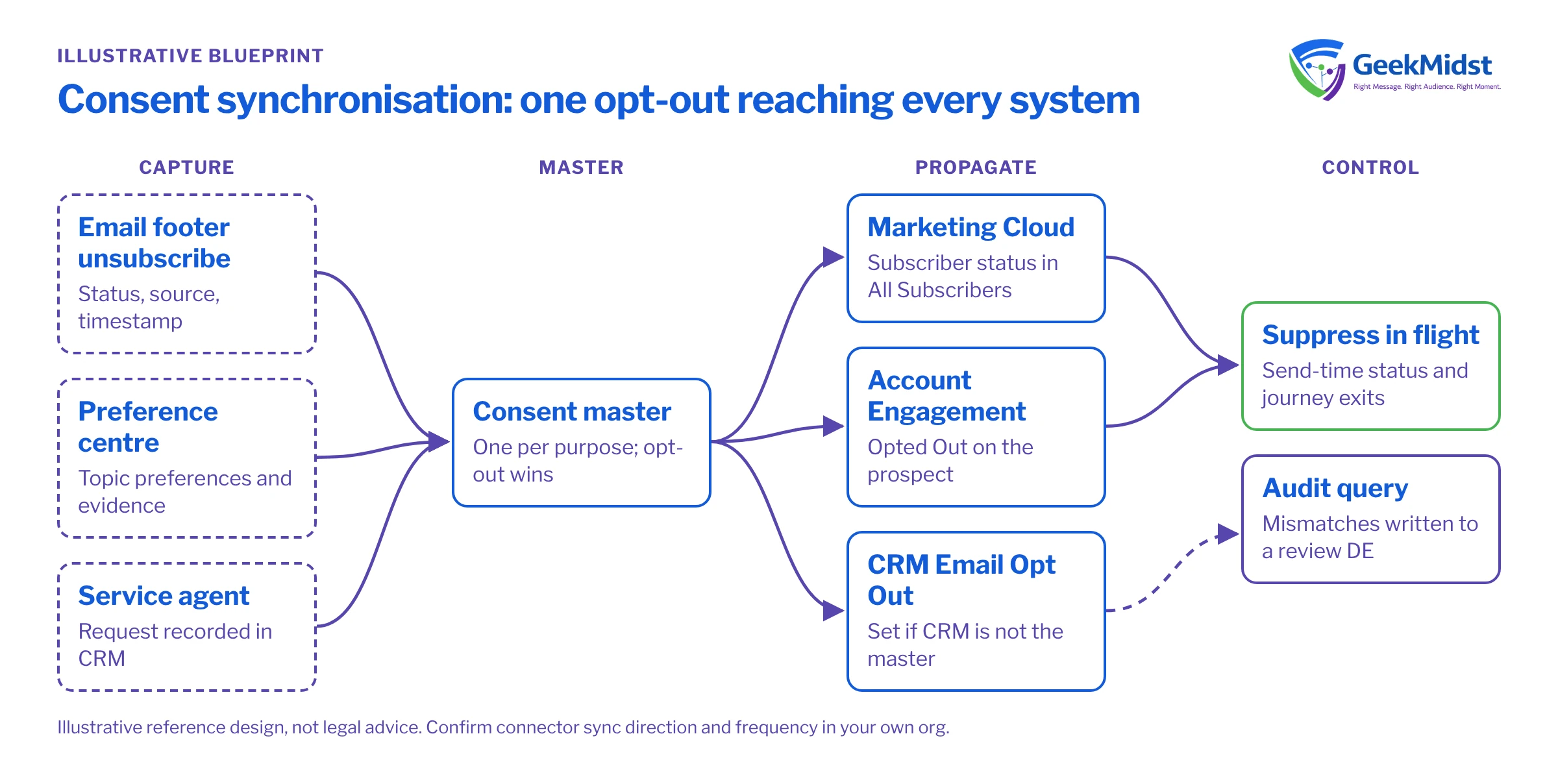
1. One consent master per purpose. Pick the system that holds the authoritative record for each purpose, for example the CRM for global email opt-out and a preference data extension or consent object for topic preferences. Every other system holds a synchronised copy.
2. A conflict rule. When two systems disagree, which wins? The safest default is "opt-out wins": if any system holds a valid opt-out for that purpose, treat the person as opted out until they opt back in through a channel that records evidence. Where re-subscription is allowed, compare timestamps and keep the most recent explicit action.
3. Evidence travels with the status. Store capture source, date and the wording version alongside each consent, not just a true or false flag.
Marketing Cloud Connect and the Account Engagement connector can both move opt-out status between platforms, but their behaviour depends on configuration. Confirm in your own org which direction each field syncs and how often, and document it. See Marketing Cloud Connect sync patterns and pitfalls for the common gaps.
Data flow for a single opt-out
- 01
Capture
The person unsubscribes from an email footer, a preference centre or by telling a service agent. The capturing system records status, source and timestamp.
- 02
Update the master
The change is written to the consent master for that purpose, either directly or through the connector or an integration.
- 03
Propagate
The master's change flows to every other platform. Marketing Cloud subscriber status and Account Engagement prospect fields are updated, and the CRM field is set if it is not the master.
- 04
Suppress in flight
Commercial sends honour the subscriber's status at send time, and exit criteria remove the contact from journeys and nurture programmes, so a mid-journey contact stops receiving commercial email.
- 05
Audit
A scheduled query compares status across systems and writes mismatches to a review data extension.
SELECT
    c.Id AS SubscriberKey,
    c.Email AS EmailAddress,
    s.Status AS MCStatus,
    GETDATE() AS CheckedDate
FROM Contact_Salesforce c
INNER JOIN _Subscribers s
    ON s.SubscriberKey = c.Id
WHERE c.HasOptedOutOfEmail = 1
AND s.Status = 'active'Run the reverse check as well (unsubscribed in Marketing Cloud, still reachable in CRM). A small, stable count of mismatches is normal while sync jobs catch up; a growing count means a broken flow.
Data model and consent detail
- Use one subscriber key across Marketing Cloud, ideally the CRM Contact or Lead ID, so consent is not split across duplicate subscribers.
- Decide how lead conversion handles consent. The converted contact gets a new ID, so the opt-out must be carried to it and the old subscriber record handled.
- Separate global opt-out from topic preferences. A person who leaves the newsletter list may still want order updates.
- Lock down who can edit Email Opt Out in the CRM with field-level security and validation, and log changes with field history tracking.
- Classify sends correctly. Transactional send classifications should only be used for genuinely transactional messages.
The GDPR, India's Digital Personal Data Protection Act and local anti-spam laws all affect what counts as valid consent. Confirm requirements with your legal team; our consent requirements worksheet helps capture them in a form builders can use.
Testing and launch
Build a test matrix covering every capture point and every system, and run it in sandboxes and a test business unit before production. For each case, opt out in one place and confirm the status and timestamp in every other place after the expected sync interval. Include lead conversion, merged contacts, re-subscription and a contact who is mid-journey. Back-fill existing mismatches before go-live, applying the opt-out-wins rule, and keep a record of what was changed.
How to measure it
Consent work is measured by control, not by campaign metrics:
- The number of cross-system mismatches found by the audit query, tracked daily.
- Time from opt-out capture to suppression in every system, sampled with test records.
- Complaint and unsubscribe-after-opt-out reports from customers or service teams.
Risks and variations
- Sync loops, where two systems keep overwriting each other, appear when both are treated as master. Define direction per field.
- Bulk updates by integrations can reset opt-outs. Protect consent fields from unconditional overwrite.
- Marketing Cloud Next uses a different consent model; if you are moving, see consent and preferences for Marketing Cloud Next.
Worried your consent data has drifted?
We can map where consent lives in your Salesforce estate, run mismatch checks and design a synchronisation approach your privacy team can sign off.


