

Event Registration and Reminder Journey
A reference design for registration confirmations, timed reminders and attended or missed follow-ups for webinars and in-person events, using Journey Builder.

This is an illustrative blueprint. It is a reference architecture, not a write-up of a specific client project; outcomes depend on your data and setup.
Event registration journeys look simple until the details arrive: people register minutes before the start, sessions move, attendees sit in different time zones and the follow-up depends on whether they turned up. This blueprint describes a registration and reminder journey in Marketing Cloud Engagement that handles those details without a separate build for every event.
This is a reference blueprint, not a write-up of a specific client project. The event platform, fields and timings are examples.
The business problem
- Each event has its own journey, copied from the last one and edited by hand, so errors creep in.
- Reminders are scheduled at fixed times and arrive after the event for late registrants.
- Times in emails are shown in one time zone, so overseas attendees turn up an hour early or late.
- Attendance data never comes back, so attendees and no-shows receive the same follow-up.
- Sales cannot see who registered or attended in the CRM.
Architecture and data flow
- 01
Register
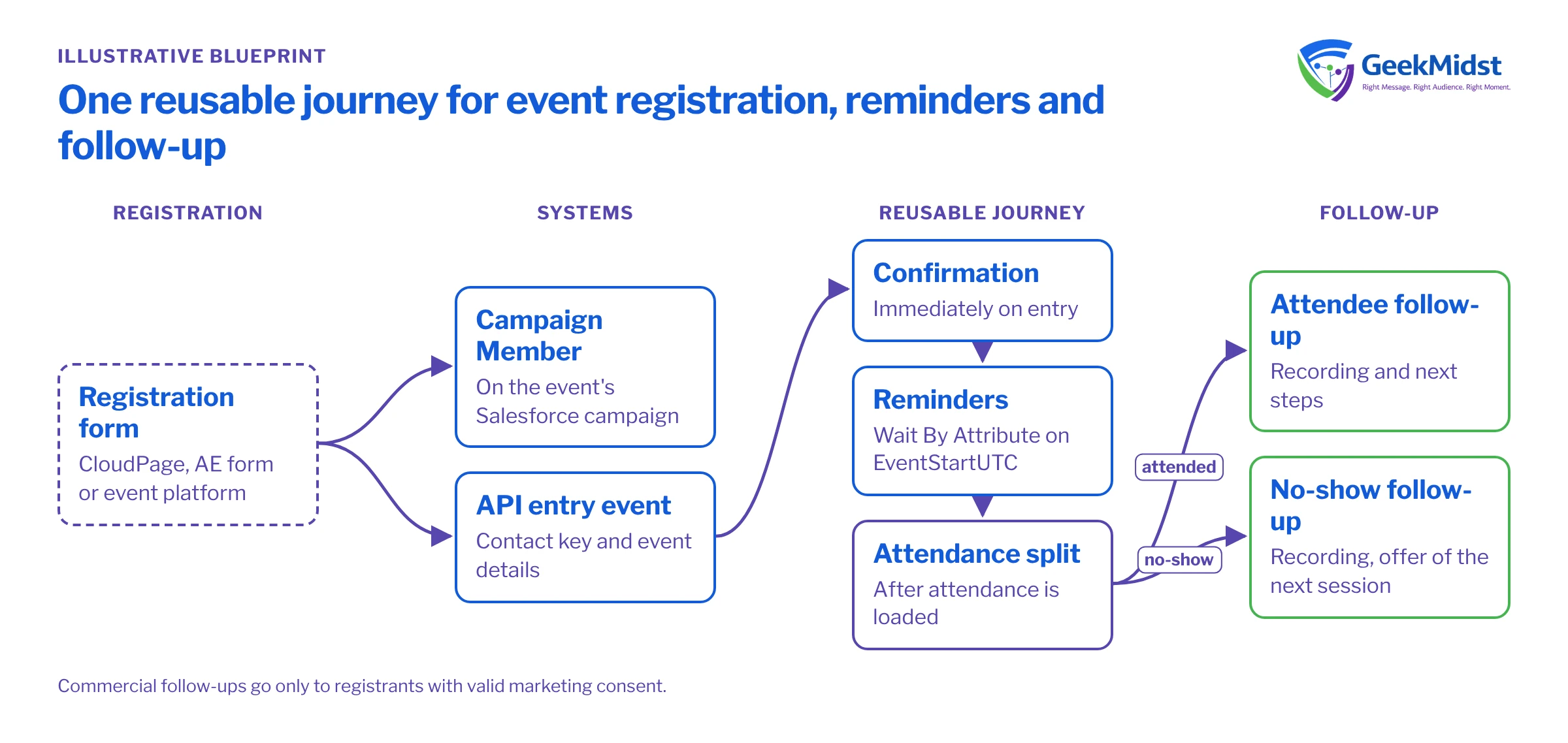
The registration form (a CloudPage, an Account Engagement form or an event platform) captures the registrant and the event ID, with consent captured separately.
- 02
Record in CRM
The registration creates or updates a Campaign Member on the event's Salesforce campaign, so sales sees it.
- 03
Fire the entry event
The registration system calls the Journey Builder API entry event with the contact key and event details.
- 04
Send and remind
One reusable journey sends the confirmation, then waits until fixed offsets before the event start for each reminder.
- 05
Load attendance
After the event, attendance is imported from the event platform into Event_Attendance_DE and the Campaign Member status is updated.
- 06
Follow up
The journey splits on attendance: recording and next steps for attendees, a recording and a short note offering the next session for no-shows.
{
  "ContactKey": "0035g00000SAMPLEAAA",
  "EventDefinitionKey": "APIEvent-sample-event-registration",
  "Data": {
    "SubscriberKey": "0035g00000SAMPLEAAA",
    "EmailAddress": "registrant@example.com",
    "FirstName": "Asha",
    "EventId": "EVT-2026-11-ROADMAP",
    "EventName": "Product roadmap webinar",
    "EventStartUTC": "2026-11-12T09:30:00Z",
    "EventStartLocal": "12 November 2026, 3:00 pm IST",
    "JoinUrl": "https://events.example.com/join/abc123"
  }
}Journey design
One journey, many events. All event details travel in the entry data, so the same journey serves every event. Emails pull the event name, local start time and join link from the journey data rather than hard-coded content.
Date-based reminders. Use Wait By Attribute on EventStartUTC with a negative offset (for example, one day before and one hour before) instead of fixed waits. Add a decision split before each reminder that checks whether the reminder time has already passed, so a late registrant goes straight to the last relevant reminder instead of receiving three emails at once.
Time zones. Store the start time in UTC for logic and a pre-formatted local string for display, built by the registration system from the registrant's time zone. Converting time zones inside the email is possible but harder to test.
Changes and cancellations. If an event moves, update the entry record and send a change notice through a separate short journey or a triggered send. Exit criteria based on a cancellation flag stop reminders for people who cancel or for events that are cancelled.
Calendar links. Offer an "add to calendar" link generated by the event platform or a small CloudPage, rather than attaching files to emails.
Message schedule (example)
| Message | Timing | Classification |
|---|---|---|
| Registration confirmation | Immediately on entry | Transactional, if it only confirms the request |
| Reminder one | One day before start | Usually transactional for a registered event; confirm with your privacy team |
| Reminder two | One hour before start | As above |
| Attendee follow-up | Morning after the event | Commercial if it promotes further offers |
| No-show follow-up | Morning after the event | Commercial |
Data model and consent
Event_Entry_DE uses a composite primary key of SubscriberKey and EventId, so one person can register for several events. Event_Attendance_DE holds SubscriberKey, EventId and AttendanceStatus. Registration does not by itself give marketing consent; capture marketing consent as a separate, unticked choice on the form, and send post-event commercial follow-ups only to those who gave it or who already have valid consent. The GDPR and India's Digital Personal Data Protection Act both expect that distinction to be clear. Keep event data only as long as you need it, with retention set on each data extension.
Testing and launch
- Fire the API entry event from a test client with sample payloads, including a missing first name and a registration ten minutes before start.
- Use test events with start times a few hours ahead to run the full reminder sequence in real time.
- Check local time strings for at least three time zones.
- Import sample attendance and confirm the attended and no-show branches.
- Confirm Campaign Member statuses update in the CRM.
See triggered sends vs Journey API entry events for the trade-offs of the entry method, and testing journeys before activation for a fuller test plan.
How to measure it
- Registration to attendance rate per event, compared with events run before the journey launched, with care since topics and audiences differ.
- Reminder effect, by holding back the second reminder for a random share of registrants on a few events and comparing attendance.
- Data completeness: the share of events with attendance loaded within a day.
Risks and variations
- Entry API failures mean no confirmation. Log every API call and alert on errors; see Salesforce API integration error handling.
- Very large events may need throttling on reminders sent at the same moment.
- Multi-session events need a session-level key rather than one event ID.
Questions we hear
Can Account Engagement handle event reminders instead?
What if people register through the event platform directly?
Should reminders go to people who opted out of marketing?
Running regular events?
We can design a reusable registration and reminder journey, connect it to your event platform and CRM, and test it across time zones.


