

Service Case Notification Journeys
How to keep customers informed as a service case moves from open to resolved, without notification storms, leaked internal statuses or marketing creeping in.

This is an illustrative blueprint. It is a reference architecture, not a write-up of a specific client project; outcomes depend on your data and setup.
This is a reference blueprint, not a write-up of a specific client project. It describes how we would design case notifications for an organisation that runs support in Service Cloud and customer messaging in Marketing Cloud Engagement.
The business problem
After a customer raises a support case, silence generates the next contact. They email again, call to check progress, or miss the one message asking for information, so the case stalls in "Waiting on Customer" until it auto-closes. Agents spend time on status questions instead of resolving cases.
Most orgs already send something: old email alerts, a few Flow-driven emails and an auto-response rule nobody remembers configuring. The tone is inconsistent, internal status names leak, and nobody can say which customers received what.
The goal of this blueprint is a small, deliberate set of notifications tied to meaningful case events, sent from one place, with clear rules about when a customer hears from you and when they do not.
Choosing where messages are sent from
There are three reasonable options, and the right one depends on volume, branding needs and latency:
- Service Cloud only. Email alerts or the Send Email action in Flow. Simple and close to the data, but limited for branded templates, multi-channel and engagement reporting.
- Marketing Cloud Engagement via Journey Builder. A Salesforce Data entry source on the Case object, through Marketing Cloud Connect. Good for branded, multi-step and multi-channel flows. Entry is not instant, so it suits progress updates better than time-critical alerts.
- Marketing Cloud Transactional Messaging API. Flow or Apex calls an integration that posts a send request. Lowest latency, more build effort. See the transactional email via API blueprint.
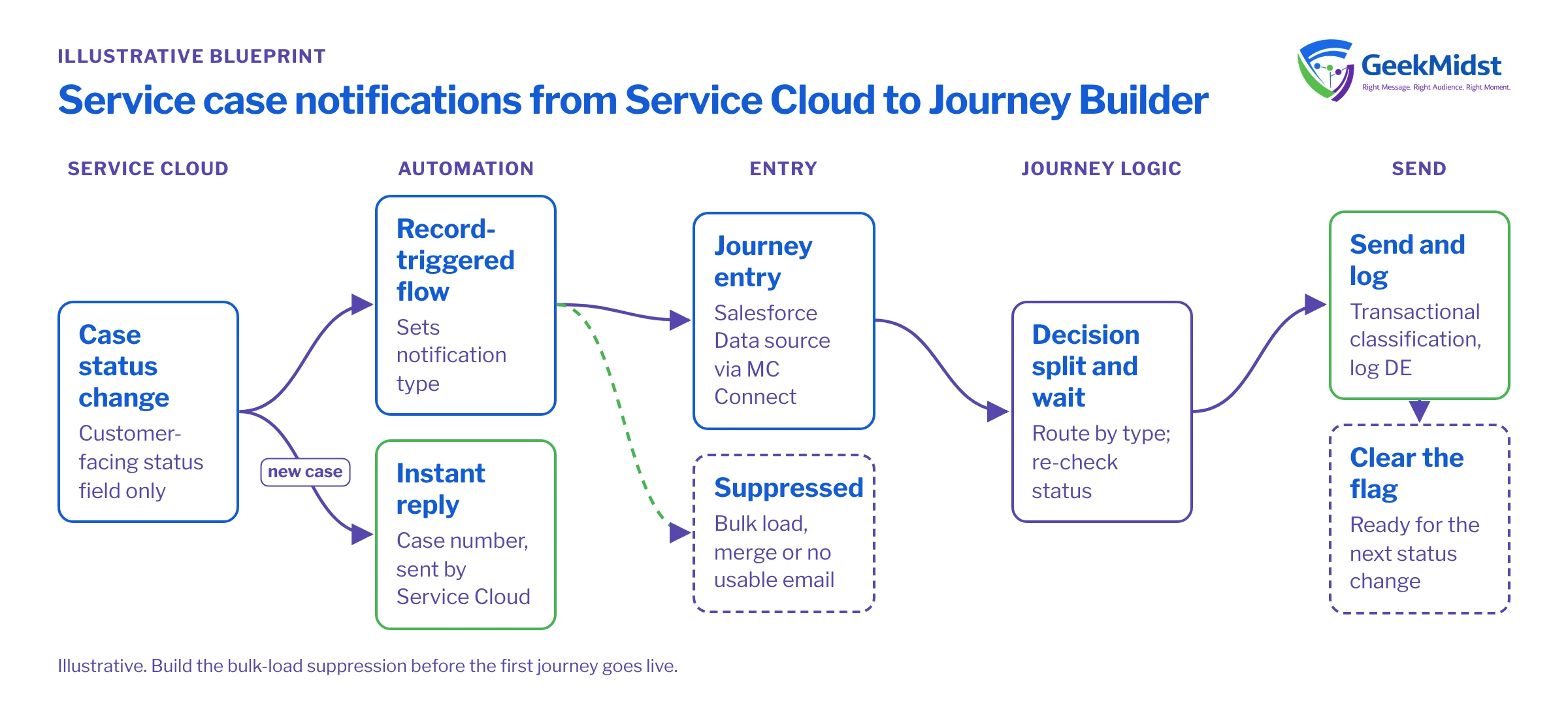
This blueprint uses Journey Builder for most notifications and keeps the immediate case acknowledgement in Service Cloud, because the acknowledgement must arrive within seconds and is usually tied to Email-to-Case threading.
Architecture components
| Component | Role in the design | Notes |
|---|---|---|
| Service Cloud Case | Source of truth for status, owner and contact | Add a customer-facing status field rather than exposing internal values |
| Flow (record-triggered) | Sets notification flags and suppression reasons on the case | Keeps journey entry criteria simple |
| Marketing Cloud Connect | Makes case changes available to Journey Builder | Check sync and entry behaviour for your org in Salesforce Help |
| Journey Builder | Decides which message to send and when | One journey with decision splits, or one journey per notification type |
| Content Builder | Branded templates with shared header, footer and status blocks | Content blocks reused across every notification |
| Notification log | Data extension recording what was sent per case | Used for QA, support lookups and measurement |
How a notification moves through the system
- 01
Case event occurs
An agent changes the case status, a customer replies, or a milestone is reached. Only changes to the customer-facing status field count as events.
- 02
Flow evaluates the change
A record-triggered flow checks the new status, whether the contact has a usable email address, whether the case was created by a bulk load or merge, and sets a Notification_Type__c value plus a suppression reason if one applies.
- 03
Journey entry
The Salesforce Data entry source admits the case when Notification_Type__c is set and no suppression reason exists. Re-entry is allowed, because a case legitimately changes status several times.
- 04
Decision and wait logic
Decision splits route by notification type. A short wait absorbs rapid status changes, and a re-check of the case status before sending prevents stale messages.
- 05
Send and log
The email sends with a transactional send classification. A record is written to the notification log with case number, notification type and timestamp.
- 06
Clear the flag
A Salesforce activity in the journey, or a follow-up flow, clears Notification_Type__c so the next status change can trigger a fresh entry.
Journey and message design
Keep the set small. For most support operations five notifications cover what customers actually need:
- Acknowledgement with the case number and what happens next (sent from Service Cloud).
- Waiting on you, when the agent needs information. This is the most valuable message, because it unblocks the case.
- Reminder if the customer has not replied after a defined period, sent once.
- Resolved, with a clear way to reopen if the problem is not fixed.
- Closed without reply, explaining that the case was closed and how to raise it again.
Add progress updates only for long-running case types, on a predictable cadence.
Rules that prevent most complaints:
- Map internal statuses to customer language. "Escalated to L3" becomes "Our specialist team is reviewing your case".
- Absorb flapping. If a case moves Closed, Reopened, Closed within ten minutes, the customer should get one message, not three.
- Respect quiet hours for SMS and push. Email can usually send at any time.
- No marketing content. No product promotions, no newsletter sign-up banners. This keeps the message clearly operational.
Data model and consent
The case needs a Contact with a valid email (and a mobile number with SMS consent if you use SMS). Cases created from Web-to-Case with unmatched email addresses are a common gap; decide whether to create contacts automatically or send acknowledgements only.
Service notifications are generally treated as operational messages rather than marketing, but how they are classified depends on your jurisdiction and your terms, so confirm the position with your legal or privacy team. Even when a marketing opt-out does not apply, honour channel preferences where the customer has stated them, and keep the consent model consistent across CRM and marketing.
A small AMPscript block keeps status wording in one place and stops a send if required data is missing.
%%[
/* Assumes the send context exposes attributes named CaseNumber and Customer_Status__c.
   Check the actual attribute names your Salesforce Data entry source provides. */
VAR @caseNumber, @status, @headline
SET @caseNumber = AttributeValue("CaseNumber")
SET @status = AttributeValue("Customer_Status__c")

IF Empty(@caseNumber) THEN
  RaiseError("Missing case number", true)
ENDIF

IF @status == "Waiting on Customer" THEN
  SET @headline = "We need a little more information from you"
ELSEIF @status == "Resolved" THEN
  SET @headline = "We think your case is resolved"
ELSE
  SET @headline = "We are working on your case"
ENDIF
]%%
<h1>%%=v(@headline)=%%</h1>
<p>Case reference: %%=v(@caseNumber)=%%</p>Testing and launch plan
Test with real case behaviour in a full or partial sandbox connected to a Marketing Cloud test business unit, not just with preview data.
- Walk a test case through every status, including reopen and merge.
- Change status twice within a minute and confirm only one message sends.
- Bulk update 200 test cases and confirm the bulk-load suppression works.
- Create a case with no contact, and one with a contact who has no email.
Our journey QA checklist covers the generic journey checks. Launch one notification type at a time, starting with "Waiting on you", and watch the log and the case queue for a week before adding the next.
How to measure
Decide the measures and capture a baseline before launch. Useful measures are:
- Repeat contacts per case: inbound emails or calls asking for status, per case, by case type.
- Time in Waiting on Customer: how long cases sit before the customer replies.
- Reopen rate after the Resolved message, to check that "resolved" is not being declared too early.
- Unsubscribe and complaint signals on notification emails, which should stay near zero.
For optional messages such as reminders, a randomised holdout (a small share of eligible cases that do not receive the message) is fairer than before-and-after numbers, because case mix changes over time. Never hold out the acknowledgement or the "Waiting on you" message.
Related services and blueprints
Service Cloud implementation
Case model, statuses, routing and Email-to-Case set up so notifications have clean events to work from.
→Journey Builder consulting
Entry sources, re-entry settings, splits and waits designed for operational messaging.
→CRM to Marketing Cloud sync
How case and contact data reaches Marketing Cloud and what can go wrong.
→Plan your case notifications
If your customers are chasing case updates, we can review your current notifications and design a set that fits your support process.


