

Transactional Email via API
A reference design for sending order confirmations, password resets and account alerts from your own systems through Marketing Cloud Engagement's APIs.

This is an illustrative blueprint. It is a reference architecture, not a write-up of a specific client project; outcomes depend on your data and setup.
This is a reference blueprint, not a write-up of a specific client project. It describes how we would design API-driven transactional email through Marketing Cloud Engagement for an organisation whose orders, accounts or bookings live in other systems.
The business problem
Transactional emails are the messages customers actually wait for: order confirmations, shipping updates, password resets, booking confirmations, payment receipts. They are often sent from the application itself, through a basic SMTP relay, with templates maintained by developers. That works until the brand team wants consistent design, the business wants these messages in the same customer view as marketing, or the relay's deliverability becomes a problem nobody owns.
Moving transactional sends to Marketing Cloud puts templates, sender authentication, tracking and engagement data in one place. The trade-off is that your application now depends on an external API for messages that cannot be late, so the integration has to be designed for failure as much as for success.
Choosing the API pattern
Marketing Cloud Engagement offers more than one way to send a single message on request:
- Transactional Messaging API: you create a send definition once, then post individual send requests to it. Designed for this use case, with per-message status lookups.
- Triggered sends: the older pattern, still widely used and supported in many existing integrations.
- Journey API entry events: inject a contact into a journey. Useful when the message starts a multi-step flow, less suited to a single immediate email.
We compare the last two in triggered sends vs Journey API entry events. This blueprint uses the Transactional Messaging API for single, time-sensitive messages.
Architecture and data flow
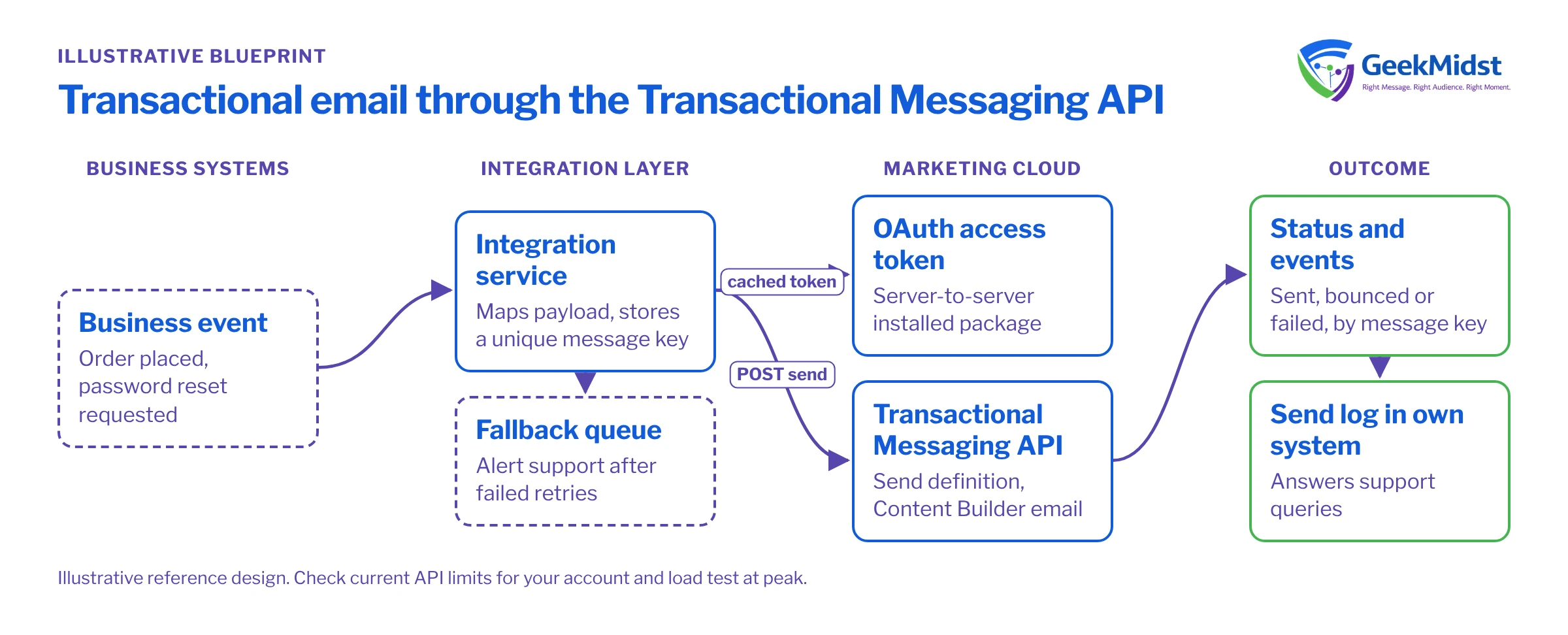
- 01
Business event
The order service, identity provider or booking engine raises an event such as OrderPlaced or PasswordResetRequested.
- 02
Integration layer
A small service or your middleware receives the event, maps it to a send definition and a payload, and generates a unique message key that it stores against the event.
- 03
Authentication
The service obtains an OAuth access token from Marketing Cloud using a server-to-server installed package with only the permissions it needs, caches the token and refreshes it before expiry.
- 04
Send request
The service posts the payload to the Transactional Messaging API for the right send definition. An accepted response means the request is queued, not that the email was delivered.
- 05
Status and events
The service checks message status by message key, or subscribes to event notifications for sent, bounced and failed outcomes, and records the result.
- 06
Fallback
If the API is unavailable after retries, the service queues the message and alerts the support team. For password resets, a fallback relay may be justified.
The send request
Assumptions
- A transactional send definition with the key
order-confirmationexists, linked to an email in Content Builder and a send classification set up for transactional sends. - The email reads
OrderNumber,OrderTotalandFirstName. Attribute names must match the fields the definition expects; check the current Transactional Messaging API reference on the Salesforce Developers documentation site before building. - The message key in the URL is generated by your service, for example from the order ID plus event type.
{
  "definitionKey": "order-confirmation",
  "recipient": {
    "contactKey": "CUST-000123",
    "to": "customer@example.com",
    "attributes": {
      "FirstName": "Asha",
      "OrderNumber": "A10045",
      "OrderTotal": "2,499.00"
    }
  }
}Design rules
- One message key per business event. Store it before you call the API. If a retry is needed, check the status of that key first so you do not send the same confirmation twice.
- Retry only what is retryable. Network errors and server errors can be retried with backoff. Validation errors (a missing attribute, an unknown definition key) will fail every time and should go to an error queue for a developer. Our API error handling guide covers the pattern.
- Use a stable contact key. The same customer identifier you use for marketing, so transactional engagement joins the rest of the customer record.
- Keep content out of the payload. Send data, not HTML. Templates belong in Content Builder where they can be reviewed and versioned.
- Know your limits. API rate limits and throughput vary by account and contract. Check current limits for your account in Salesforce Help and load test at expected peak, such as a sale day.
Data model and consent
Transactional messages are sent because the customer did something that requires a response, so marketing opt-outs typically do not stop them. That only holds if the content stays transactional. Promotional banners inside an order confirmation can change how the message is classified in some jurisdictions; check with your legal or privacy team before adding them. Configure the send classification deliberately, and verify in Salesforce Help how it treats unsubscribed and held subscribers.
Keep a send log in your own system (event ID, message key, definition, timestamp, final status). Marketing Cloud's Data Views provide engagement data afterwards, but your support team will want an answer to "did the customer get the reset email?" from the system they already use.
Testing and launch plan
- Build against a test business unit with test send definitions and internal addresses only.
- Test every event type with complete data, missing optional data, and invalid data.
- Simulate token expiry, API timeouts and a burst of requests to confirm caching, backoff and queueing behave.
- Check rendering and links from a real inbox, including the reply-to address.
- Switch one message type at a time from the old sender, starting with a lower-risk message such as shipping updates. Keep the old path available for a defined rollback period.
How to measure
The measures here are operational:
- Latency: time from business event to API accepted, and from accepted to sent, tracked as percentiles rather than averages.
- Failure rate by cause: authentication, validation, throttling, bounces.
- Support contacts about missing confirmations or resets, against a pre-launch baseline.
- Deliverability of transactional sends, monitored separately from marketing sends.
Set alert thresholds on latency and failure rate so problems reach the on-call team before customers report them.
Risks and variations
- Single point of failure: decide in advance which messages justify a fallback route.
- Credential sprawl: one installed package per integration, minimum scopes, secrets in a vault, rotation on a schedule. See securing Salesforce API integrations.
- SMS and push: the same pattern applies to other channels where your account is licensed for them.
Related services
Integration services
API design, middleware and error handling for the integration layer.
→Deliverability consulting
Sender authentication and monitoring for time-critical messages.
→Integration error handling checklist
A practical list of failure modes to design for.
→Review your transactional email design
If you are moving order or account emails into Marketing Cloud, we can review the integration design and failure handling before you build.


