

Welcome and Onboarding Journey Blueprint
How to design a welcome and onboarding journey that reacts to what new customers do, from entry rules and branching to consent, testing and honest measurement.

This is an illustrative blueprint. It is a reference architecture, not a write-up of a specific client project; outcomes depend on your data and setup.
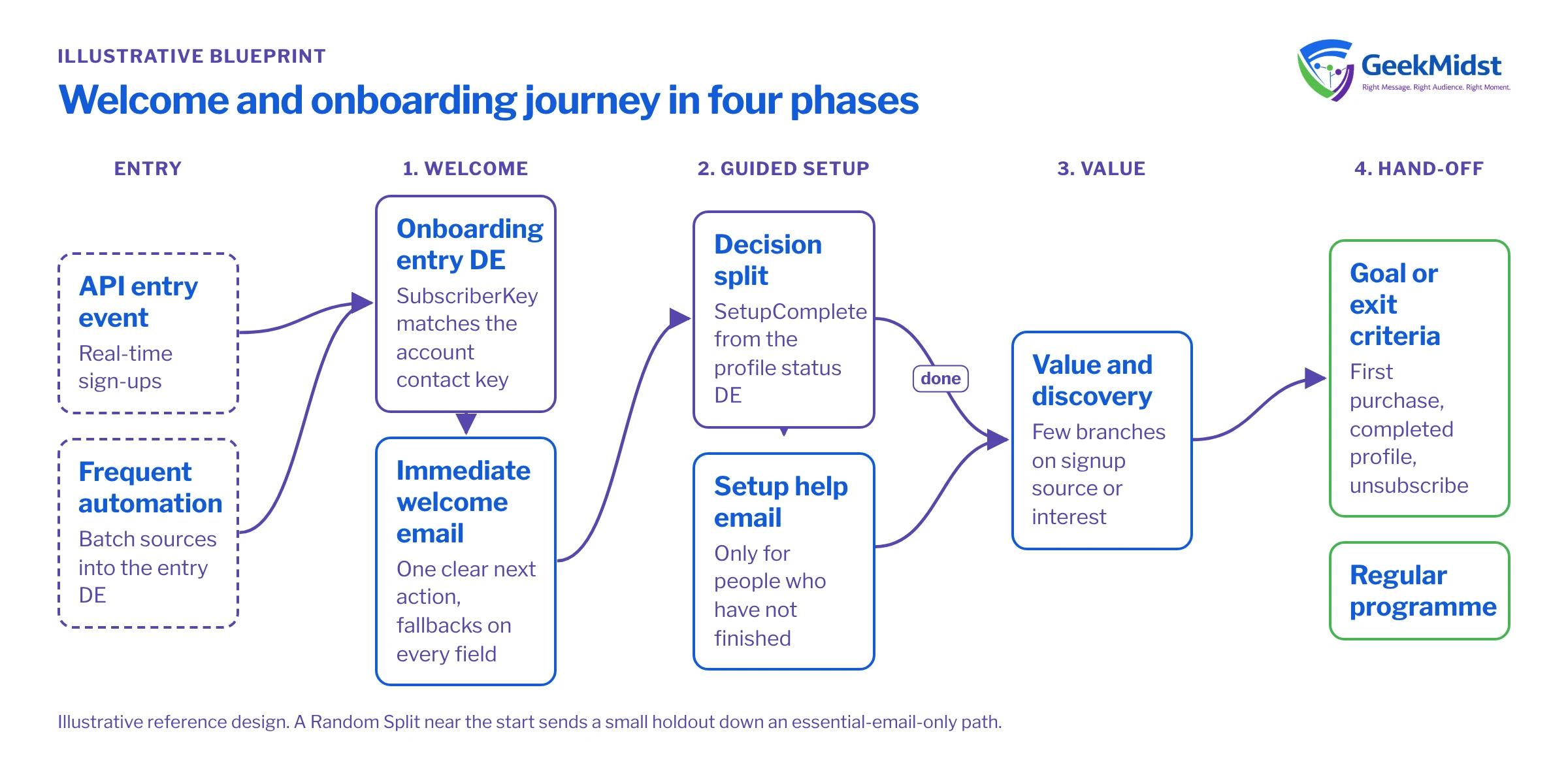
New subscribers and new customers pay the most attention in their first few weeks. A welcome programme that sends the same three emails to everyone wastes that window. This page sets out a reference design for a welcome and onboarding lifecycle journey in Marketing Cloud Engagement that adapts to what each person actually does.
This is a reference blueprint, not a write-up of a specific client project. It describes how we would approach the build; adapt the timings, content and rules to your own audience and data.
The business problem
A weak onboarding programme usually shows the same symptoms:
- Everyone receives the same sequence, regardless of how they signed up or what they bought.
- The welcome email arrives hours late because entry depends on a nightly file.
- People who have already completed the key setup step are still told to do it.
- Nobody can say whether the programme changes behaviour, because there is no comparison group.
The aim is a journey that starts quickly, branches on real signals, respects consent and can be measured against a holdout.
Architecture and data flow
| Component | Role in the design |
|---|---|
| Entry source | API entry event for real-time sign-ups, or a data extension filled by a frequent automation for batch sources |
| Onboarding_Entry_DE | Sendable data extension holding the entry record and onboarding attributes |
| Profile_Status_DE | Refreshed by a scheduled Query Activity so decision splits see current setup progress |
| Journey Builder | Orchestrates waits, splits, emails, the goal and exit criteria |
| Content Builder | Modular email templates with AMPscript personalisation and safe fallbacks |
| Marketing Cloud Connect | Optional, when sign-up or account data originates in Salesforce CRM |
Journey design
The journey has four phases. The timings below are starting points to test, not rules that suit every brand.
1. Immediate welcome
Entry triggers the first email within minutes. It confirms the sign-up, says what the person will receive and how often, and gives one clear next action. If you need double opt-in, the confirmation step sits before this journey, not inside it, so unconfirmed addresses never enter.
2. Guided setup
A wait of two to three days is followed by a decision split on SetupComplete from Profile_Status_DE. People who have finished the key action skip ahead; those who have not receive a practical help email. A decision split evaluates data when the contact reaches it, so the status data extension must be refreshed before contacts arrive at the split.
3. Value and discovery
Content branches on signup source or product interest. Keep branches few: every branch is content to write, test and maintain, and small branches make measurement harder.
4. Hand-off
After roughly three to four weeks the contact leaves for the regular programme. A journey goal (for example, first purchase or a completed profile) shows conversion inside Journey Builder, and exit criteria remove people who unsubscribe or convert early.
Engagement splits based on opens became less reliable once mail privacy features started pre-fetching images. Branch on clicks, or better, on behaviour data from your own systems. Our article on decision splits vs engagement splits covers the trade-offs.
The snippet below shows the personalisation pattern used in the first email: every attribute has a fallback, and links built from variables go through RedirectTo so clicks are still tracked.
%%[
SET @firstName = AttributeValue("FirstName")
SET @interest = AttributeValue("ProductInterest")

IF Empty(@firstName) THEN
  SET @greeting = "Hello"
ELSE
  SET @greeting = Concat("Hi ", ProperCase(@firstName))
ENDIF

IF @interest == "analytics" THEN
  SET @guideUrl = "https://www.example.com/start/analytics"
ELSE
  SET @guideUrl = "https://www.example.com/start"
ENDIF
]%%
<p>%%=v(@greeting)=%%,</p>
<p><a href="%%=RedirectTo(@guideUrl)=%%">Open your getting-started guide</a></p>Data model and consent
Onboarding_Entry_DE uses SubscriberKey as its primary key, and that key should match the contact key used everywhere else in the account (often the CRM Contact or Lead ID). Typical fields are SubscriberKey, EmailAddress, FirstName, SignupDate, SignupSource, ProductInterest, Locale and ConsentSource. Profile_Status_DE holds SetupComplete and FirstPurchaseDate.
Agree these consent rules before anything is built:
- Which sign-up routes give marketing consent and which only allow service messages. A transactional confirmation can go to everyone; nurture emails cannot.
- Where consent is recorded (CRM, Marketing Cloud or a consent platform) and how a change reaches the journey while a contact is mid-flow.
- How long entry records are kept after exit. Set data retention on the data extension instead of relying on manual clean-up.
If your audience includes people in the EU or India, the GDPR and India's Digital Personal Data Protection Act both shape what consent you need and how you record it. Take legal advice on the rules themselves; this blueprint only covers how to implement them.
Testing and launch plan
- 01
Validate data first
Load sample records covering every signup source, missing first names and each branch value, then confirm which path each record should take.
- 02
Test in a copy of the journey
Use Journey Builder test mode on a copy with shortened waits, so production timings are never edited and forgotten.
- 03
Check rendering and personalisation
Send every email to a seed list across major clients and dark mode, with empty, long and accented values in each personalised field.
- 04
Soft launch
Activate for one signup source first and watch entry counts, send errors and split distribution for several days.
- 05
Full rollout with holdout
Open entry to all sources and switch on the holdout path described below.
How to measure it
Measure against a comparison group, not against last quarter.
- Add a Random Split near the start of the journey that sends a small share of entrants down a path with only the essential welcome email. This is the holdout.
- Define the outcome before launch: setup completion within 30 days, first purchase, or retention at 60 days.
- Compare outcome rates between the full journey and the holdout, and wait until both groups are large enough for a difference to mean something.
- Use email metrics such as clicks, unsubscribes and complaints to diagnose individual emails, not as the measure of success.
Our guide to measuring marketing automation honestly covers holdout sizing and common traps.
Risks and variations
- Duplicate entry. Decide whether a contact may re-enter (for example, after a second product sign-up) and set the journey's entry mode to match.
- Slow entry. If the source can only deliver a nightly file, the welcome email will lag. An API entry event or a more frequent automation fixes this.
- Stale split data. Schedule the status query well ahead of split windows and alert on failures.
- Sales-led onboarding. For B2B, the same phases work with CRM tasks for account owners replacing some emails.
- Marketing Cloud Next. The phase design carries over, but the build and data foundation differ, so plan it as a redesign rather than a copy.
Related services and reading
We help teams design and build journeys like this through Journey Builder consulting and AMPscript development. Before go-live, work through testing journeys before activation.
Planning an onboarding journey?
Share your sign-up sources and current welcome emails, and we will outline a journey design, data model and measurement plan that fits your account.


