

Marketing Cloud Contact Deletion and Retention
Deleting a row is not deleting a person. How Contact Delete and retention policies work in Marketing Cloud Engagement, and how to build a deletion process you can evidence.

A customer asks to be forgotten, or your retention policy says inactive contacts must go after three years. Deleting a row from one data extension does not achieve either: the same person usually exists as a contact, in several data extensions, in synchronised CRM data and in old import files. This guide covers contact deletion and data retention in Marketing Cloud Engagement, and how to build a process you can actually evidence.
Two different jobs
- Contact deletion removes a specific person from the account, usually because of an erasure request or a purge decision. In Marketing Cloud Engagement this is the Contact Delete feature in Contact Builder, which is also available through the API.
- Data retention stops data piling up in the first place. A data extension can have a retention policy that deletes individual rows, all rows or the whole data extension after a set period.
You need both. Retention keeps the footprint small; deletion handles individuals. Regulations such as GDPR and India's DPDP Act give people rights over their personal data, but what they require of your organisation is a question for your legal or privacy team. This article covers the mechanics.
How Contact Delete behaves
Contact Delete works by contact key (SubscriberKey). A deleted contact first enters a suppression period, during which it is excluded from sends, and the data is then removed. The suppression period is configured in Contact Builder settings. Deletion is permanent and there is no undo, so try the process on dummy contacts first and confirm how it applies across business units in your account in Salesforce Help.
Contact Delete is aimed at the contact record and its sendable data. Personal data also sits in places it may not reach, which is where most gaps appear.
Where personal data lives in an account
| What it holds | How to handle it | |
|---|---|---|
| Contacts and sendable data extensions | The contact record and its attribute data | Contact Delete, then verify after the suppression period |
| Lists and All Subscribers | Subscription status and profile attributes | Covered by Contact Delete; verify after the suppression period |
| Non-sendable data extensions | Lookup tables, staging and logs holding emails or names | Retention policies, plus clean-up you schedule yourself |
| Files on the SFTP | Import and export files left behind | Automated clean-up or file retention on the SFTP |
| Tracking and data views | Sends, opens and clicks keyed by contact key | Limited rolling window; check Help for how deletion affects it |
| Synchronised CRM data | Copies of CRM Contacts and Leads | Delete or anonymise in CRM, or the data returns on the next sync |
| Copies outside Marketing Cloud | Exports, BI tools and partner files | Your own retention process for each destination |
Set retention when you create data extensions
Retention policies are easiest to set when a data extension is created, and some choices are hard to change later. Decide per data extension:
- Staging and import data extensions: delete all records after a short period, because they are rebuilt on each run.
- Journey entry and send audience data extensions: delete individual records after the period your reporting needs.
- Long-lived attribute data: usually no row deletion, but a clear rule for who is removed and when, driven from the source system.
For more on structuring data extensions, see Data extension design: primary keys, sendable fields and retention.
Finding contacts that are due for deletion
Inactivity rules need a reliable last-activity date. Data views only hold a limited window of tracking data, so they cannot tell you whether someone engaged three years ago. Keep a last-activity date in a master data extension fed by your CRM or data platform instead. The Query Activity below assumes a data extension Customer_Master_DE with SubscriberKey, LastActivityDate and a boolean ErasureRequested, writing to Deletion_Candidates_DE with the Overwrite action.
SELECT
    c.SubscriberKey,
    c.LastActivityDate,
    CASE WHEN c.ErasureRequested = 1 THEN 'Erasure request'
         ELSE 'Retention policy' END AS DeletionReason,
    GETDATE() AS IdentifiedDate
FROM Customer_Master_DE c
WHERE c.ErasureRequested = 1
OR c.LastActivityDate < DATEADD(MONTH, -36, GETDATE())Handling an erasure request end to end
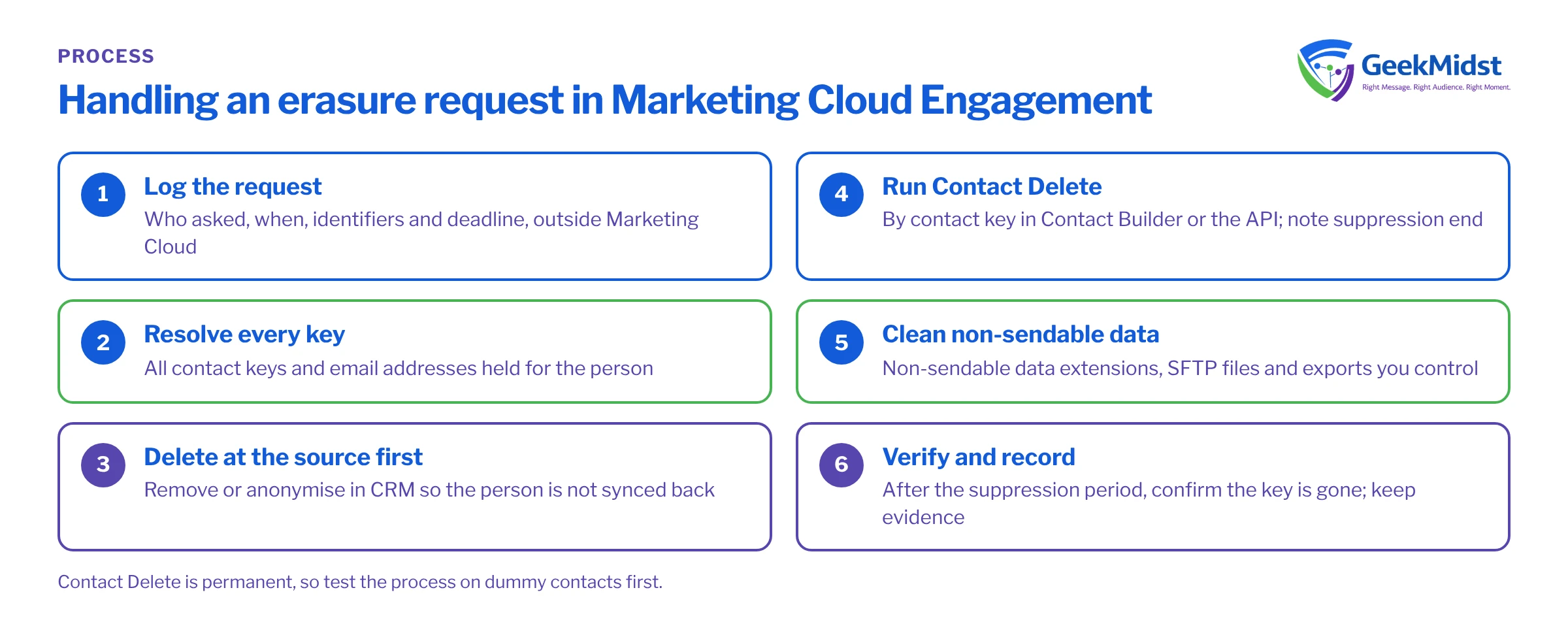
- 01
Log the request
Record who asked, when, which identifiers were supplied and the deadline your policy sets, in your privacy or case management system rather than in Marketing Cloud.
- 02
Resolve every key
Find all contact keys and email addresses for the person. Duplicates are common wherever keys were ever based on email.
- 03
Delete at the source first
Remove or anonymise the person in CRM and other feeding systems so they are not synchronised or imported again.
- 04
Run Contact Delete
Delete the contact by key in Contact Builder or through the API, and note when the suppression period ends.
- 05
Clean non-sendable data
Remove the person from non-sendable data extensions, files on the SFTP and any exports you control.
- 06
Verify and record
After the suppression period, confirm the key no longer appears in contacts or data extensions, then close the request with evidence.
Common mistakes
- Email address as SubscriberKey. It makes keys personal data in their own right and creates duplicates when people change address. Use a stable, non-personal ID.
- Deleting rows but not the contact. Removing someone from one data extension leaves the contact record and other attributes in place.
- No retention on staging data extensions. These quietly keep copies of personal data long after the import finished.
- Forgetting files. Import files on the SFTP and exported reports often outlive everything else.
- No evidence. If you cannot show when a deletion ran and what it covered, the process will be hard to defend.
Checklist
- Every data extension has a recorded retention decision.
- SubscriberKey is a stable, non-personal ID.
- Deletion starts in the source system.
- Contact Delete settings, including the suppression period, are documented.
- Non-sendable data, files and exports are covered by a written procedure.
- Every request is logged and verified.
Related: the consent requirements worksheet, Marketing Cloud Connect sync patterns and pitfalls and our Contact Builder and data modelling service.
Questions we hear
Does unsubscribing someone delete their data?
Can a deleted contact come back?
How long does deletion take?
Can we automate Contact Delete?
Build a deletion process you can evidence
We can map where personal data sits in your Marketing Cloud account and design retention and deletion procedures that meet your privacy team's requirements.


