

Data Extension Design: Keys, Sends, Retention
How to choose primary keys, configure sendable and testable data extensions, pick field types and set retention so Marketing Cloud data stays reliable as it grows.

Data extensions are cheap to create and expensive to fix. A wrong primary key turns every update into a duplicate, a sendable relationship on the wrong field sends to the wrong person, and a missing retention policy leaves years of personal data nobody needs. Three decisions matter most, and they are all easier to get right on the day you create the data extension than afterwards.
Before you start
The examples use an orders model: Customers_DE (one row per customer), Orders_DE (one row per order line) and a sending data extension built from them. Names and fields are samples. Before creating anything in production, write the design in a data dictionary so others can review it.
Primary keys: what they actually do
A primary key in a data extension enforces uniqueness on one or more fields. It is also what imports and Query Activities use to decide whether an incoming row updates an existing one:
- Imports set to "Add and Update" or "Update Only" match on the primary key.
- Query Activities with the Update data action require a primary key and upsert on it. Append inserts rows and fails if a key would be duplicated. Overwrite clears the data extension and reloads it.
- Lookups in AMPscript do not need a primary key, but lookups on key fields tend to behave more predictably at volume.
Guidelines that hold up in practice:
- Choose the key from the grain of the data. One row per customer:
SubscriberKey. One row per order line:OrderNumberplusLineNumberas a composite key. - Avoid email address as a key. People change addresses, and the same address can belong to more than one customer record.
- Key fields cannot be nullable, so the source must always supply them. Size text keys for the longest real value with headroom.
- Decide the key before the data extension holds data. Changing keys on a populated data extension is restricted, and the usual fix is a new data extension and a migration.
Example design: Orders_DE
| Field | Type | Primary key | Nullable | Notes |
|---|---|---|---|---|
| OrderNumber | Text (20) | Yes | No | From the commerce platform |
| LineNumber | Number | Yes | No | Composite key with OrderNumber |
| SubscriberKey | Text (50) | No | No | Relates to Customers_DE |
| OrderDate | Date | No | No | Store one agreed time zone |
| ProductSKU | Text (40) | No | No | Joins to a product catalogue |
| LineValue | Decimal (12,2) | No | No | Use Decimal for money, never Text |
| IsFirstOrder | Boolean | No | Yes | Derived by a nightly query |
Sendable and testable data extensions
A data extension is sendable when you tick "Is Sendable" and define the send relationship: a field in the data extension related to Subscriber Key in All Subscribers. Marketing Cloud uses that relationship to apply subscription status, so the field must contain the same stable identifier you use as subscriber key everywhere else, typically the CRM Contact or Lead ID when Marketing Cloud Connect is in use.
Things to get right:
- Include an
EmailAddressfield of type EmailAddress. It is the address the send uses for that row. - Relate the send relationship to a stable ID field, not to email address, unless your whole account genuinely uses email as subscriber key.
- Keep sending data extensions at one row per subscriber. If you need several products per person, look them up at send time from a related data extension rather than duplicating the subscriber.
- Mark a data extension testable when you want to use it for previews and test sends with realistic rows. Keep test data extensions separate from production audiences.
Not every data extension should be sendable. Reference data (product catalogues, store lists) and log tables are better left non-sendable so nobody can accidentally select them as an audience.
Field types
Pick the narrowest correct type: Text, Number, Decimal, Date, Boolean, EmailAddress, Phone or Locale. Dates stored as Text cannot be compared reliably in SQL or in journey filters, and Booleans stored as "Yes" strings make decision splits fragile. Text fields have a length; set it deliberately rather than leaving long defaults on every column.
Retention policies
Data retention on a data extension can delete individual records after a period, delete all records after a period, or delete the whole data extension and its records. A period can be counted from creation or set to a fixed date, and there is an option to reset the period on each import, which suits staging tables that are refreshed regularly.
Set retention at creation where you can, and check in your account whether it can be changed later. Retention deletes data permanently, so test on a copy first. Retention also does not remove the contact itself or their tracking history; that is a separate process covered in Contact deletion and data retention.
Four data extension patterns and their defaults
Sending audience
Sendable, one row per subscriber, keyed on SubscriberKey, retention matched to the campaign lifetime.
→Reference data
Non-sendable, keyed on the business ID (SKU, store code), no retention or a long one, refreshed by import.
→Staging
Non-sendable, loaded by import or query, retention with reset on import so stale rows clear themselves.
→Log and audit
Non-sendable, append-only with a composite key of ID plus timestamp, retention aligned to your data policy.
→/* Build a sendable audience: one row per subscriber, latest order only */
SELECT
c.SubscriberKey,
c.EmailAddress,
c.FirstName,
o.OrderNumber AS LastOrderNumber,
o.OrderDate AS LastOrderDate
FROM Customers_DE c
INNER JOIN (
SELECT SubscriberKey, OrderNumber, OrderDate,
ROW_NUMBER() OVER (PARTITION BY SubscriberKey
ORDER BY OrderDate DESC, OrderNumber DESC) AS rn
FROM Orders_DE
) o ON o.SubscriberKey = c.SubscriberKey AND o.rn = 1
WHERE c.EmailAddress IS NOT NULLCommon mistakes and how to spot them
- "Violation of PRIMARY KEY constraint" in a query. The query returns more than one row per key. Count rows per key in the source and deduplicate.
- Sends reaching unexpected people. The send relationship points at a field that does not hold subscriber keys. Check a few rows against All Subscribers.
- Journey filters failing on dates. The date is stored as Text. Convert it in a query into a proper Date field.
- Data extensions nobody can explain. Add a description and a folder structure, and record the owner and purpose in your data dictionary.
Checklist
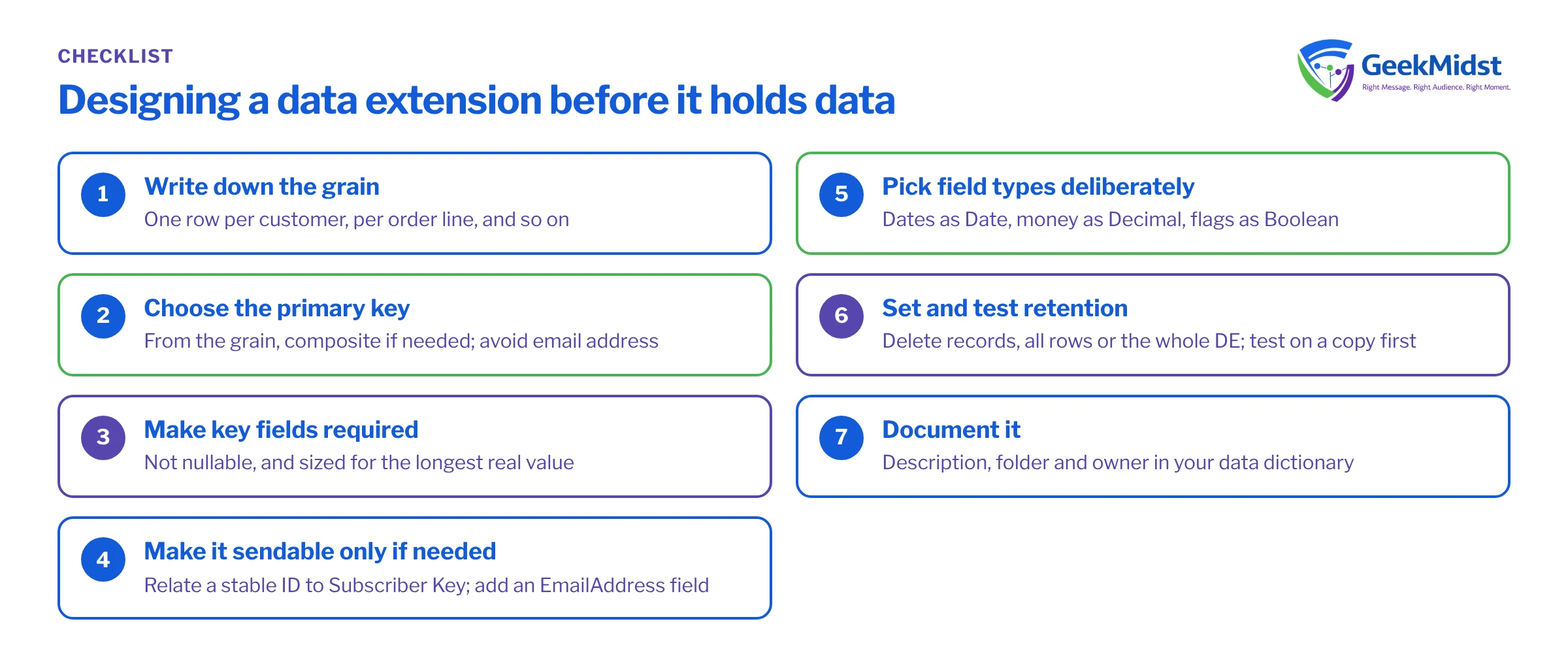
- Grain written down and primary key chosen from it
- Key fields required and sized correctly
- Sendable only where needed, related to the stable subscriber key
- EmailAddress field typed as EmailAddress
- Field types chosen deliberately, with dates as Date and money as Decimal
- Retention set and tested on a copy
- Description, folder and owner recorded
Untangling an inherited data model?
If your account has hundreds of data extensions and nobody is sure which ones matter, we can review the model and propose a cleaner structure with a migration plan.


