

Deduplicating Records with SQL ROW_NUMBER
How to use ROW_NUMBER() in Marketing Cloud SQL to keep exactly one row per subscriber or order, pick the right record to keep and stop primary key errors.

Your Query Activity fails with "Violation of PRIMARY KEY constraint", or it succeeds but the target data extension keeps a different version of a customer each night. Both come from the same root cause: the source has more than one row per key, and the query does not say which one should win. ROW_NUMBER() lets you state that rule explicitly.
Before you start
The examples assume a staging data extension Contacts_Staging_DE loaded from several sources, with SubscriberKey, EmailAddress, FirstName, Source and ModifiedDate. The target Contacts_Clean_DE has SubscriberKey as its primary key. Names are samples. Run new queries against a copy of the target first.
How ROW_NUMBER works
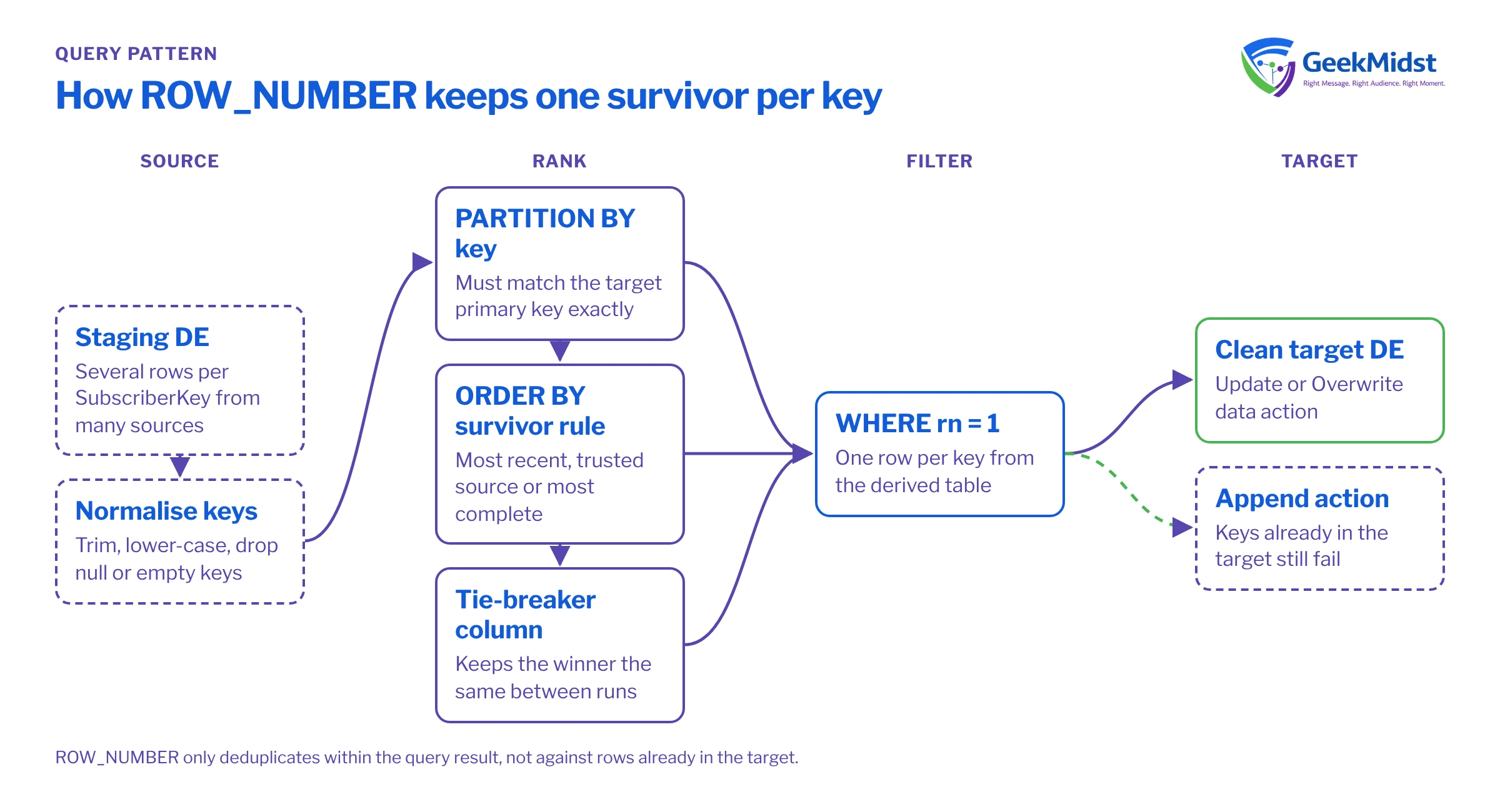
ROW_NUMBER() is a window function. For each row it returns a sequence number within a group:
PARTITION BYdefines the group, which should be the key you want to be unique (for exampleSubscriberKey).ORDER BYinside theOVERclause decides which row in each group gets number 1. That row is your survivor.
You compute the number in a derived table, then keep only rows where it equals 1. Marketing Cloud SQL is a subset of T-SQL run by Query Activities, and derived tables are the most dependable way to structure this.
SELECT
    x.SubscriberKey,
    x.EmailAddress,
    x.FirstName,
    x.Source,
    x.ModifiedDate
FROM (
    SELECT
        s.SubscriberKey,
        s.EmailAddress,
        s.FirstName,
        s.Source,
        s.ModifiedDate,
        ROW_NUMBER() OVER (
            PARTITION BY s.SubscriberKey
            ORDER BY s.ModifiedDate DESC, s.Source ASC
        ) AS rn
    FROM Contacts_Staging_DE s
    WHERE s.SubscriberKey IS NOT NULL
) x
WHERE x.rn = 1Choosing the survivor
The ORDER BY inside OVER is a business rule, so agree it with whoever owns the data:
- Most recent wins (
ModifiedDate DESC) suits profile attributes that change over time. - Most trusted source wins suits cases where the CRM should beat a web form regardless of date. Express it with a
CASEexpression that ranks sources. - Most complete wins keeps the row with a phone number or consent flag populated, again with a
CASE.
Always add a tie-breaker. If two rows share the same ModifiedDate, the database can return either as number 1, and the "winner" may change between runs. A second sort column such as a source rank or row ID makes the result repeatable.
Watch NULL handling too. In T-SQL, NULL sorts as the lowest value, so it comes last in a descending sort and first in an ascending one. If a missing date should never win, a descending sort already handles it; if you sort ascending, filter or replace nulls explicitly.
Deduplicating on email across two sources
When the key is an email address, normalise it before partitioning, otherwise Sam@Example.com and sam@example.com count as different people. The example below combines two staging tables, ranks sources and keeps one row per normalised address.
SELECT EmailKey AS EmailAddress, FirstName, Source, ModifiedDate
FROM (
    SELECT
        u.EmailKey, u.FirstName, u.Source, u.ModifiedDate,
        ROW_NUMBER() OVER (
            PARTITION BY u.EmailKey
            ORDER BY CASE u.Source WHEN 'CRM' THEN 1 WHEN 'Web' THEN 2 ELSE 3 END,
                     u.ModifiedDate DESC
        ) AS rn
    FROM (
        SELECT LOWER(LTRIM(RTRIM(EmailAddress))) AS EmailKey,
               FirstName, 'CRM' AS Source, ModifiedDate
        FROM CRM_Leads_DE
        UNION ALL
        SELECT LOWER(LTRIM(RTRIM(EmailAddress))) AS EmailKey,
               FirstName, 'Web' AS Source, SubmittedDate AS ModifiedDate
        FROM Web_Signups_DE
    ) u
    WHERE u.EmailKey <> ''
) r
WHERE r.rn = 1ROW_NUMBER compared with the alternatives
| What it returns per group | Good for | Risk | |
|---|---|---|---|
| ROW_NUMBER() | Exactly one row numbered 1 | Picking a single survivor | Arbitrary winner without a tie-breaker |
| RANK() | Ties share 1, then gaps | Leaderboards, top-N with ties | More than one row can be rank 1 |
| DENSE_RANK() | Ties share 1, no gaps | Grouping by tiers | Same duplicate risk as RANK |
| GROUP BY with MAX() | One aggregated row | Single values such as the latest date | Columns from different rows get mixed |
| SELECT DISTINCT | Unique combinations of all columns | Removing exact copies | Rows that differ in any column survive |
Diagnosing duplicate problems
When a query fails on the primary key, first find out how bad the duplication is and where it comes from. Point a quick diagnostic query at a scratch data extension:
SELECT SubscriberKey, COUNT(*) AS Copies, MIN(Source) AS FirstSource, MAX(Source) AS LastSource
FROM Contacts_Staging_DE
GROUP BY SubscriberKey
HAVING COUNT(*) > 1Common causes it reveals:
- A join that multiplies rows. Joining customers to orders produces one row per order. Deduplicate after the join, or join to a derived table that is already one row per key.
- Partitioning on the wrong field. If the target key is
SubscriberKeybut you partition by email, two subscribers sharing an address still collide (or two addresses for one subscriber do). - Case and whitespace. Normalise text keys before partitioning.
- Appending to a populated target.
ROW_NUMBER()only deduplicates within the query result. With the Append action, a key that already exists in the target still fails. Use Update to upsert, or Overwrite to rebuild. - Survivor rule changes between runs. If yesterday's winner differs from today's for the same key, the sort has ties. Add a stable tie-breaker and rerun on a copy to confirm the output no longer changes.
- Slow queries on large data. Filter the inner query to the rows you need (for example recent changes) before ranking, and avoid ranking entire data views when a date filter will do.
Checklist
- Partition matches the target data extension's primary key exactly
- Survivor rule agreed with the data owner and documented
- Tie-breaker column added to the window
ORDER BY - Text keys trimmed and lower-cased where appropriate
- Null and empty keys filtered out
- Data action chosen deliberately: Update, Overwrite or Append
- Duplicate-count diagnostic saved for future troubleshooting
Related reading
Queries failing or running slowly?
We can review your Automation Studio queries, the data extensions behind them and the survivor rules, and rebuild them so they are predictable and documented.


