

Abandoned cart recovery blueprint
Reference architecture for cart recovery with Marketing Cloud: data flow, journey design, consent, testing and measurement.

This is an illustrative blueprint. It is a reference architecture, not a write-up of a specific client project; outcomes depend on your data and setup.
Business problem
Shoppers add items to a cart and leave. A timely, relevant reminder can bring some of them back — but only if the data is fresh, consent is respected and the message stops as soon as the customer buys.
Architecture
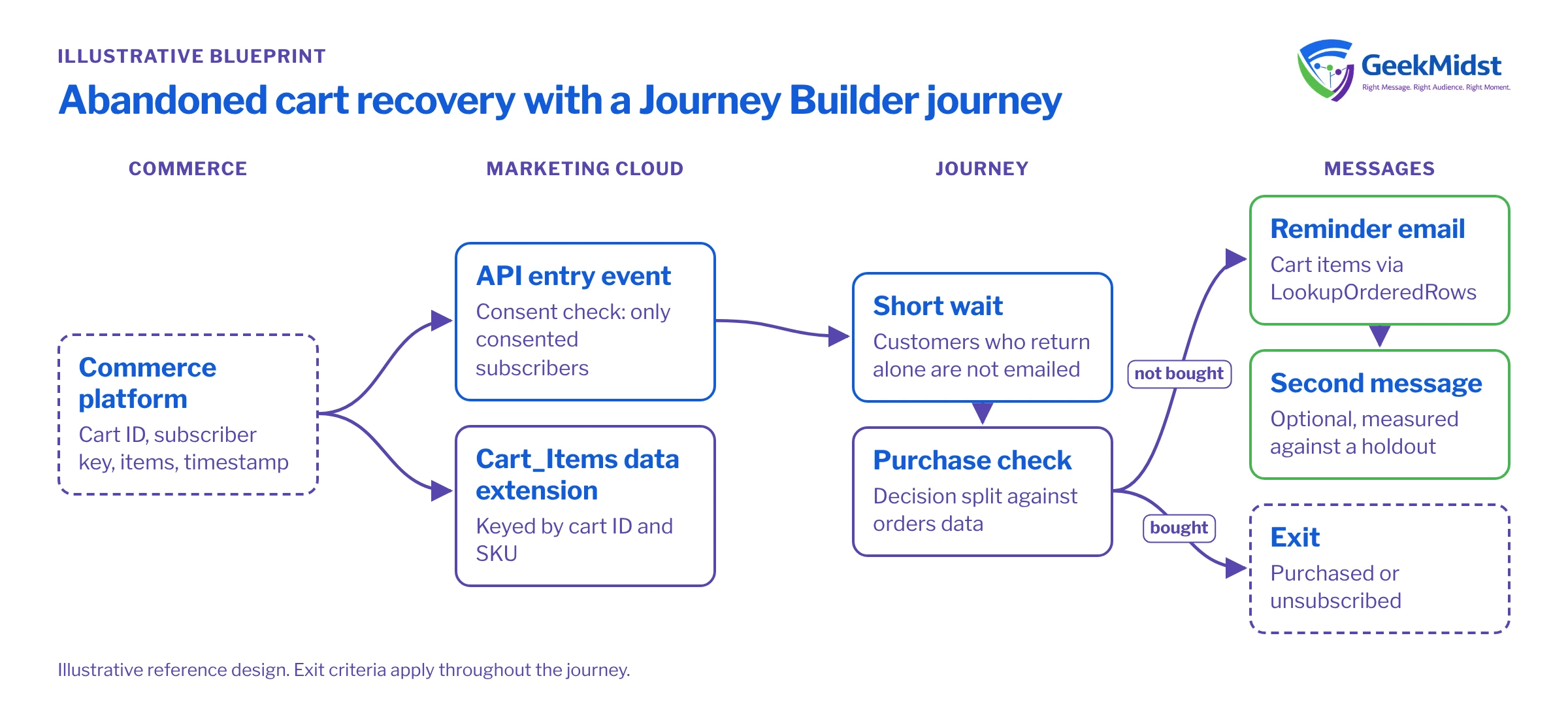
- The commerce platform sends a cart event (cart ID, subscriber key, items, timestamp) to Marketing Cloud through the Journey API or an API-triggered entry.
- Cart items are written to a
Cart_Itemsdata extension keyed by cart ID and SKU. - A journey waits a configurable period, then checks purchase status before each message.
- Emails render cart contents with
LookupOrderedRows. - Exit criteria remove anyone who purchases or unsubscribes.
Example data extension: Cart_Items
| Field | Type | Notes |
|---|---|---|
| CartID | Text | Part of the primary key |
| SKU | Text | Part of the primary key |
| SubscriberKey | Text | Links the cart to the contact |
| ProductName | Text | Captured at add-to-cart time |
| ImageURL | Text | Absolute HTTPS URL |
| Price | Decimal | Price shown when the item was added |
| Quantity | Number | Units of this SKU in the cart |
| AddedDate | Date | Used to sort items in the email |
Entry event
An API event entry source is fired by a REST call to the journey events endpoint, passing the contact key, the event definition key configured on the entry source, and any data the journey needs (such as cart ID and cart value). Write the line items to Cart_Items before firing the event, so the email has data to render when it is sent. Consult the Journey Builder API documentation in Salesforce Help for the current request format and authentication.
Rendering cart contents
The email looks up the cart's items by cart ID with LookupOrderedRows, sorted by AddedDate, and shows a limited number of items with a link to the full cart. Always include a fallback block for the case where no items are found — for example, if the cart was cleared between entry and send.
Journey design
- 01
Entry
API event with consent check — only subscribers with marketing consent enter.
- 02
Wait
A short wait so customers who return on their own are not emailed.
- 03
Purchase check
Decision split against the orders data; buyers exit.
- 04
Reminder
Email showing cart items, images and a deep link back to the cart.
- 05
Follow-up
Optional second message later; measured against a holdout group.
Common pitfalls
- Stale purchase data. If orders reach Marketing Cloud hours after they happen, the purchase check cannot see them and buyers get reminders. Agree an order-feed frequency that suits the wait period.
- Re-entry. Decide whether a contact can re-enter while already in the journey, and what happens when the same person creates a new cart. Journey Builder's entry settings control this.
- Price and stock changes. Prices captured at add-to-cart time may change. Either refresh them before sending or word the email so it does not promise a specific price.
- Consent. Cart reminders are marketing messages in most cases. Check consent at entry and again before each send if preferences can change during the wait.
- Too many messages. Add the journey to your frequency rules so a cart reminder does not land on the same day as several promotional sends.
Build checklist
Cart_Itemsand order data extensions created with sensible primary keys- Order feed frequency agreed and monitored
- API event entry source and event definition configured
- Re-entry and exit criteria set and tested
- Fallback content for empty carts
- Holdout group configured before launch, not after
Testing and measurement
- Seed test carts covering empty, single-item and multi-item cases.
- Keep a randomised holdout group so recovered revenue can be measured against what would have happened anyway.
- Monitor entry volumes daily for the first weeks.
Related
Talk to a Salesforce specialist
Tell us about your org, your goals and your timeline. We will reply with practical next steps — no obligation.


