

Loyalty Tier Lifecycle Messaging
A reference design for messaging members as they move between loyalty tiers, from upgrade welcomes to fair, well-timed downgrade warnings.

This is an illustrative blueprint. It is a reference architecture, not a write-up of a specific client project; outcomes depend on your data and setup.
This is a reference blueprint, not a write-up of a specific client project. It shows how we would design tier-based lifecycle messaging for a loyalty programme, with Marketing Cloud Engagement handling the messaging and a loyalty platform holding the rules.
The business problem
Loyalty tiers only change behaviour if members know where they stand. In many programmes the tier logic is sound but the communication is not: upgrades are announced weeks late in a monthly newsletter, members find out about a downgrade when a benefit stops working at the checkout, and nobody tells the member who is two purchases short of the next tier that they are close.
The result is a programme that costs money in benefits but gets little credit for them. Members who are downgraded without warning are also a common source of complaints.
The aim is a set of timely, accurate tier messages driven by the same data the loyalty platform uses, so what the email says always matches what the member sees in the app and at the till.
The tier lifecycle
Five moments matter for most tiered programmes:
- Upgrade: the member has qualified for a higher tier. Announce it quickly and explain the new benefits.
- Approaching next tier: the member is within a defined distance of the next threshold before the qualification period ends.
- Requalification at risk: the member is on track to drop a tier at the end of the period.
- Downgrade notice: the tier has changed. Explain why, what remains, and how to regain the tier.
- Points expiry: points will lapse on a known date. Often governed by programme terms, so wording matters.
Upgrade, downgrade and expiry notices are usually part of running the programme and may be described in its terms as service communications. Approach and at-risk nudges are promotional by nature and should be sent only to members with marketing consent. Confirm the classification with your legal or privacy team.
Data flow
| Stage | System | What happens |
|---|---|---|
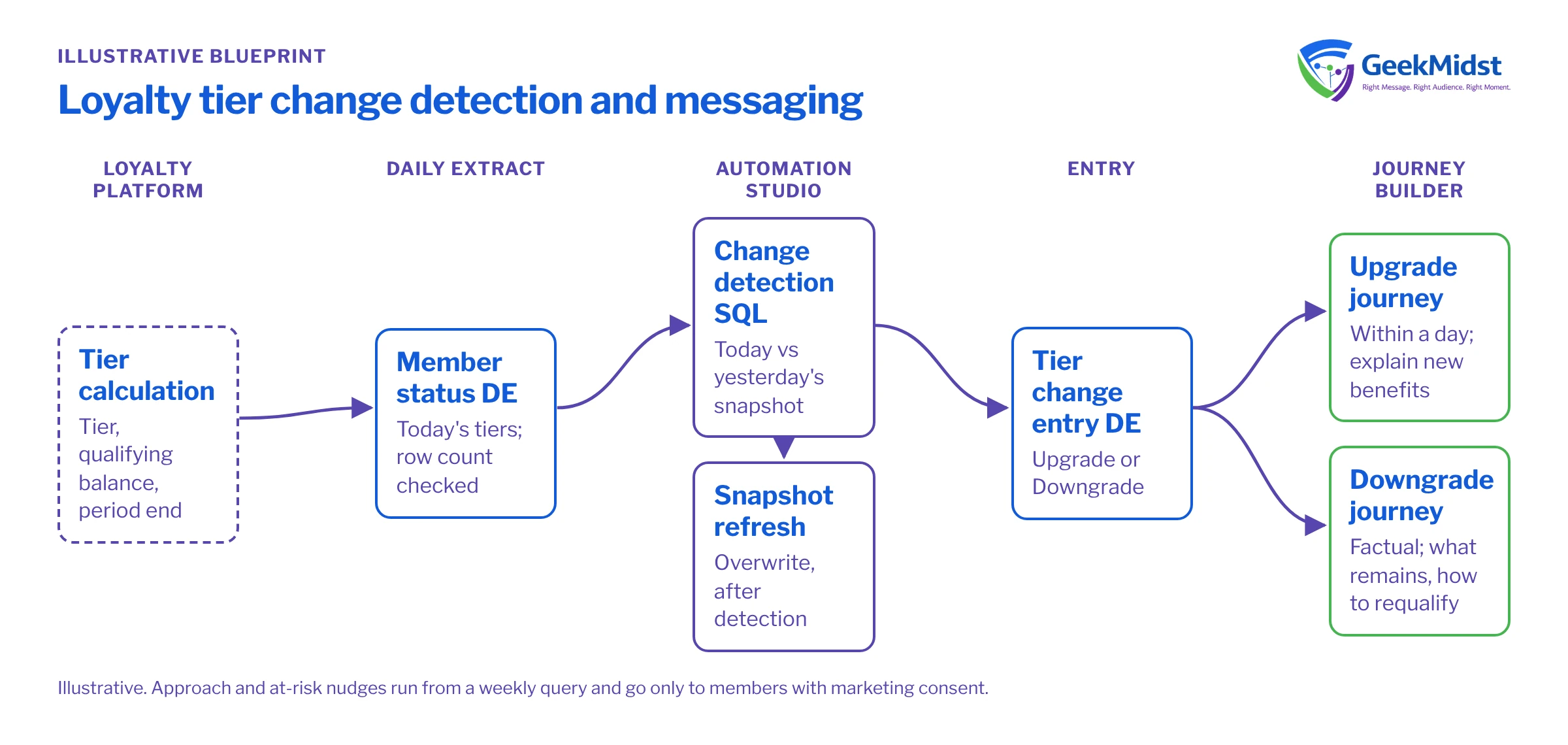
| Tier calculation | Loyalty platform (for example Salesforce Loyalty Management or an external platform) | Computes tier, qualifying spend or points, and period end date |
| Daily extract | Integration or file drop | Member tier status lands in a Loyalty_Members_DE data extension |
| Change detection | Automation Studio SQL | Compares today's status with yesterday's snapshot and writes changes to an entry data extension |
| Snapshot refresh | Automation Studio SQL | Overwrites the snapshot so tomorrow's comparison is correct |
| Messaging | Journey Builder | Separate journeys or splits for upgrade, downgrade, approach, at-risk and expiry |
| Logging | Data extension and Data Views | Records what each member received for support and measurement |
Detecting tier changes
If the loyalty platform can emit tier change events through an API, use them, because they are the most accurate source. Many platforms only offer a daily extract, in which case a snapshot comparison in Automation Studio works well.
Assumptions
Loyalty_Members_DEholds today's status withMemberId,SubscriberKey,EmailAddress,CurrentTierandTierRank(1 for the lowest tier).Loyalty_Tier_Snapshot_DEholds yesterday'sMemberId,TierandTierRank.- The query writes to
Tier_Change_Entry_DEwith the Overwrite action. Field names are samples.
SELECT
    c.SubscriberKey,
    c.EmailAddress,
    c.MemberId,
    p.Tier AS PreviousTier,
    c.CurrentTier,
    CASE
        WHEN c.TierRank > p.TierRank THEN 'Upgrade'
        ELSE 'Downgrade'
    END AS ChangeType,
    GETDATE() AS DetectedDate
FROM Loyalty_Members_DE c
INNER JOIN Loyalty_Tier_Snapshot_DE p
    ON p.MemberId = c.MemberId
WHERE c.TierRank <> p.TierRank
AND c.EmailAddress IS NOT NULLThe order of activities in the automation matters: import, change detection, snapshot refresh, then journey entry. If the snapshot refresh runs first, no changes are ever found. If the import fails and the query still runs against an empty or partial table, you can generate false downgrades, so add a verification step that stops the automation when the row count falls outside an expected range.
Journey design
Build the upgrade and downgrade journeys as separate journeys. They have different tone, different content owners, and different approval needs.
- Upgrade journey: send within a day of the change. A short follow-up a week later highlights one benefit the member has not used yet, if your data shows benefit usage.
- Approach journey: runs from a weekly query that finds members within the threshold distance and a set number of weeks before period end. Cap it so a member receives at most one approach message per period, otherwise it starts to feel like pressure.
- At-risk and downgrade: the at-risk message goes out early enough for the member to act. The downgrade notice is factual, explains what the member keeps, and shows how to requalify. Avoid language that feels like a penalty.
Personalise with the member's actual numbers (spend or points needed, period end date), drawn from the same extract that drives the tier logic. Where numbers could be stale by the time the email is opened, phrase them with a date: "as of 14 March you need 1,200 more points".
Data model and consent
At minimum you need member identity, current tier and rank, qualifying balance, threshold for the next tier, period end date and points expiry date. Keep a tier history table, not just the current tier, so support can answer "when did I drop to Silver?" and so measurement can look back. See data extension design for primary key and retention choices.
Use separate send classifications or publication lists for service-style loyalty notices and promotional nudges, so a marketing opt-out stops the nudges without stopping the factual notices your terms promise.
Testing and launch
Create seeded test members for every transition: each upgrade path, each downgrade path, members exactly on a threshold, members whose period ends today, and members in different time zones if the programme spans regions. Run the automation in a test business unit against these records and compare the entry data extension with the expected list before any journey is activated. Launch upgrades first, because they carry the least risk, then downgrades with a manual review of the first few batches.
How to measure
Measure the nudges, not the mandatory notices. For approach and at-risk messages, hold out a random share of eligible members and compare the proportion that reach or retain their tier by the end of the period. Track this per tier, because behaviour differs widely between entry and top tiers. For upgrade and downgrade notices, watch support contacts about tier status and complaint volumes against a pre-launch baseline. Our guide to measuring marketing automation honestly covers holdout design in more detail.
Risks and variations
- Retroactive corrections: returns or reversed transactions can move a member back down after an upgrade email. Agree a grace rule with the programme team before launch.
- Timing mismatch: if the extract runs before the loyalty platform finishes its nightly calculation, you message yesterday's truth.
- Multiple programmes or regions: tier names and thresholds may differ by market. Keep tier content in a lookup data extension rather than hard-coded in emails.
- App and wallet channels: push and wallet pass updates can follow the same change table once email is stable.
Related services
Automation Studio services
Reliable import, query and verification sequences for daily lifecycle data.
→Marketing Cloud SQL development
Change detection, threshold queries and logging written for the Query Activity engine.
→Segmentation and personalisation
Tier-aware content and member-level numbers that stay accurate.
→Re-engagement and win-back
The companion blueprint for members who stop engaging altogether.
→Design your tier messaging
If your loyalty programme has the rules but not the communication, we can map the lifecycle and build the data and journeys behind it.


