

Self-Service Preference Centre Blueprint
A reference design for a preference centre that lets people choose topics and frequency instead of unsubscribing from everything, built on CloudPages and AMPscript.

This is an illustrative blueprint. It is a reference architecture, not a write-up of a specific client project; outcomes depend on your data and setup.
When the only option in an email footer is "unsubscribe from all", people who just want fewer emails, or different ones, leave entirely. A self-service preference centre gives them a better choice and gives you clearer consent data. This blueprint describes a preference centre built on Marketing Cloud Engagement CloudPages with AMPscript.
This is a reference blueprint, not a write-up of a specific client project. Topic names, fields and the page flow are examples.
The business problem
- The footer offers a single global unsubscribe, so the list loses people who would have stayed for one topic.
- Topic preferences, where they exist, are stored in a data extension that journeys and the CRM never check.
- Preference links contain the subscriber's ID or email in plain text, so anyone can change anyone else's preferences by editing the URL.
- Service agents cannot see or change preferences when a customer calls.
Preference model
| Preference | Stored in | Effect |
|---|---|---|
| Global email opt-out | Subscriber status in All Subscribers, synced to CRM Email Opt Out | Stops all commercial email |
| Newsletter topic | Preferences_DE flag, optionally mirrored to a publication list | Controls inclusion in newsletter sends |
| Offers and promotions | Preferences_DE flag | Controls inclusion in promotional journeys |
| Frequency | Preferences_DE value such as weekly or monthly | Read by audience queries to cap sends |
| Service messages | Not a preference; governed by send classification | Order and account emails continue while the relationship exists |
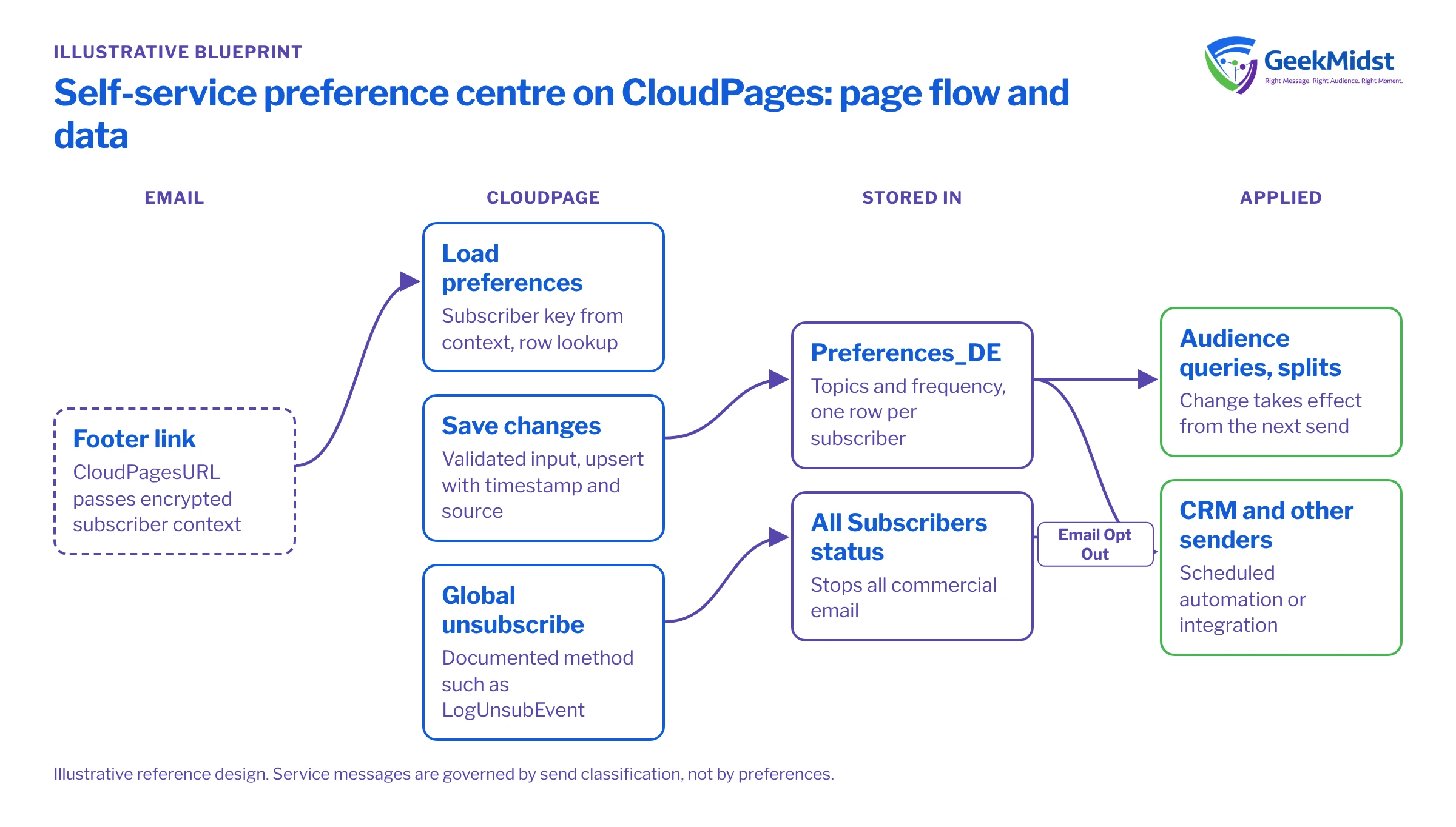
Architecture and page flow
- 01
Link from every email
The footer link uses CloudPagesURL so the subscriber context is passed in an encrypted parameter rather than a readable ID.
- 02
Load current preferences
The page reads the subscriber key from that context and looks up the current row in Preferences_DE.
- 03
Save changes
On submit the page validates input, upserts the row with a timestamp and source, and shows a confirmation.
- 04
Handle global unsubscribe
A separate, clearly labelled option records a global unsubscribe through a documented method such as the LogUnsubEvent call, so subscriber status and tracking stay correct.
- 05
Propagate
A scheduled automation, or an integration, carries changes to the CRM and any other system that sends email.
- 06
Apply in sends
Audience queries and journey splits read Preferences_DE, so a change takes effect from the next send.
%%[
SET @key = AttributeValue("_subscriberkey")

IF Empty(@key) THEN
  SET @noContext = "true"
ELSEIF RequestParameter("submitted") == "1" THEN
  SET @news = IIF(RequestParameter("newsletter") == "on", "true", "false")
  SET @offers = IIF(RequestParameter("offers") == "on", "true", "false")
  SET @freq = RequestParameter("frequency")
  IF @freq != "weekly" AND @freq != "monthly" THEN
    SET @freq = "monthly"
  ENDIF
  UpsertData("Preferences_DE", 1, "SubscriberKey", @key, "Newsletter", @news, "Offers", @offers, "Frequency", @freq, "LastUpdated", Now(), "UpdateSource", "PreferenceCentre")
  SET @saved = "true"
ENDIF

IF @noContext != "true" THEN
  SET @rows = LookupRows("Preferences_DE", "SubscriberKey", @key)
  IF RowCount(@rows) > 0 THEN
    SET @row = Row(@rows, 1)
    SET @news = Field(@row, "Newsletter")
    SET @offers = Field(@row, "Offers")
    SET @freq = Field(@row, "Frequency")
  ENDIF
ENDIF
]%%A few notes on the snippet. Unchecked checkboxes are not posted at all, which is why each flag is set explicitly to true or false. The frequency value is checked against an allowed list, so a tampered request cannot write arbitrary text. If there is no subscriber context (for example, someone opens the page URL directly), show a short message with a way to request a fresh link instead of a form. The form should post back to the same page with its query string intact so the subscriber context survives; our guide to building a preference centre with CloudPages and AMPscript shows the full page, including the form markup.
Security
- Never accept a subscriber key, contact ID or email address from a plain URL parameter.
- Serve the page over HTTPS on your branded CloudPages domain.
- Avoid showing personal data on the page beyond what the person needs to recognise their own preferences.
- If you add a "send me a link" option for people without context, send the link to the address on file only, and never confirm whether an address exists.
Data model and consent
Preferences_DE holds one row per subscriber key with the topic flags, frequency, LastUpdated and UpdateSource. Keep a separate append-only history data extension if you need an audit trail of each change. Decide which system is the master for each preference; often Marketing Cloud is the master for topic preferences and the CRM for global opt-out. The consent synchronisation blueprint covers how to keep the two aligned.
Wording matters. Each option should say plainly what the person will receive. Under the GDPR and India's Digital Personal Data Protection Act, withdrawing consent should be as easy as giving it, so keep the global unsubscribe visible rather than hidden below the topics.
Testing and launch
- Test with seed subscribers in each state: no row yet, all topics on, all off, and globally unsubscribed.
- Confirm each change appears in Preferences_DE with the right timestamp and source, and that the global option changes subscriber status.
- Try to break it: remove the context parameter, post unexpected values and resubmit the form repeatedly.
- Check accessibility, including keyboard use, labels on every input and readable error messages.
- Swap footer links in one email first, then roll out across templates.
How to measure it
- The share of footer clicks that end in a topic or frequency change rather than a global unsubscribe.
- Global unsubscribe rate before and after launch, read alongside list growth and send volume.
- Complaint rates, which should not rise.
- Mismatches between Preferences_DE and the CRM, from a scheduled audit query.
Risks and variations
- Preferences ignored downstream. The centre only works if every audience query and journey reads it. Audit this before launch.
- Too many topics confuse people. Start with a few clear choices.
- Experience Cloud or Marketing Cloud Next. Logged-in customers may be better served by a preference page in a customer portal, or by Marketing Cloud Next's consent model; see Marketing Cloud Next consent and preferences.
For the build itself, see our AMPscript development service.
Questions we hear
Should we use publication lists or a data extension for topics?
Can service agents update preferences?
Does a preference centre replace the unsubscribe link?
Want a preference centre people actually use?
We can design the preference model, build the CloudPages and connect preferences to your audiences and CRM.


