

Order-to-Cash Integration With MuleSoft
How we would connect Salesforce and an ERP with MuleSoft so orders, invoices and payment status move reliably, with errors that people can see and fix.

This is an illustrative blueprint. It is a reference architecture, not a write-up of a specific client project; outcomes depend on your data and setup.
This blueprint describes how we would connect Salesforce to an ERP using MuleSoft so that orders, invoices and payment status move between them reliably. Orders may start in Sales Cloud, B2B Commerce or Revenue Cloud. The focus is what usually goes wrong: identifiers, retries, error visibility and monitoring.
Business problem
Sales closes deals in Salesforce, but finance re-keys orders into the ERP. Invoice and payment status never comes back, so account managers call finance to find out whether a customer has paid. A previous point-to-point integration failed silently during ERP maintenance.
The goal is a governed integration where orders flow to the ERP once and only once, invoices and payment status flow back, failures are visible to the right people, and new consumers can reuse the same APIs.
Architecture
Components and responsibilities
| Component | Responsibility |
|---|---|
| Salesforce (Sales Cloud, Commerce or Revenue Cloud) | Accounts, quotes, orders and the user's view of invoice and payment status |
| Event publishing (Platform Events or Change Data Capture) | Announcing that an order is ready without a direct callout |
| MuleSoft Anypoint Platform: system APIs | Wrapping Salesforce and the ERP behind stable, reusable interfaces |
| MuleSoft process API | Order-to-cash orchestration, mapping, validation and idempotency |
| Error store and replay queue | Holding failed messages with enough context to fix and resend |
| Monitoring and alerting | Dashboards, alerts and logs for integration and support teams |
| ERP | System of record for fulfilment, invoicing, credit and payments |
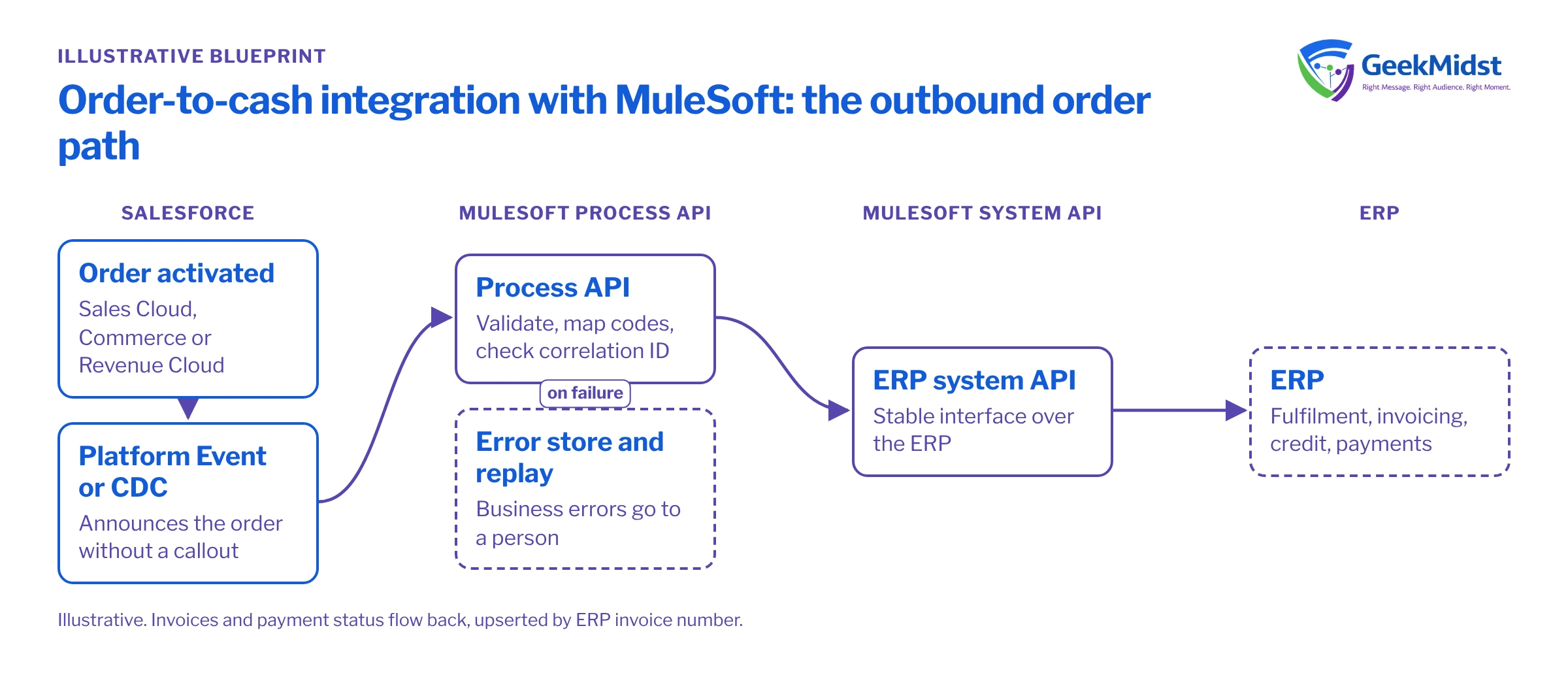
We follow an API-led pattern: system APIs hide each application's quirks, a process API owns the business flow, and experience APIs are added only when a channel needs its own shape. Salesforce publishes an event when an order reaches an agreed status, which decouples users from ERP availability; our article on Platform Events for decoupled integrations explains the pattern. For a comparison with direct connections, see middleware versus point-to-point APIs.
Data model
Salesforce holds Account, Order and Order Product records (or the Commerce and Revenue Cloud equivalents). We add an ERP customer number on Account, an ERP order number and integration status on Order, and a custom Invoice object (number, amounts, due date, status, ERP link) related to the account and order. Payment status is a field on Invoice, updated from the ERP.
Each outbound message carries a unique correlation ID so retries can be detected and duplicates rejected. An Integration Log object records each attempt and error, linked to the source record so users can see what happened.
Key components
Order outbound
When an order is activated, an event is published. The process API validates required fields, maps the account and products to ERP codes, calls the ERP system API and writes the ERP order number back. Validation errors return as a clear status for sales operations.
Invoices and payments inbound
The ERP publishes invoice and payment changes, or MuleSoft polls on a schedule. Upserts by ERP invoice number make reprocessing safe.
Error handling
We separate transient errors (timeouts, locks, ERP maintenance), retried automatically with back-off, from business errors (unknown product code, credit hold), which go to a queue for a person to fix. Every failure has an owner. Our API error-handling article and integration error-handling checklist describe the rules in detail.
Security and authentication
MuleSoft authenticates to Salesforce with OAuth, and any Salesforce callouts to MuleSoft use Named Credentials. Salesforce has announced that connected apps support ends in Summer '27 in favour of External Client Apps, and that refresh tokens expire after 30 days of inactivity from 4 November 2026, so we design new integrations with that in mind. See securing Salesforce API integrations.
Monitoring
Dashboards show throughput, errors by type and the oldest unprocessed message. Alerts go to the support rota, and a Salesforce report lists stuck records for business users.
Testing and launch
- 01
Agree contracts and mappings
Document each API's fields, codes and error responses with both teams.
- 02
Build with test doubles
Develop against mocked ERP responses so errors and timeouts can be tested early.
- 03
Test idempotency
Send the same order twice, replay failed messages and confirm the ERP never creates duplicates.
- 04
Run volume and failure tests
Test peak volumes and ERP downtime; confirm messages queue and recover.
- 05
Rehearse support
Walk support staff through alerts, the error queue and replay, with a runbook.
- 06
Cut over in stages
Switch one order type or region first, reconcile orders and invoices daily, then widen once totals match.
Risks and variations
- Master data mismatches (customers, products, tax codes) cause most business errors; agree ownership and a sync approach first.
- Silent failures are worse than loud ones; every flow needs monitoring and an owner.
- Lighter options: for low-volume, simple flows, MuleSoft Composer or Flow-based callouts may be enough.
- Agent access: MuleSoft Agent Fabric and Salesforce's Integration Agent (Agentforce Operations) are newer options to evaluate once core APIs are stable.
Our Salesforce integration services and architecture consulting cover API design, build and support.
Sources
Connecting Salesforce to your ERP?
We can help you design order and invoice APIs, error handling and monitoring that your support team can run.


