

Bulkifying Apex Triggers: Patterns and Pitfalls
A trigger that works for one record can fail for two hundred. Here is how to rewrite per-record logic into bulk-safe Apex and test that it stays that way.

The trigger passed every test and worked perfectly when users edited records one at a time. Then someone ran a Data Loader update, or an integration sent a batch, and the job failed with System.LimitException: Too many SOQL queries. That error almost always means the trigger was written for one record, not for a list of them.
Bulkifying a trigger means writing it so that the number of queries and DML statements stays the same whether it processes one record or two hundred.
Why triggers see many records
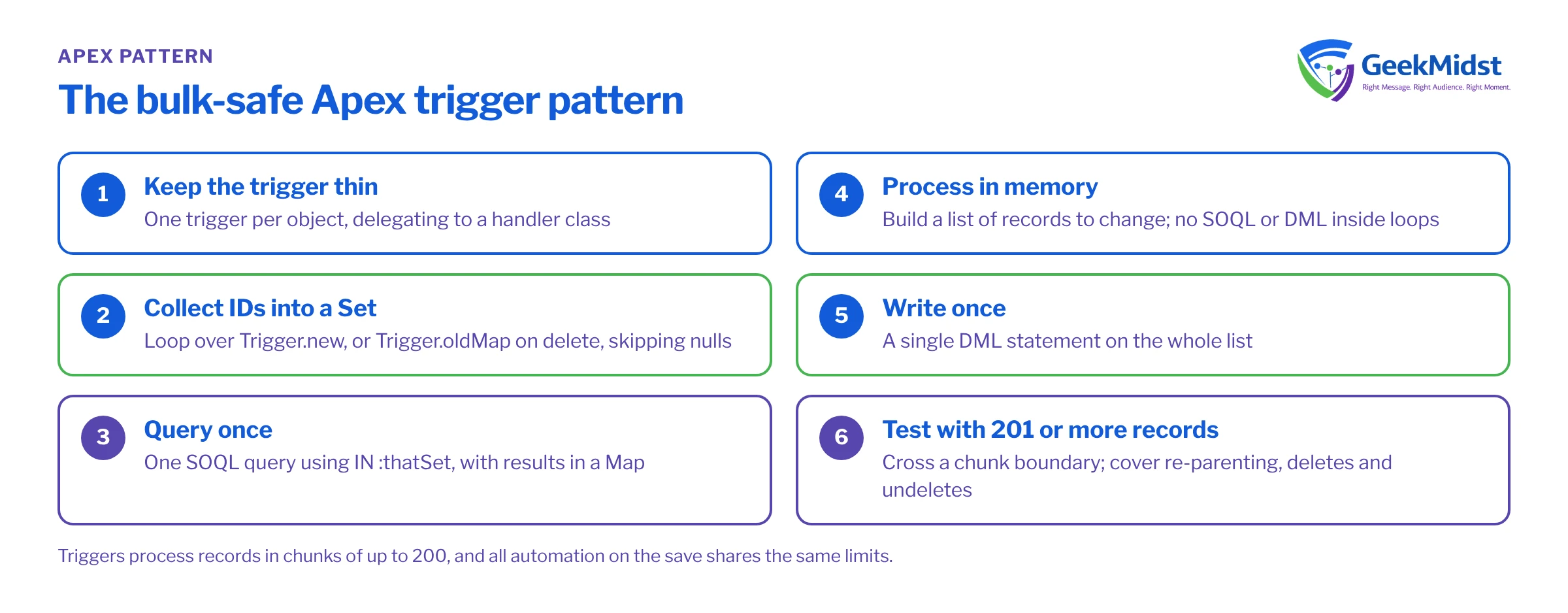
A trigger does not fire once per record. It fires once per batch of records saved together, and Trigger.new holds all of them. Triggers process records in chunks of up to 200, so a single DML statement on 1,000 records runs the trigger five times within one transaction, and every query and DML statement inside the trigger counts against shared governor limits. In a synchronous transaction you get 100 SOQL queries, and other automation on the same save (flows, other triggers, managed packages) uses the same allowance. Check the current limits table in the Apex Developer Guide for the full list.
The practical rule follows from that: no SOQL and no DML inside a loop over records.
A trigger that is not bulk-safe
This trigger keeps a contact count on Account. It queries and updates once per contact, so 200 contacts mean 200 queries and 200 updates.
// Anti-pattern: one query and one update per record
trigger ContactTrigger on Contact (after insert) {
    for (Contact c : Trigger.new) {
        Account a = [SELECT Id, Contact_Count__c FROM Account WHERE Id = :c.AccountId];
        a.Contact_Count__c = a.Contact_Count__c + 1;
        update a;
    }
}It has three other problems besides limits. It only handles inserts, so moving a contact between accounts or deleting one makes the count wrong. It fails when AccountId is null. And incrementing a stored number drifts over time; recalculating from the source is more reliable.
The bulk-safe pattern
The standard approach has four steps:
- Collect the IDs you care about into a
Setby looping over the trigger records. - Query once for everything you need, using
IN :thatSet, and put the results in aMap. - Process in memory, building a list of records to change.
- Write once with a single DML statement on the list.
Keep the trigger itself thin and put logic in a handler class. That makes it testable and lets you control the order of operations when an object has several requirements.
Assumptions
Account has a custom number field Contact_Count__c. The handler is declared without sharing on purpose: a count should include contacts the running user cannot see. Decide sharing deliberately for each handler rather than copying a default.
trigger ContactTrigger on Contact (after insert, after update, after delete, after undelete) {
    ContactCountHandler.recalculate(Trigger.new, Trigger.oldMap);
}public without sharing class ContactCountHandler {
public static void recalculate(List<Contact> newList, Map<Id, Contact> oldMap) {
Set<Id> accountIds = new Set<Id>();
if (newList != null) {
for (Contact c : newList) {
addIfPresent(accountIds, c.AccountId);
Contact prior = (oldMap == null) ? null : oldMap.get(c.Id);
if (prior != null && prior.AccountId != c.AccountId) {
addIfPresent(accountIds, prior.AccountId);
}
}
} else {
for (Contact c : oldMap.values()) {
addIfPresent(accountIds, c.AccountId);
}
}
if (accountIds.isEmpty()) {
return;
}
Map<Id, Integer> counts = new Map<Id, Integer>();
for (AggregateResult ar : [
SELECT AccountId accId, COUNT(Id) total
FROM Contact
WHERE AccountId IN :accountIds
GROUP BY AccountId
]) {
counts.put((Id) ar.get('accId'), (Integer) ar.get('total'));
}
List<Account> updates = new List<Account>();
for (Id accId : accountIds) {
Integer total = counts.containsKey(accId) ? counts.get(accId) : 0;
updates.add(new Account(Id = accId, Contact_Count__c = total));
}
update updates;
}
private static void addIfPresent(Set<Id> ids, Id value) {
if (value != null) {
ids.add(value);
}
}
}Whatever the batch size, this uses one query and one DML statement. On delete, Trigger.new is null, so the handler reads the old values; deleted contacts are excluded from the count because SOQL does not return records in the Recycle Bin by default. On update, only contacts that changed account add the old account to the set.
For a simple count like this you could also use a standard roll-up summary field if the relationship were master-detail, or a declarative rollup tool. Use code when the rule is more involved.
Other bulkification habits
- Use
Trigger.newMapandTrigger.oldMapto compare old and new values instead of querying for the previous state. - Filter early. Only add a record to the work set if a relevant field changed. That keeps queries smaller and avoids unnecessary updates that fire more automation.
- Query related data with relationship queries rather than several separate queries.
- Avoid boolean recursion flags. A static
Boolean hasRunstops the trigger running for the second chunk of 200 in the same transaction, silently skipping records. If you need a recursion guard, track processed record IDs in a staticSet<Id>. - Move slow work out of the transaction. Callouts are not allowed directly in triggers; enqueue a Queueable job and pass it the record IDs.
Test with more than 200 records
A bulk test should insert enough records to cross a chunk boundary, then assert the outcome. Wrap the operation in Test.startTest() and Test.stopTest() so it gets a fresh set of limits. Testing with 201 or more records helps catch recursion flags that only break on the second chunk. Also test re-parenting, deletes and undeletes, since those are the paths most often forgotten. Our guide to writing reliable Apex tests covers test data and assertions in more depth.
Diagnosing a limit error
- Open the debug log for the failing transaction and look at the cumulative limits section near the end.
- Find which code unit used most of the queries or DML. It may not be your trigger; flows and managed packages share the same budget.
- Search that code for SOQL or DML inside
forloops, including inside methods called from loops. - Check for automation that updates the same records again, which re-fires triggers.
Questions we hear
Should every object have only one trigger?
Do I need a trigger framework?
Is Flow bulk-safe in the same way?
Can I bulkify code that makes callouts?
Related reading
Hitting governor limits in production?
We can trace which automation is consuming your limits, refactor the triggers involved and add bulk tests so the problem stays fixed.


