

Named and External Credentials, Explained
Named Credentials hold the endpoint, External Credentials hold the authentication, and permission sets decide who can use them. Here is how the pieces fit together.

Hard-coded endpoints and API keys in Apex, custom settings or custom metadata are still common in Salesforce orgs. They leak into sandboxes, appear in debug logs and get copied into source control. Named Credentials exist to stop that: they keep the URL and the secrets in Setup, out of your code, and the platform adds authentication to the callout for you.
Since Salesforce redesigned the feature, setting one up involves two objects instead of one, plus permission sets. The split confuses people the first time, so this guide explains what each piece does.
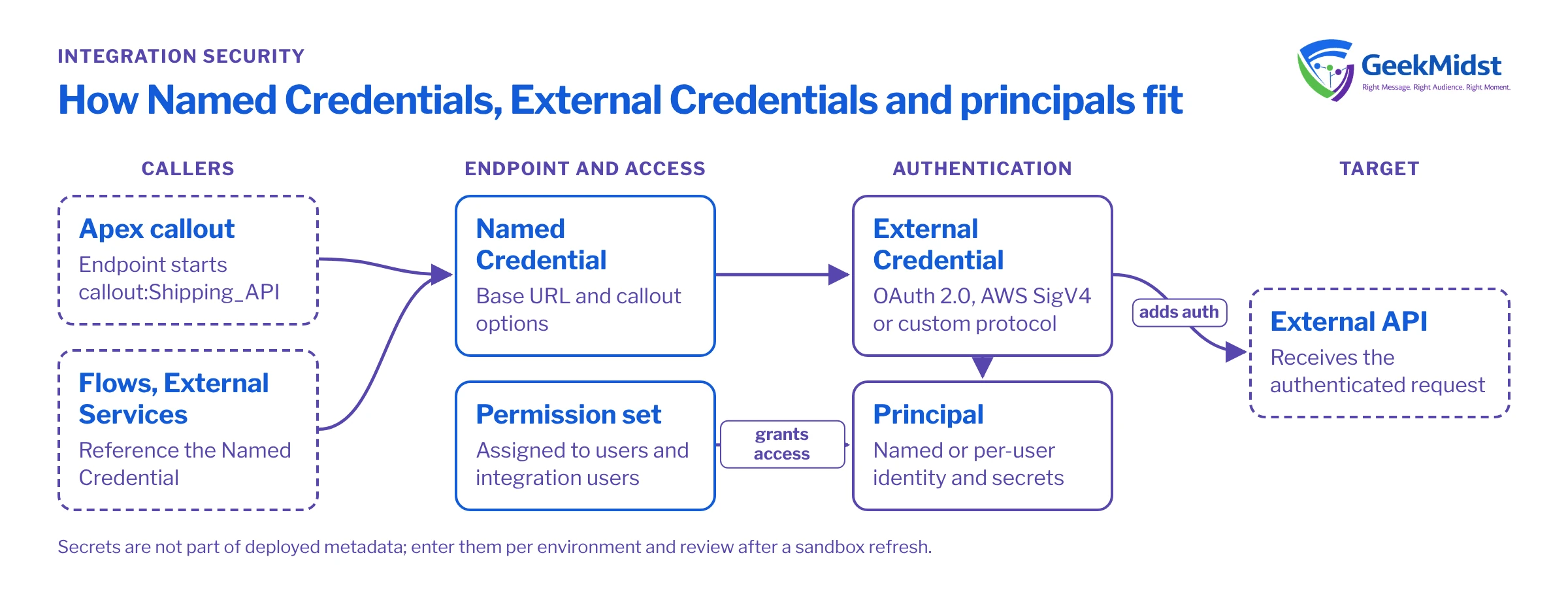
The pieces and what they hold
Named Credential. The endpoint: a base URL and callout options such as whether to generate an authorisation header and whether formulas are allowed in headers. Code refers to it by name with the callout: prefix. A Named Credential points to one External Credential.
External Credential. How to authenticate: the protocol and its settings. Options include OAuth 2.0 flows, AWS Signature Version 4 and a custom protocol where you define your own parameters and headers, such as an API key. Check Salesforce Help for the full current list. One External Credential can be shared by several Named Credentials that use the same login, for example separate endpoints on the same vendor platform.
Principal. The identity used for the callout, defined on the External Credential. A named principal is one shared identity for everyone, typical for system-to-system integrations. A per-user principal means each user authenticates with their own account, typical when the external system must see who is acting.
Permission set access. Users, including integration and automation users, only get to use a principal if a permission set or permission set group grants access to it. This is the step most often missed.
Legacy Named Credentials. The older model combined endpoint and authentication in one record. It still works in many orgs, but new work should use the current model.
Who holds what
| Holds | Configured by | Referenced from | |
|---|---|---|---|
| Named Credential | URL and callout options | Admin or developer | Apex, flows, External Services |
| External Credential | Protocol, parameters, principals | Admin with security input | Named Credentials |
| Principal | Identity and its secrets | Admin, or each user for per-user | Permission sets |
| Permission set | Access to principals | Admin | Assigned users |
Setting up an API key integration
- 01
Create the External Credential
Choose the custom protocol, then add a named principal and store the API key as an authentication parameter on it.
- 02
Add the header
Define a custom header, for example X-Api-Key, whose value is a formula referencing the principal's parameter. Help documents the $Credential merge syntax for this.
- 03
Create the Named Credential
Set the base URL, link it to the External Credential and enable formulas in headers so the header formula is evaluated.
- 04
Grant access
Add the External Credential principal to a permission set and assign it to the users or integration user who run the callout. Check Help for any related object permissions that users also need.
- 05
Call it from code
Use callout: followed by the Named Credential name in the endpoint, and test in a sandbox with a sandbox key.
Calling a Named Credential from Apex
Assumptions
A Named Credential called Shipping_API whose URL is the vendor's base address, with authentication handled by its External Credential. The vendor returns JSON with a numeric rate field. The code is illustrative and leaves out logging and retries.
public with sharing class ShippingRateClient {

    public class ShippingApiException extends Exception {}

    public static Decimal fetchRate(String postcode) {
        HttpRequest req = new HttpRequest();
        req.setEndpoint('callout:Shipping_API/v1/rates?postcode='
            + EncodingUtil.urlEncode(postcode, 'UTF-8'));
        req.setMethod('GET');
        req.setTimeout(10000);

        HttpResponse res = new Http().send(req);
        if (res.getStatusCode() != 200) {
            throw new ShippingApiException(
                'Rate lookup failed with HTTP ' + res.getStatusCode());
        }

        Map<String, Object> body =
            (Map<String, Object>) JSON.deserializeUntyped(res.getBody());
        return Decimal.valueOf(String.valueOf(body.get('rate')));
    }
}Because the endpoint is resolved by name, the same code works in every environment. Each sandbox has its own Named Credential and External Credential values pointing at the vendor's test environment, and production points at the live one. After a sandbox refresh, review these records: the configuration copies from production, but secrets may need re-entering and you do not want a sandbox calling a live endpoint.
Common mistakes and how to diagnose them
- Callout fails with an authentication or permission error for some users only. The user lacks a permission set granting the principal, or the per-user principal has not been authenticated by that user.
- Works in a test, fails from a flow or scheduled job. The automation runs as a different user (an integration user, or the Automated Process user for some async contexts) that has not been granted access.
- Header formula sent literally. Formulas in headers are not enabled on the Named Credential, or the merge syntax is wrong.
- Secrets in source control anyway. Named Credential metadata can be deployed, but secret values are not part of it. Keep it that way; enter secrets per environment.
- Unit tests make real callouts. Apex tests cannot make callouts; use
HttpCalloutMockto simulate the response.
Security checklist
- No endpoints or secrets in Apex, custom settings or custom metadata.
- Named principals for system integrations, per-user principals where the external system must know the user.
- Access to principals granted through a dedicated permission set, assigned only to those who need it.
- Separate credentials for sandboxes and production, reviewed after every refresh.
- OAuth scopes and API keys limited to what the integration needs.
- A named owner and a rotation date for each secret.
Related reading
Secrets in code or custom settings?
We can audit how your org stores integration credentials and move callouts to Named and External Credentials with a clear access model.


