

Error Handling for Salesforce API Integrations
An integration is only as good as what it does when a call fails. Here is how to classify Salesforce API errors, retry safely and make failures visible.

Most Salesforce integrations are built for the happy path and tested with ten records. Then a validation rule changes, a token expires overnight or a bulk update locks a parent account, and records quietly stop arriving. Nobody notices until a sales manager asks why last week's orders are missing.
Good error handling is not a try/catch around the HTTP call. It is a set of decisions: which failures are worth retrying, how to retry without creating duplicates, what to do with records that will never succeed, and who gets told.
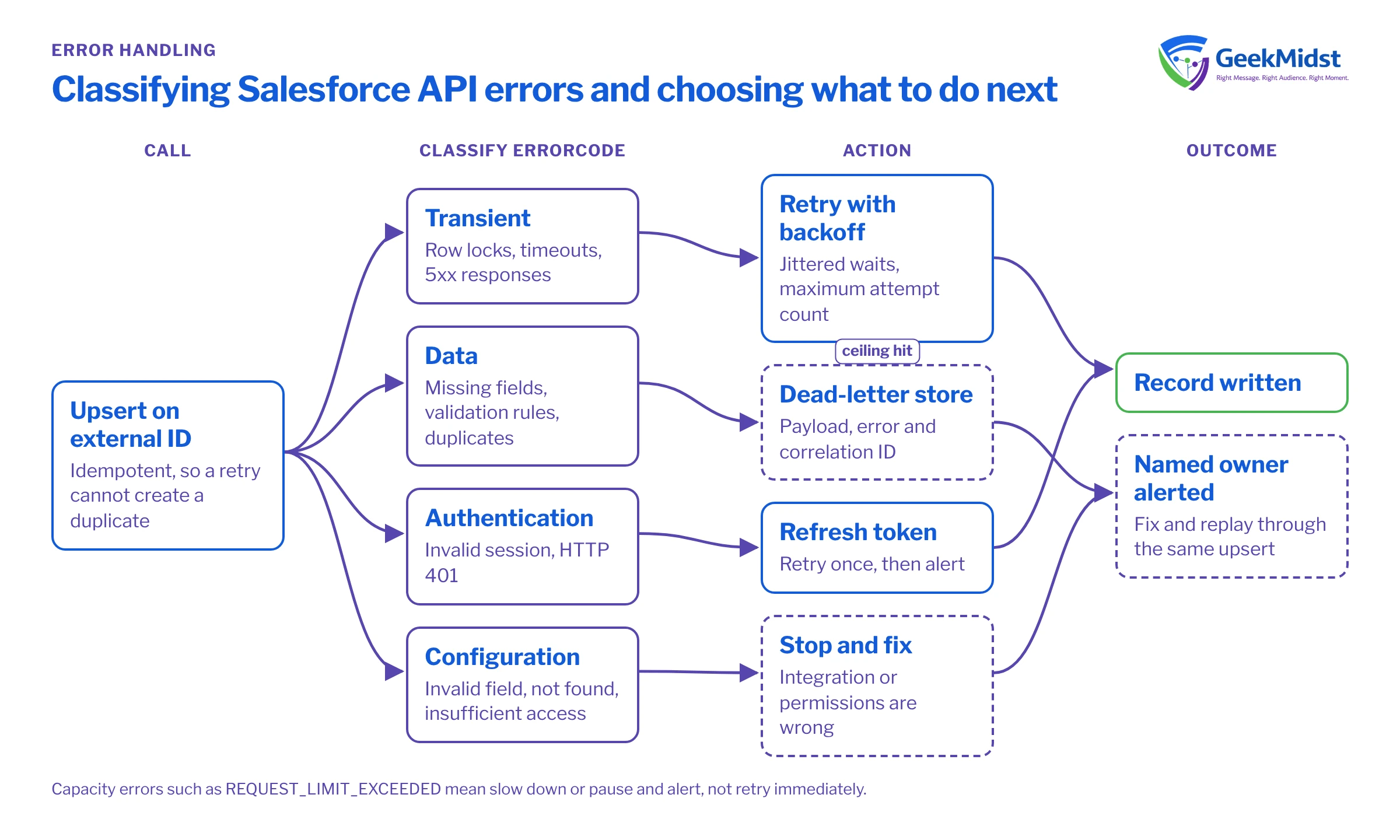
Read the error, not just the status code
Salesforce REST API errors return a JSON body with an errorCode, a message and, for field errors, a list of fields. The HTTP status alone is not enough to decide what to do: several quite different problems return 400, and exceeding the org's API request allocation returns an error with the code REQUEST_LIMIT_EXCEEDED. Always parse the body and branch on errorCode.
[
  {
    "message": "Required fields are missing: [LastName]",
    "errorCode": "REQUIRED_FIELD_MISSING",
    "fields": ["LastName"]
  }
]Classifying common failures
| Examples | Retry? | Action | |
|---|---|---|---|
| Transient | UNABLE_TO_LOCK_ROW, timeouts, 5xx responses | Yes, with backoff | Retry a few times, then park |
| Capacity | REQUEST_LIMIT_EXCEEDED, HTTP 429 from middleware | Later | Slow down or pause, alert the owner |
| Authentication | INVALID_SESSION_ID, HTTP 401 | Once | Refresh the token, retry once, then alert |
| Data | REQUIRED_FIELD_MISSING, FIELD_CUSTOM_VALIDATION_EXCEPTION, DUPLICATE_VALUE | No | Park the record with the error for a human to fix |
| Configuration | INVALID_FIELD, NOT_FOUND, INSUFFICIENT_ACCESS_OR_READONLY | No | Stop the flow and fix the integration or permissions |
Make retries safe with idempotency
Retrying is only safe if doing the same thing twice has the same effect as doing it once. A POST that creates a record is not idempotent: if the first call actually succeeded but the response was lost, the retry creates a duplicate.
The standard Salesforce answer is an external ID field and an upsert. Mark a field such as External_Order_Id__c as an External ID and Unique, then upsert by that key (in REST, a PATCH to the sObject resource addressed by the external ID field and value). A retry then updates the same record instead of inserting another. If your source system has no stable key, create one before the record leaves it.
Retry with backoff and a ceiling
When you do retry, wait longer each time and add some randomness so many failed calls do not all retry at the same instant. Put a ceiling on attempts. After the ceiling, the record goes to a dead-letter store with the full error, not into a log nobody reads.
Before you start
The example below assumes a Node.js 18 or later service (for the built-in fetch) that already holds a valid access token, and an upsert endpoint keyed on an external ID. It is a sketch of the logic, not production code: token refresh, structured logging and configuration are left out.
const RETRYABLE_CODES = new Set(['UNABLE_TO_LOCK_ROW']);
const sleep = (ms) => new Promise((resolve) => setTimeout(resolve, ms));

async function upsertWithRetry(url, token, payload, maxAttempts = 4) {
  for (let attempt = 1; attempt <= maxAttempts; attempt++) {
    let res;
    try {
      res = await fetch(url, {
        method: 'PATCH',
        headers: { Authorization: `Bearer ${token}`, 'Content-Type': 'application/json' },
        body: JSON.stringify(payload),
      });
    } catch (networkError) {
      if (attempt === maxAttempts) throw networkError;
      await sleep(backoff(attempt));
      continue;
    }
    if (res.ok) return res.status === 204 ? null : res.json();

    const errors = await res.json().catch(() => []);
    const code = Array.isArray(errors) && errors.length ? errors[0].errorCode : 'UNKNOWN';
    const retryable = res.status >= 500 ? true : RETRYABLE_CODES.has(code);

    if (!retryable) {
      throw Object.assign(new Error(`Permanent failure: ${code}`), { errors, status: res.status });
    }
    if (attempt === maxAttempts) {
      throw Object.assign(new Error(`Gave up after ${attempt} attempts: ${code}`), { errors });
    }
    await sleep(backoff(attempt));
  }
}

function backoff(attempt) {
  const base = 500 * 2 ** (attempt - 1);
  return base + Math.floor(Math.random() * base);
}Partial success is the normal case
Bulk and collection operations rarely fail completely. The sObject Collections resource and the Composite API let you choose between all-or-none behaviour and per-record results; Bulk API jobs report successful and failed rows separately. Inside Salesforce, Apex gives you the same choice through Database methods with allOrNone set to false. Whatever you choose, handle each failed row individually and keep the successful ones.
Here is the Apex version, writing failures to a custom Integration_Error__c object (an assumption; use whatever logging object your org already has).
List<Integration_Error__c> failures = new List<Integration_Error__c>();
List<Database.UpsertResult> results =
    Database.upsert(accounts, Account.External_Id__c, false);

for (Integer i = 0; i < results.size(); i++) {
    Database.UpsertResult r = results[i];
    if (r.isSuccess()) continue;
    for (Database.Error err : r.getErrors()) {
        failures.add(new Integration_Error__c(
            Record_Key__c  = accounts[i].External_Id__c,
            Status_Code__c = String.valueOf(err.getStatusCode()),
            Message__c     = err.getMessage().left(255),
            Fields__c      = String.join(err.getFields(), ',')
        ));
    }
}
if (!failures.isEmpty()) {
    insert failures;
}Make failures visible to a person
A dead-letter store is only useful if someone looks at it. Give each integration a named owner, a simple report or dashboard of parked records grouped by error code, and an alert when the count crosses a threshold or when no successful call has happened for longer than expected. Include a correlation ID (an ID you generate per message and pass through every system) so one record can be traced end to end.
Decide in advance how parked records are replayed: fixed in the source and resent, or corrected and retried from the store. Replays should go through the same idempotent upsert as normal traffic.
Common mistakes
- Retrying validation errors. They will fail every time and consume API requests. Classify first.
- Catching and logging to debug logs only. Debug logs expire and are not monitored.
- Swallowing partial failures because the overall call returned 200 or the job completed.
- Retrying a create without an external ID, which produces duplicates under load.
- Hard-coded credentials in the integration. Use Named Credentials inside Salesforce and a secrets store outside it.
Quick checklist
- Every integration parses
errorCodeand classifies the failure. - Writes are upserts on an external ID wherever the data allows.
- Retries use backoff with a maximum attempt count.
- Failed records land in a store with the payload, error and correlation ID.
- Someone owns the store and gets alerted.
Our integration error handling checklist expands each point into testable checks.
Related reading
Is an integration losing records?
We can review how your Salesforce integrations classify, retry and report failures and help you put monitoring in place that people will actually use.


