

Platform Events for Decoupled Integrations
Platform Events let Salesforce and other systems exchange messages without calling each other directly. Here is how to design publishers and subscribers that hold up.

Point-to-point integrations couple systems tightly. When Salesforce calls the warehouse API directly on every order update, a slow warehouse slows down the user's save, a warehouse outage fails it, and adding a second consumer means changing Salesforce code again.
Platform Events break that coupling. A publisher announces that something happened; any number of subscribers react in their own time. The publisher does not need to know who is listening or whether they are available right now.
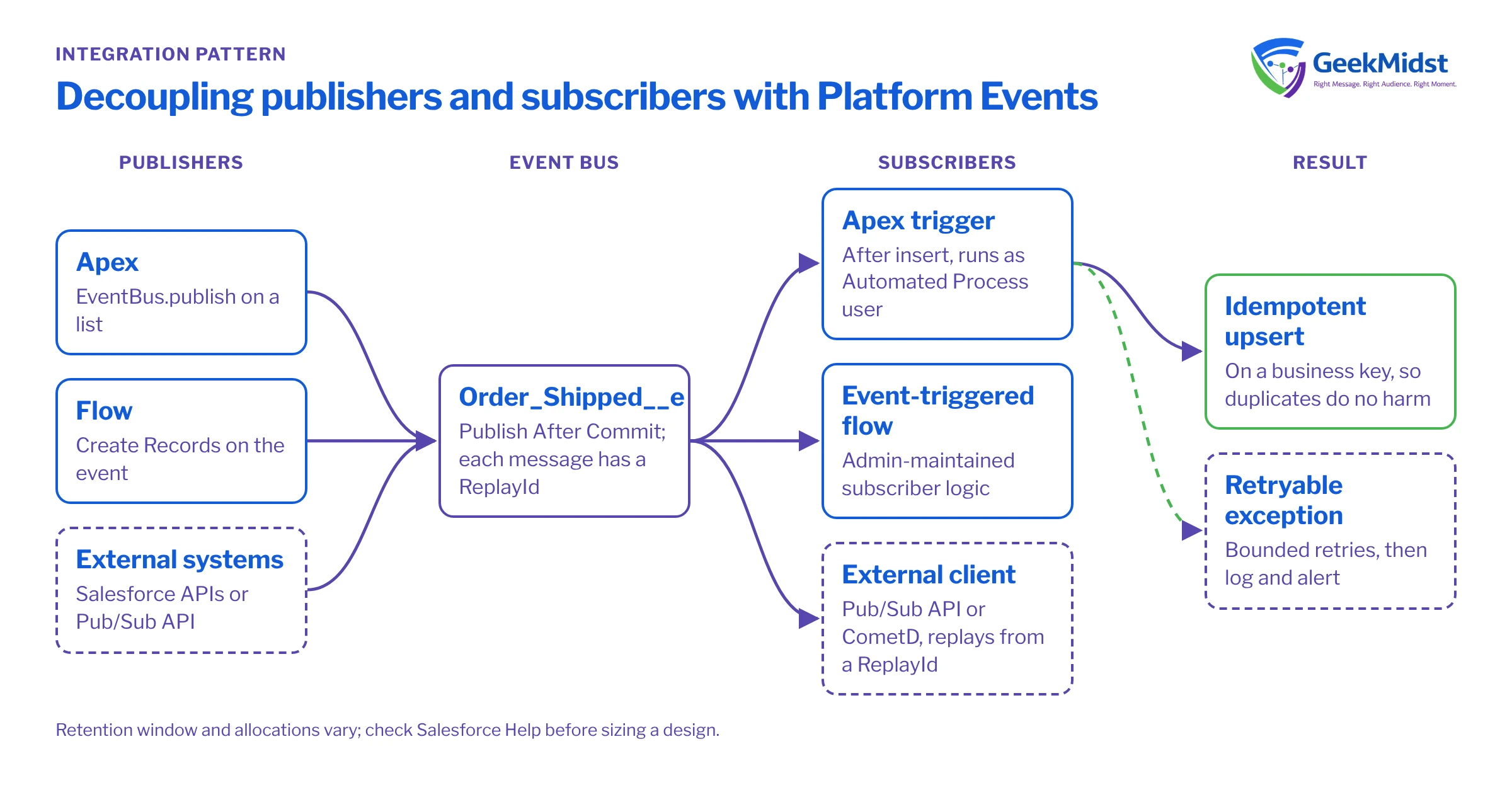
How Platform Events work
You define a platform event much like a custom object, with an API name ending in __e and custom fields for the payload. Publishers write event messages to the Salesforce event bus. Subscribers receive them in the order they were published on that channel, each carrying a ReplayId that identifies its position in the stream.
Publishers can be Apex (EventBus.publish), flows (a Create Records element on the event), processes outside Salesforce through the APIs, and the Pub/Sub API. Subscribers can be:
- Apex triggers on the event (after insert only).
- Platform event-triggered flows.
- External clients using the Pub/Sub API (gRPC based) or the older CometD-based Streaming API.
Events are retained on the bus for a limited period so subscribers that were offline can catch up using a replay ID. Check the current retention window and your org's publishing and delivery allocations in Salesforce Help before sizing a design.
Publish behaviour matters
Each event definition has a publish behaviour setting:
- Publish After Commit: the event is published only if the publishing transaction commits. Use this for most business events, so subscribers never hear about an order that was rolled back.
- Publish Immediately: the event is published when the publish call runs, even if the transaction later fails. Useful for logging and monitoring events that must survive a rollback, but subscribers may then see events for changes that never happened.
Worked example: an order shipped event
Assumptions
A platform event Order_Shipped__e with text fields Order_Number__c and Tracking_Number__c, publish behaviour set to Publish After Commit. A custom object Shipment_Log__c records what the subscriber processed. Names are samples.
The publisher builds all events in a list and publishes once, then checks each result.
List<Order_Shipped__e> events = new List<Order_Shipped__e>();
for (Order o : shippedOrders) {
    events.add(new Order_Shipped__e(
        Order_Number__c    = o.OrderNumber,
        Tracking_Number__c = o.Tracking_Number__c
    ));
}

List<Database.SaveResult> results = EventBus.publish(events);
for (Database.SaveResult sr : results) {
    if (!sr.isSuccess()) {
        for (Database.Error err : sr.getErrors()) {
            System.debug(LoggingLevel.ERROR,
                'Event publish failed: ' + err.getStatusCode() + ' ' + err.getMessage());
        }
    }
}The subscriber is an Apex trigger. Event triggers run asynchronously, by default as the Automated Process user, and can receive larger batches than record triggers. You can change the running user and batch size with a PlatformEventSubscriberConfig setting; see the Platform Events Developer Guide.
When a subscriber hits a temporary problem, it can throw EventBus.RetryableException to ask the platform to resend the batch later. Put your own ceiling on retries and record anything that still fails.
trigger OrderShippedSubscriber on Order_Shipped__e (after insert) {
    List<Shipment_Log__c> logs = new List<Shipment_Log__c>();
    for (Order_Shipped__e evt : Trigger.new) {
        logs.add(new Shipment_Log__c(
            Order_Number__c    = evt.Order_Number__c,
            Tracking_Number__c = evt.Tracking_Number__c,
            Replay_Id__c       = evt.ReplayId
        ));
    }

    try {
        upsert logs Shipment_Log__c.Order_Number__c;
    } catch (DmlException e) {
        if (EventBus.TriggerContext.currentContext().retries < 3) {
            throw new EventBus.RetryableException('Retrying shipment log: ' + e.getMessage());
        }
        // Retries exhausted: raise an alert for manual follow-up here.
    }
}The upsert on an external ID matters. Events can reach a subscriber more than once, for example after a retry or when a client replays from an earlier position. A subscriber that inserts blindly creates duplicates; one that upserts on a business key does the same work twice with the same result.
Design rules that keep event integrations healthy
- Design the event, not the table. Name events after business facts (
Order_Shipped__e,Payment_Failed__e) and include the fields subscribers need, so they do not have to call back for details. - Make every subscriber idempotent. Use upserts, check for already-processed keys, or store processed replay IDs.
- Keep payloads small and stable. Adding fields is easy; renaming or removing them breaks subscribers. Version events if their meaning changes.
- Do not use events for request and response. If the caller needs an answer now, a synchronous API call is clearer.
- Monitor both ends. Track publish failures, subscriber errors and lag. Event subscriber status is visible in Setup on the event definition page.
- Mind the allocations. Bulk data loads that publish an event per record can consume daily allocations quickly. Consider batching several changes into one message or using Change Data Capture.
Common problems
- Subscriber stops processing. An Apex trigger that keeps throwing
EventBus.RetryableExceptionbeyond the platform's retry limit moves to an error state and stops receiving events. Check the subscription status, fix the cause and resume it. Other uncaught exceptions are not retried, so log failures or that batch is lost. - Events missing for rolled-back changes, or present for them. Check the publish behaviour setting.
- Records created by the subscriber show an unexpected owner. The trigger runs as the Automated Process user unless configured otherwise.
- Duplicates downstream. The subscriber is not idempotent.
When not to use Platform Events
Events are not the answer to every integration. If a user needs an immediate answer, such as a credit check before saving an order, a synchronous callout with a sensible timeout is simpler to reason about. If you need to move large volumes of records on a schedule, Bulk API jobs or an ETL tool are usually a better fit than one event per record. And if only one system will ever consume the message and both sides are under your control, the extra moving parts may not be worth it yet. Events earn their place when several consumers, independent release cycles or unreliable endpoints are involved.
Related reading
Questions we hear
Are Platform Events guaranteed to be delivered exactly once?
Can a flow subscribe to a Platform Event?
Should I use Change Data Capture instead?
Planning an event-driven integration?
We can help you decide where events fit, design the event contracts and build publishers and subscribers that tolerate retries and outages.


