

CRM to Marketing Cloud Data Synchronisation
How to move Salesforce CRM data into Marketing Cloud Engagement reliably, with the right subscriber key, synchronised data extensions, SQL staging and monitoring.

This is an illustrative blueprint. It is a reference architecture, not a write-up of a specific client project; outcomes depend on your data and setup.
Marketing Cloud Engagement is only as good as the data it sends to. When CRM data arrives late, with mismatched keys or missing fields, journeys target the wrong people and personalisation breaks. This blueprint sets out a reference design for synchronising Salesforce CRM data into Marketing Cloud, from the integration choice to the subscriber key and the daily checks.
This is a reference blueprint, not a write-up of a specific client project. Object names, fields and schedules are examples.
The business problem
- Marketing exports CRM reports and imports them by hand, so data is a day or a week old.
- Subscriber keys are email addresses in some places and CRM IDs in others, so the same person exists twice.
- Synchronised data extensions are used directly as sendable audiences, with no filtering or deduplication.
- When a sync fails, nobody notices until a campaign goes out to an incomplete audience.
Integration options
| Option | Fits when | Watch for |
|---|---|---|
| Marketing Cloud Connect with synchronised data extensions | CRM is the main source and scheduled refresh is acceptable | Read-only data extensions, field selection and refresh interval limits |
| Journey entry from Salesforce data | A record change in CRM should start a journey | Entry criteria design and volume of record changes |
| API integration | Near real-time updates or non-Salesforce sources | Building retries, logging and authentication yourself |
| Middleware | Many systems need to exchange data | Another platform to run and monitor |
| Data Cloud | You need unified profiles and segments across many sources | Licensing, data model work and activation design |
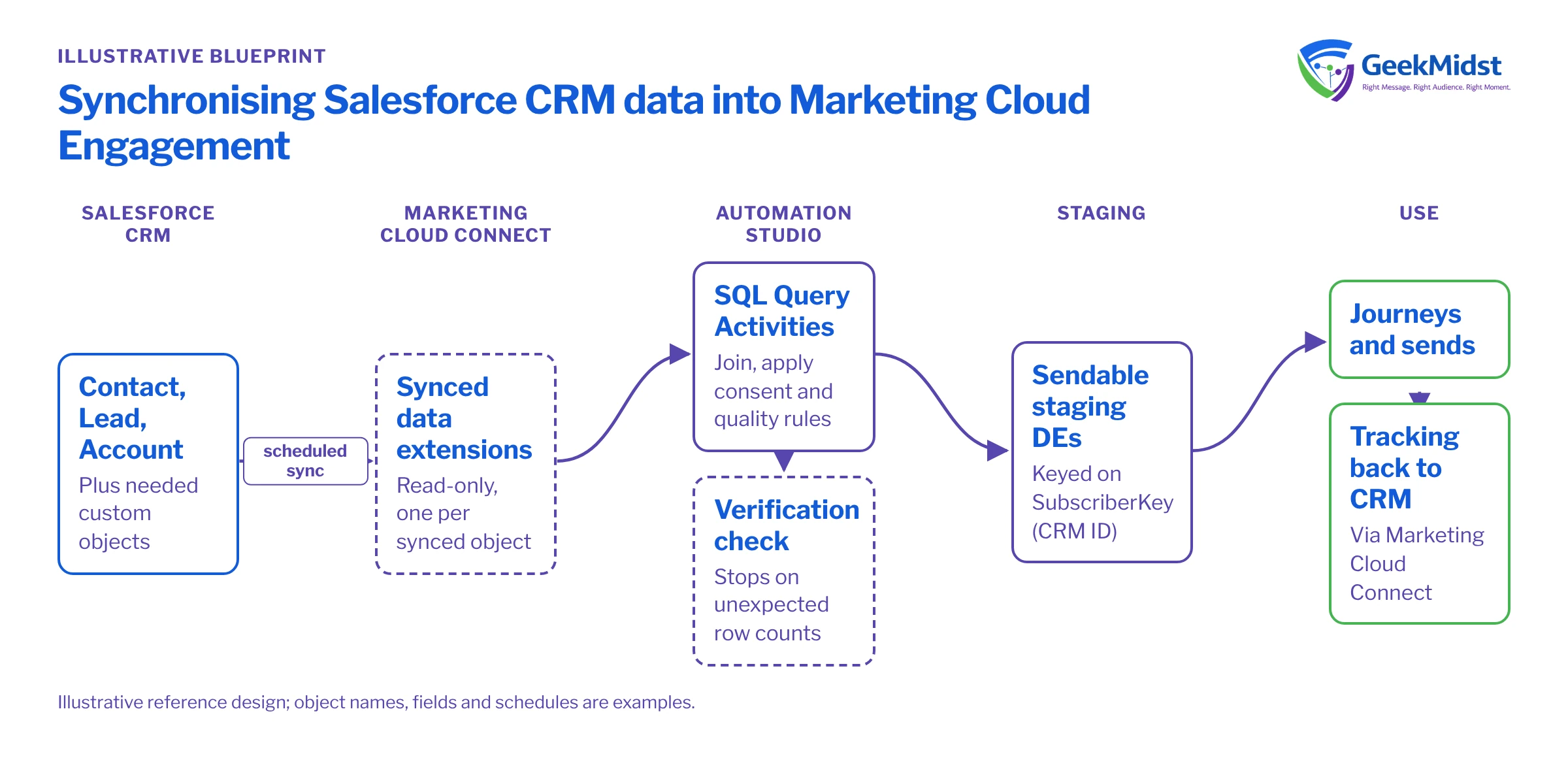
For most organisations whose customer data lives mainly in Salesforce CRM, Marketing Cloud Connect with synchronised data extensions is the starting point, with SQL staging on top. The rest of this blueprint assumes that design. Check current refresh intervals and object support for your org in Salesforce Help.
Architecture and data flow
- 01
Configure synchronised objects
Select Contact, Lead, Account and the custom objects you need, choosing only the fields with a real use. Each object appears as a read-only data extension such as Contact_Salesforce.
- 02
Set refresh and filters
Choose a refresh schedule that matches how fresh the data must be, and filter out records that should never reach marketing.
- 03
Stage with SQL
An Automation Studio automation runs Query Activities that join synchronised data, apply consent and quality rules and write sendable staging data extensions.
- 04
Verify
A verification activity or check query stops the automation if row counts fall outside expected bounds.
- 05
Use in sends and journeys
Journeys and sends use the staging data extensions, never the synchronised ones directly.
- 06
Return engagement data
Marketing Cloud Connect can write email tracking back to CRM so sales sees what was sent and clicked.
SELECT
    c.Id AS SubscriberKey,
    c.Email AS EmailAddress,
    c.FirstName,
    a.Name AS AccountName,
    a.Industry,
    c.LastModifiedDate AS CRMLastModified
FROM Contact_Salesforce c
LEFT JOIN Account_Salesforce a
    ON a.Id = c.AccountId
WHERE c.Email IS NOT NULL
  AND c.Email LIKE '%_@_%._%'
AND c.HasOptedOutOfEmail = 0The LIKE pattern is only a rough sanity check, not email validation. Because SubscriberKey is the Contact ID and the primary key of the target, each contact appears once. If you combine Leads and Contacts in one audience, deduplicate with ROW_NUMBER(); see deduplicating records with ROW_NUMBER.
Data model and consent
- Subscriber key. Use the 18-character CRM ID (Contact or Lead ID) as the subscriber key everywhere. Mixing email addresses and IDs creates duplicate subscribers with split consent and history.
- Lead conversion. A converted lead becomes a contact with a new ID, so the person gains a second subscriber key. Decide how to handle it, for example by excluding converted leads from audiences and carrying opt-outs to the contact.
- Field selection. Sync only what you use, and record each field's purpose. Unused personal data increases risk without adding value.
- Consent. Apply opt-out filters in staging queries and keep subscriber status in Marketing Cloud aligned with CRM. Our consent synchronisation blueprint covers this in depth.
- Retention. Set retention on staging data extensions so old audiences do not pile up.
Testing and launch
- Connect a sandbox to a test business unit first and confirm field mappings and user permissions.
- Reconcile record counts between CRM reports and synchronised data extensions after the first full sync.
- Run the staging queries against known test records, including contacts with no account, no email and an opt-out.
- Run the automation end to end in production with a non-sending audience before connecting journeys.
- Set up failure notifications on every automation.
How to measure it
This is plumbing, so measure reliability:
- Data freshness: time between a CRM change and its arrival in the staging data extension, sampled weekly.
- Row-count reconciliation between CRM and Marketing Cloud, with tolerances agreed in advance.
- Automation failures and how quickly each is resolved.
- Duplicate subscriber keys per email address, which should trend down after go-live.
Risks and variations
- Large objects can make sync and queries slow. Filter at sync level and avoid unnecessary joins.
- Field changes in CRM are not picked up until the field is added to the synchronised object.
- Multiple business units need a clear rule for which records each unit receives.
- Marketing Cloud Next uses a different data foundation, so this design does not carry over directly.
See Marketing Cloud Connect sync patterns and pitfalls and our Salesforce integration services.
Is your CRM data reaching Marketing Cloud cleanly?
We can review your Marketing Cloud Connect setup, subscriber keys and staging automations, and propose fixes in priority order.


