

Activating Data Cloud Segments in Journeys
A reference design for turning Data Cloud segments into Journey Builder audiences, covering identifiers, activation, staging, journey entry, consent and testing.

This is an illustrative blueprint. It is a reference architecture, not a write-up of a specific client project; outcomes depend on your data and setup.
Building a segment in Data Cloud is the easy part. The hard part is getting the right people into a Marketing Cloud Engagement journey, once, with the attributes the emails need, and with consent respected. This blueprint describes a reference design for activating Data Cloud (now branded Data 360) segments into Journey Builder.
This is a reference blueprint, not a write-up of a specific client project. The example is a cross-sell segment: customers who bought a core product in the last 60 days but no accessories.
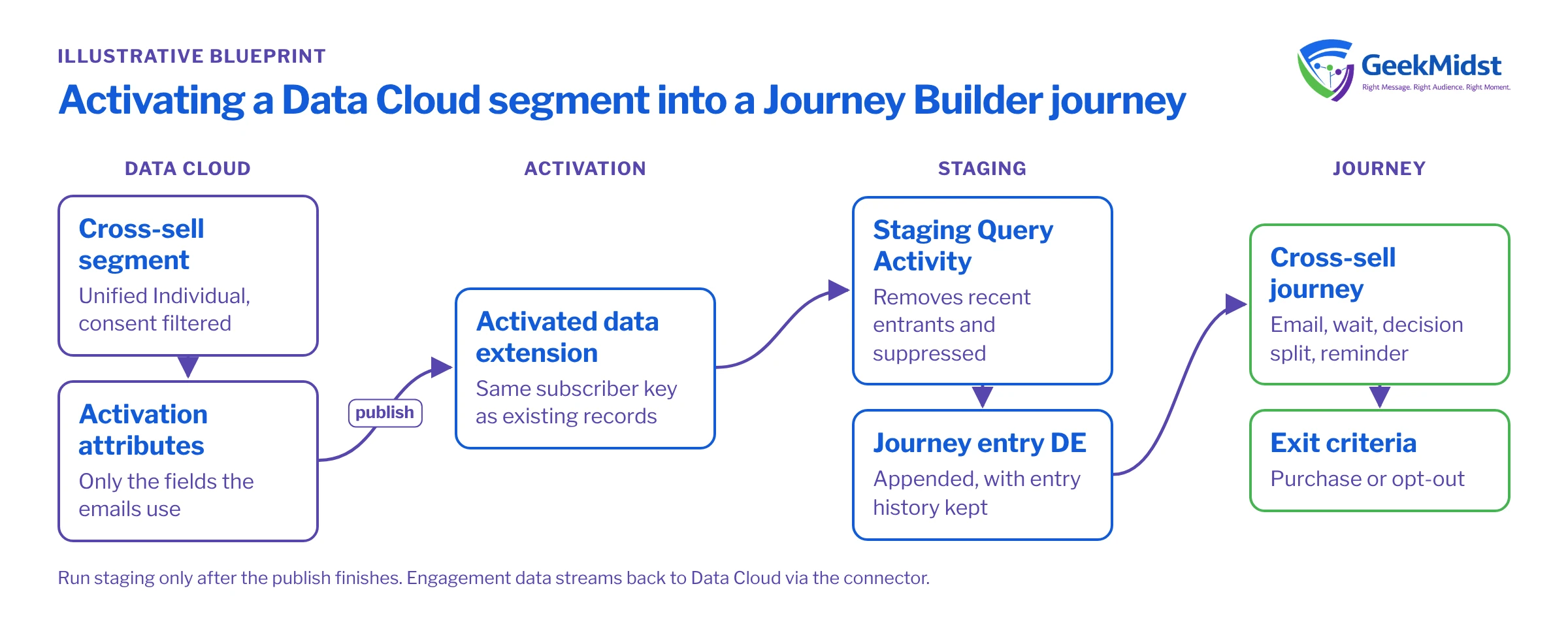
The business problem
- Segments are built in Data Cloud, but marketers export them to files to load into Marketing Cloud.
- Activated audiences reach Marketing Cloud with a different subscriber key from the one existing journeys use, so history and suppression do not line up.
- Contacts re-enter the same journey every time a segment refreshes.
- Nobody is sure whether consent has been checked in Data Cloud, in Marketing Cloud, or both.
Architecture and data flow
- 01
Build the segment
Segment on Unified Individual using order data and a calculated insight for accessory purchases. Filter on email consent in the segment itself.
- 02
Choose activation attributes
Add only the attributes the journey needs, such as first name, product purchased and purchase date, so the activated data extension stays lean.
- 03
Activate to Marketing Cloud Engagement
The activation target writes segment members to a data extension in the chosen business unit on the segment's publish schedule.
- 04
Stage and filter
A Query Activity copies members into a journey entry data extension, removing anyone who entered recently and anyone suppressed in Marketing Cloud.
- 05
Enter the journey
The journey uses the staging data extension as its entry source on a schedule that runs after staging completes.
- 06
Feed results back
Engagement data streams back into Data Cloud through the Marketing Cloud Engagement connector for future segments and reporting.
Identifiers: get this right first
The activated records must carry the same subscriber key Marketing Cloud already uses, normally the CRM Contact ID. If the activation writes a different identifier, every activated person becomes a new subscriber with no history and no existing opt-outs. Before building anything, confirm which contact point and identifier your activation uses for the subscriber key, and test with a handful of known people. Our article on activating Data Cloud segments to Marketing Cloud goes through the configuration.
Why stage instead of entering directly?
The activated data extension reflects current segment membership and is managed by Data Cloud. Pointing a journey straight at it couples journey behaviour to publish timing and makes re-entry hard to control. A staging step gives you a place to apply Marketing Cloud suppression, a re-entry window and a record of who entered when.
SELECT
    a.SubscriberKey,
    a.EmailAddress,
    a.FirstName,
    a.ProductPurchased,
    GETDATE() AS StagedDate
FROM DC_CrossSell_Accessories a
LEFT JOIN CrossSell_Entry_History_DE h
    ON h.SubscriberKey = a.SubscriberKey
   AND h.StagedDate >= DATEADD(DAY, -30, GETDATE())
LEFT JOIN Global_Suppression_DE g
    ON g.EmailAddress = a.EmailAddress
WHERE h.SubscriberKey IS NULL
  AND g.EmailAddress IS NULL
AND a.EmailAddress IS NOT NULLA second query appends the same rows to CrossSell_Entry_History_DE so the 30-day re-entry window works. Run the staging query only after the activation's publish has finished; scheduling it immediately after can pick up a half-written audience.
Journey design
The journey itself is short: an email featuring accessories that match the product purchased, a wait, a decision split on whether an accessory order has arrived (refreshed from order data), and a reminder for those who have not bought. Exit criteria remove people who purchase or opt out. Keep the journey's entry mode set so a contact cannot be in it twice at the same time.
Consent and data handling
- Filter on consent in the Data Cloud segment and again by subscriber status in Marketing Cloud. Belt and braces is right here.
- Activate only the attributes the emails use. Extra personal data in Marketing Cloud is extra risk.
- Set retention on staging and history data extensions in line with your data retention policy.
Testing and launch
- Build the segment in a sandbox or with a narrow test filter and check membership against a known-answer list.
- Activate to a test business unit or a test data extension and confirm subscriber keys match existing records.
- Run staging and check exclusions with test records that are recently entered, suppressed and missing email.
- Run the journey in test mode, then activate with a limited first publish before widening.
How to measure it
Use a holdout. Hold back a random share of segment members (for example, by a Random Split at the start of the journey) and compare accessory purchase rates over a fixed window. Define the outcome window before launch and keep the holdout share fixed for the test period. Compare against the holdout, not against everyone outside the segment, because segment members differ from the rest of the base. Track segment size per publish, staging exclusions and entry counts to catch pipeline issues early.
Risks and variations
- Publish timing drift leaves journeys running on stale audiences. Monitor publish status; see monitoring Data Cloud jobs and refresh schedules.
- Segment logic changes silently change who enters. Version segment definitions and review changes.
- Overlap with other journeys. A customer may qualify for cross-sell and win-back at the same time. Agree priority rules and exclude members of higher-priority journeys in the staging query.
- Credit consumption grows with segment frequency and size; check current limits and pricing for your org.
- Marketing Cloud Next can use Data Cloud segments natively, which removes the staging step but needs its own design.
Related services: Data Cloud calculated insights and segmentation and Journey Builder consulting.
Ready to activate Data Cloud segments?
We can check your identifiers, activation setup and journey entry design, and help you launch a first segment with a proper holdout.


