

Automation Rules, Completion Actions and Lists
Account Engagement gives you several ways to automate the same outcome. Knowing which runs when, and which is retroactive, prevents duplicated and conflicting logic.

You want every prospect who downloads the pricing guide to be tagged, added to a campaign and assigned if they are a good fit. In Account Engagement you could do that with a completion action, an automation rule, a segmentation rule, a dynamic list feeding Engagement Studio, or several of these at once. The last option is common, and it is why so many accounts have prospects assigned twice or added to lists nobody can explain.
This guide sets out how each tool behaves so you can choose one owner for each piece of logic.
How the four tools behave
| Runs when | Looks at existing prospects | Can take actions | Best for | |
|---|---|---|---|---|
| Completion action | The specific event happens, such as a form submission or link click | No, only the prospect who did it | Yes | Immediate response to one asset |
| Automation rule | Continuously, whenever prospects match | Yes, including those who matched before it existed | Yes | Ongoing criteria-based logic |
| Segmentation rule | Once, when you run it | Yes, at that moment only | Limited, mainly list and tag changes | One-off clean-up or bulk tagging |
| Dynamic list | Membership updates automatically as criteria change | Yes | No, membership only | Audiences for sends and program entry |
Completion actions
Completion actions are attached to an asset: forms, form handlers, landing pages, files, custom redirects, and email links. They fire when that asset is used, for that prospect, at that moment. They are ideal for responses that belong to the asset itself: "add to the webinar campaign as Registered", "notify the event owner", "send the confirmation email".
Their weakness is visibility. Logic is spread across many assets, so an admin looking for "why was this prospect assigned?" has to check every asset. Keep completion actions to actions that are clearly about that asset.
Automation rules
Automation rules evaluate criteria such as score, grade, field values, list membership and activity, and act on every prospect that matches. Two behaviours matter:
- They are retroactive. When you resume a rule, it acts on existing prospects that already match. Always preview first.
- They match once by default. A prospect who matched before will not match again unless you enable repeat and set the interval. Score decay and re-qualification rules depend on this setting.
Use automation rules for logic that should apply to anyone, however they arrived: MQL handoff, decay, lifecycle stage updates, data hygiene.
Segmentation rules
Segmentation rules are run once. They are useful for bulk changes, such as tagging every prospect from a past event or adding a historic group to a static list. They do nothing afterwards, which makes them safe for clean-up and unsuitable for ongoing logic.
Dynamic lists
Dynamic lists hold whoever matches their criteria and update automatically. You cannot add or remove members by hand. They do not take actions themselves, but they make excellent recipient and suppression lists for emails and Engagement Studio programs. Because they are always current, they also make useful reporting segments.
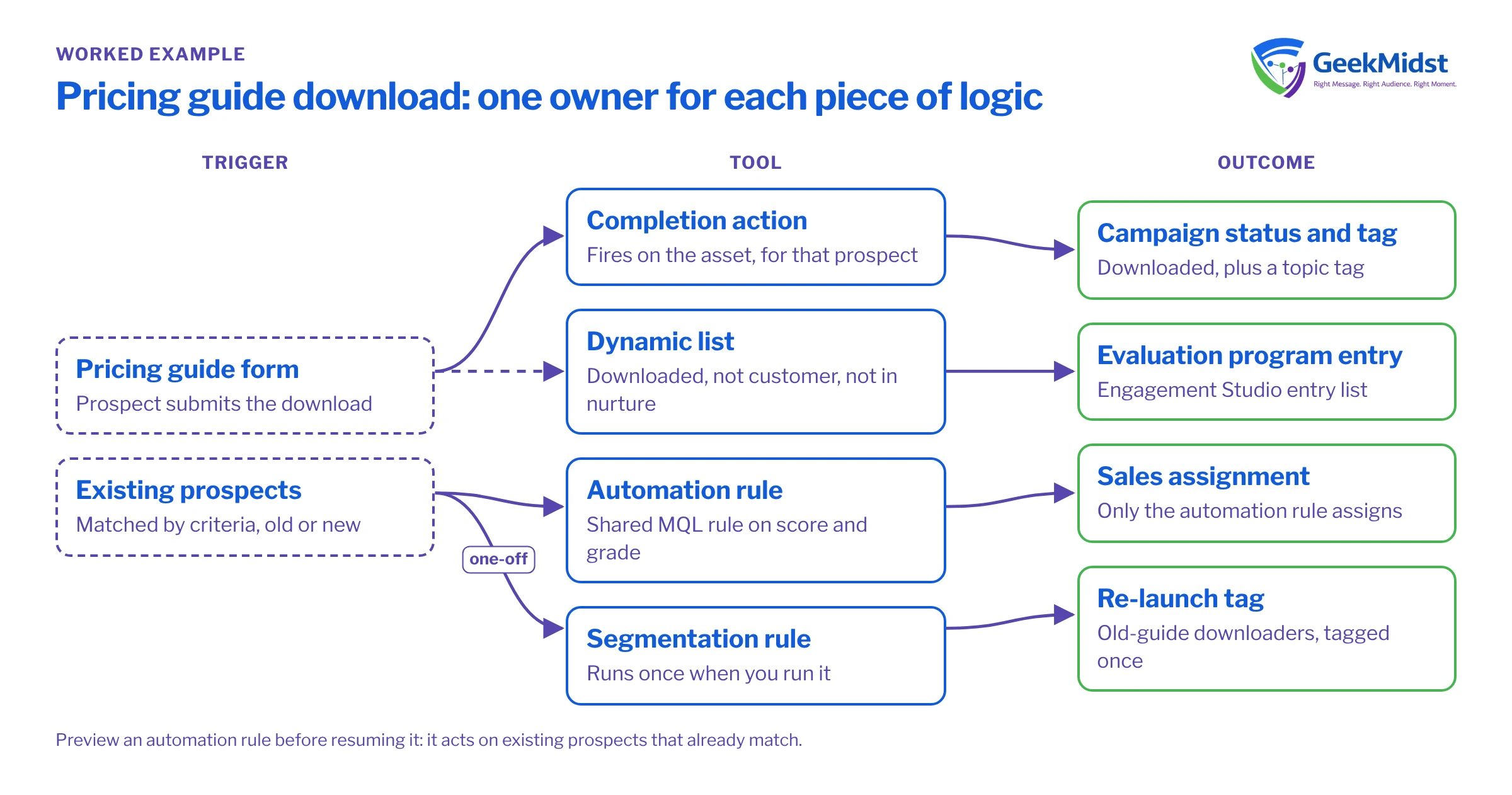
Worked example: the pricing guide download
A clean design for the scenario in the introduction:
- Completion action on the form: add to the "Pricing Guide" Salesforce campaign with status "Downloaded", and add a tag for the topic. These belong to the asset.
- Dynamic list: "Downloaded pricing guide, not customer, not in active nurture". This becomes the entry list for an evaluation-stage program.
- Automation rule (existing, shared): the one MQL rule that assigns any prospect whose score and grade pass the threshold. No assignment logic in the completion action.
- Segmentation rule (one-off): tag prospects who downloaded the old version of the guide so they can be included in a re-launch email.
Each piece of logic has one owner, and an admin can answer "why did this happen?" by checking a predictable place.
Common mistakes and how to diagnose them
- Assigned twice or to the wrong owner. Both a completion action and an automation rule assign. Pick one; usually the automation rule, so assignment criteria live in one place.
- A rule that "stopped working". It matched each prospect once and repeat is off. Check the repeat settings and the rule's matched prospects.
- A dynamic list that is empty. Criteria use "match all" when "match any" was intended, or reference a field that is not populated. Open a prospect you expect to see and test each criterion against their record.
- Programs that never receive new prospects. The entry list is static, so new matches never join. Switch to a dynamic list or add an automation rule that adds to the list.
- Nobody knows what runs. Keep a simple register: each automation rule, its purpose, owner and repeat setting, and a note of which assets carry completion actions.
To trace why a specific prospect changed, the prospect's audit history is the first place to look, as it records which rule or action made each change.
Automation hygiene checklist
- 01
List every active automation rule
Record its purpose, criteria, actions, repeat setting and owner. Pause any that nobody can explain, after checking their impact.
- 02
Audit completion actions on key assets
Review forms, form handlers and high-traffic email links. Remove actions that duplicate an automation rule.
- 03
Convert static entry lists
Replace static lists used for program entry with dynamic lists where membership should stay current.
- 04
Use naming conventions
Prefix rules and lists by purpose, such as MQL, Decay, Hygiene or Entry, so their role is clear at a glance.
- 05
Review after each campaign launch
New assets bring new completion actions. Check them against the register before go-live.
Related reading
These tools support the bigger designs in Engagement Studio program design patterns and the thresholds in lead scoring and grading. If your automation is already tangled, our Account Engagement consulting work often starts with exactly this register.
Automation that nobody can explain?
We can build a register of your rules, actions and lists, find the conflicts and simplify the logic so each outcome has a clear owner.


