

Designing B2B Nurture Programmes That Work
A nurture programme is a set of decisions about who enters, what they receive, when they leave and how you know it helped. Design those first, then build.

Many B2B nurture programmes are a sequence of six emails sent a week apart to everyone who downloaded something. They run for years, nobody can say whether they helped, and prospects who are ready to buy still wait for email five.
A better programme starts on paper. Decide the stages a buyer moves through, what should happen at each stage, and the signals that move someone forward or take them out. Building it in Account Engagement is the easy part once those decisions are made.
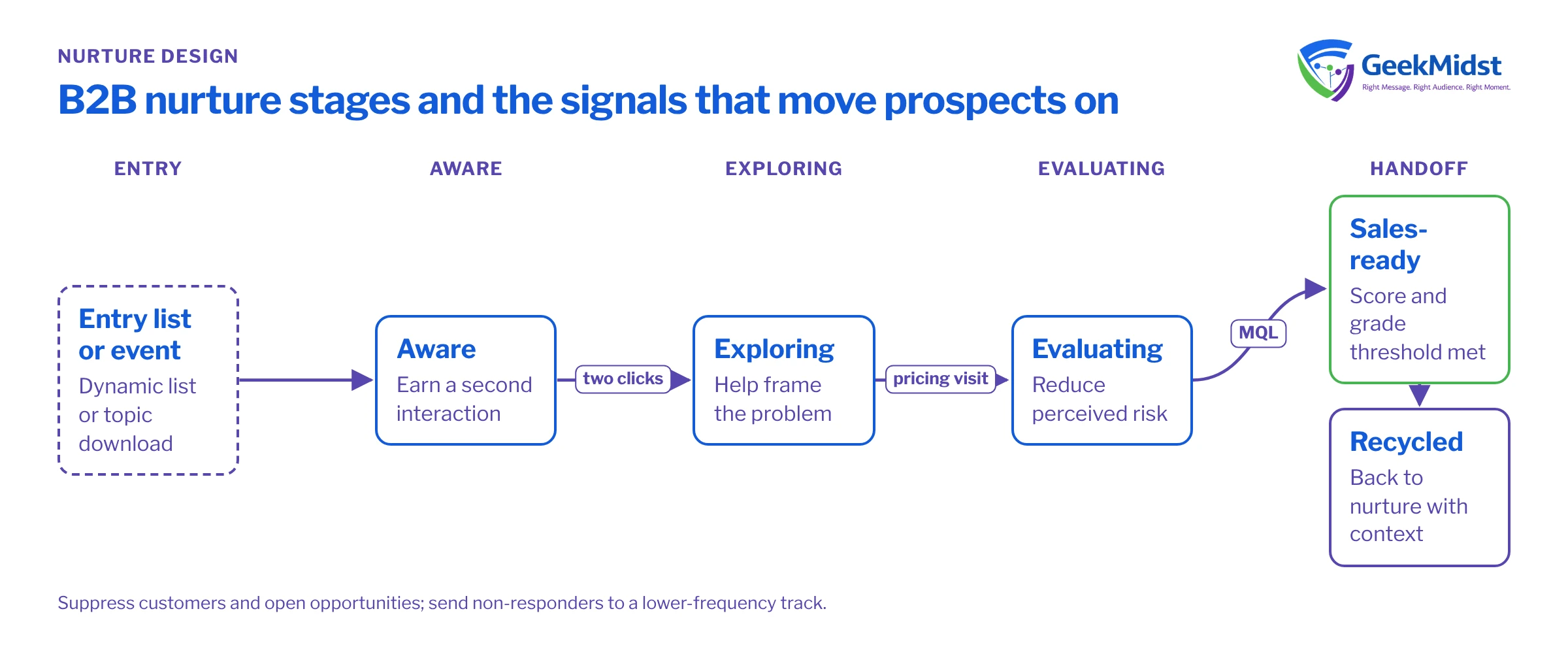
Start with the buyer stage, not the email
Map your buying process into a small number of stages that sales and marketing both recognise. A common B2B shape is:
- Aware: has engaged once, often through content or an event, with no clear need yet.
- Exploring: is reading about the problem and possible approaches.
- Evaluating: is comparing options, looking at pricing, case material or technical detail.
- Sales-ready: meets your score and grade threshold and is handed to sales.
- Recycled: was handed to sales but is not buying now, and returns to nurture with context.
Each stage needs an entry rule, a purpose, content that serves that purpose, and an exit rule. If you cannot write the exit rule, the stage is not well defined.
Example content map for a three-stage nurture
| Purpose | Content that fits | Exit signal | |
|---|---|---|---|
| Aware | Earn a second interaction | Short practical guide, checklist, webinar recording | Clicks two pieces of content or visits a solution page |
| Exploring | Help frame the problem | Comparison articles, explainers, a reference architecture | Visits pricing or product detail pages, score passes a mid-point |
| Evaluating | Reduce perceived risk | Implementation approach, FAQs, a scoping conversation offer | Requests a call or passes the MQL threshold |
| Recycled | Stay useful without pressure | Quarterly round-up, new material relevant to their stated need | Re-engages strongly or sales re-opens the lead |
Entry, suppression and exit rules
Entry should be driven by a dynamic list or a clear event, such as a content download for a specific topic. Avoid one large "all prospects" list. Smaller, purposeful entry lists make it obvious why someone is receiving a message.
Suppression matters as much as entry. Typical suppression lists include current customers, open opportunity contacts, competitors, prospects already in another active nurture, and anyone assigned to a sales user who is actively working them. Suppression lists in Engagement Studio stop a prospect from receiving actions while they match, which keeps the programme from talking over a live sales conversation.
Exit happens in three ways: the prospect reaches the end, the prospect qualifies and is handed to sales, or the prospect stops engaging. Plan all three. A prospect who has ignored every email for three months should leave the programme and go to a lower-frequency track, not keep receiving the same cadence.
Cadence and timing
There is no correct interval. Start with something the audience can absorb, often one useful message every one to two weeks, and let behaviour shorten or lengthen the path. In Engagement Studio, triggers such as "link clicked" with a wait window let engaged prospects move faster, while non-responders take a slower branch. Use the program's send day and time settings to keep emails inside business hours. These settings use one time zone for the whole program, so audiences in very different regions may need separate programs; check the current options in Salesforce Help.
Personalising without fragile templates
Account Engagement emails use Handlebars Merge Language (HML). Keep personalisation simple and always provide a fallback for missing data. The snippet below assumes a standard first name field and shows a safe greeting:
<p>
  {{#if Recipient.FirstName}}
    Hi {{Recipient.FirstName}},
  {{else}}
    Hello,
  {{/if}}
</p>
<p>Here is the implementation checklist we mentioned last week.</p>For variation by industry or product interest, dynamic content attached to a prospect field is usually easier to maintain than many near-identical emails. Keep the number of variations small; every variation is another thing to test and keep current.
The sales handoff
The handoff is where most programmes leak. Agree with sales:
- The exact score and grade combination that triggers handoff (see lead scoring and grading)
- Who receives the lead, and how quickly they are expected to act
- What context travels with it, such as recent activity, campaign and the content consumed
- What happens if sales rejects or recycles the lead, including the reason codes they should use
A completion of the nurture should never be the only handoff route. A prospect who requests a demo in week one should go straight to sales, which is usually handled by a form completion action or automation rule outside the programme.
Measuring whether nurture helped
Opens and clicks show the programme is being read, not that it changed anything. To understand impact:
- Hold out a small random group of eligible prospects who do not enter the programme, and compare conversion to MQL and opportunity over the same period.
- Track stage movement, not just email engagement: how many prospects moved from Exploring to Evaluating, and how long it took.
- Use connected campaigns so programme members appear in Salesforce campaigns and campaign influence reporting. See connected campaigns and attribution basics.
Be honest about what the data can show. Small B2B audiences make statistical certainty hard; a consistent direction over several quarters is often the best you will get. Our article on measuring the impact of marketing automation honestly goes deeper.
Common mistakes
- One programme for every persona and product, which makes content generic and branching unmanageable
- No suppression for open opportunities, so prospects receive "are you still interested?" emails during a negotiation
- Exit rules that only exist at the end of the programme
- Content written once and never reviewed, so links break and offers expire
- Counting email clicks as success without a holdout or stage measure
Design checklist
- Stages defined and agreed with sales
- Entry, suppression and exit rules written for each stage
- Content mapped to each stage's purpose, with owners and review dates
- Handoff and recycle rules documented
- Personalisation fallbacks tested with blank and unusual data
- Holdout and stage reporting set up before launch
When you are ready to build, Engagement Studio program design patterns covers how to structure the program itself.
Planning a nurture programme?
We can help you define stages, map content and design the Engagement Studio build and measurement approach before anything goes live.


