

Connected Campaigns and Attribution Basics
Attribution reporting is only as good as the campaign structure and contact roles underneath it. Here is how connected campaigns and influence fit together.

Leadership asks which campaigns generated pipeline. Marketing has Account Engagement reports showing clicks and form fills; sales has opportunities in Salesforce. Connecting the two is what connected campaigns and campaign influence are for, but the reports only make sense if the structure underneath is right.
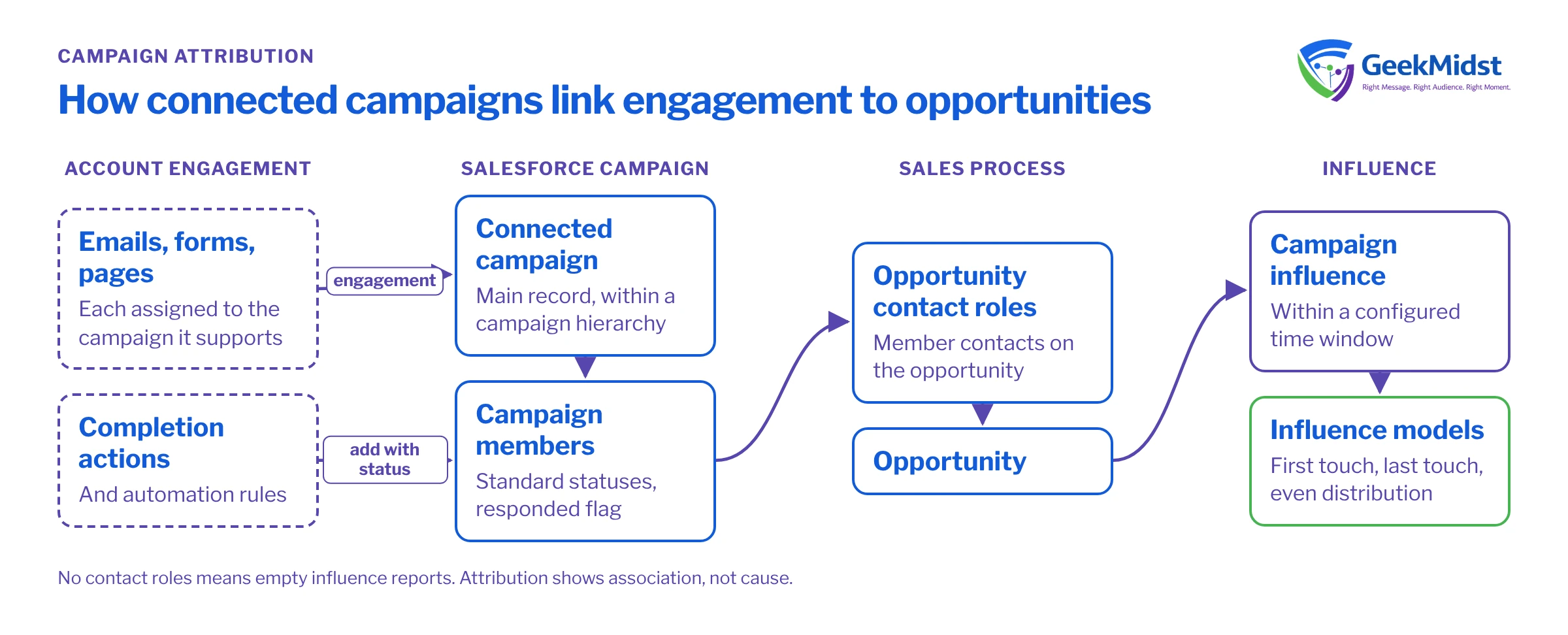
What connected campaigns do
With connected campaigns enabled, Account Engagement campaigns are aligned with Salesforce campaigns. The Salesforce campaign becomes the main record: you create and manage campaigns in Salesforce, and Account Engagement assets such as emails, forms and landing pages are associated with that campaign. Engagement with those assets can then appear on the Salesforce campaign, alongside campaign members and, through influence, opportunities.
This gives you three things that are hard to get otherwise:
- One campaign list used by both marketing and sales
- Campaign hierarchy, so a programme can roll up from individual tactics to a parent initiative
- Engagement and influence reporting on the Salesforce side, where pipeline lives
Setting up connected campaigns sensibly
- 01
Agree a campaign hierarchy
Decide levels before building, for example initiative, programme and tactic. Keep it shallow enough that people use it correctly.
- 02
Define naming conventions
Include year or quarter, region and channel in a predictable order so campaigns sort and filter cleanly.
- 03
Standardise member statuses
Agree a small set of statuses per campaign type, such as Invited, Registered, Attended for events, and mark which count as responded.
- 04
Enable and align campaigns
Enable connected campaigns, then align existing Account Engagement campaigns to the right Salesforce campaigns rather than creating duplicates.
- 05
Associate assets consistently
Every email, form and landing page should be assigned to the campaign it supports. Unassigned assets disappear from engagement reporting.
- 06
Add members through automation
Use completion actions and automation rules to add prospects to Salesforce campaigns with the right status at the right moment.
First touch is not attribution
Each prospect has a source campaign in Account Engagement, set when the prospect is created. It is a useful first touch record, but it does not change as the buyer engages with later campaigns. Using it alone gives all credit to whatever the person happened to do first, often a content download years before the deal.
Campaign influence looks across the campaigns a buyer engaged with and relates them to opportunities.
How campaign influence connects campaigns to revenue
Customizable Campaign Influence in Salesforce links campaigns to opportunities through contacts. A campaign influences an opportunity when a contact who is a campaign member is also a contact role on that opportunity, typically within a time window you configure. Influence models then decide how credit is shared.
Common influence models
| How credit is shared | Good for | Watch out for | |
|---|---|---|---|
| First touch | All credit to the earliest influencing campaign | Understanding how buyers first arrive | Ignores everything that happened during evaluation |
| Last touch | All credit to the most recent campaign before the opportunity | Seeing what precedes sales conversations | Overvalues late-stage tactics such as demos |
| Even distribution | Credit shared equally across influencing campaigns | A balanced starting view | Treats a newsletter click like an event attendance |
| Data-driven | Credit weighted by a model trained on your data | Larger datasets with consistent history | Availability depends on edition; needs volume to be meaningful |
Exact models available, and their configuration options, depend on your edition and settings. Check current behaviour in Salesforce Help before promising a particular report to stakeholders.
The contact role problem
Influence depends on opportunity contact roles. If sales does not add contacts to opportunities, no campaign can influence them, and attribution reports show very little. This is the most common reason influence reports look empty. Options include making contact roles part of the sales process at a stage gate, or using automation to add the primary contact when an opportunity is created from a converted lead. Either way, it is a sales process decision, not just a marketing setting.
Before you start
The query below is a quick health check of campaign membership. It uses standard CampaignMember fields and assumes your member statuses correctly mark which statuses count as responded. Run it in a sandbox or a read-only tool; it is for analysis only.
SELECT CampaignId, Campaign.Name, COUNT(Id) respondedMembers
FROM CampaignMember
WHERE HasResponded = true
AND Campaign.IsActive = true
GROUP BY CampaignId, Campaign.Name
ORDER BY COUNT(Id) DESC
LIMIT 50Active campaigns with assets in use but no responded members usually mean statuses are not being set by completion actions, or the responded flag is wrong on the status values.
Common mistakes
- Duplicate campaigns created in both systems before connected campaigns were enabled, so engagement splits across two records
- Assets not assigned to campaigns, so engagement history is incomplete
- Too many member statuses, which makes responded counts inconsistent across campaigns
- No contact roles, so influence is empty regardless of marketing activity
- Treating one model as the truth. Compare first touch, last touch and even distribution side by side and discuss the differences.
Attribution checklist
- Hierarchy and naming conventions documented
- Member statuses standardised, with responded flags checked
- Every active asset assigned to a campaign
- Contact roles captured on opportunities as part of the sales process
- Influence models configured and compared, not used in isolation
- Reports reviewed with sales and finance before being shared widely
Attribution shows association, not cause. For a fuller view of impact, combine it with the holdout approaches in measuring the impact of marketing automation honestly. Our marketing analytics and reporting service and nurture design guide cover the surrounding work.
Questions we hear
Can I turn connected campaigns off again?
Why does an opportunity show no influencing campaigns?
Does campaign influence prove that marketing caused the revenue?
Should every email be its own campaign?
Attribution reports nobody believes?
We can review your campaign structure, member statuses and contact role process, then set up influence reporting that sales and finance can follow.


