

Engagement Studio Program Design Patterns
Most tangled Engagement Studio programs grew one branch at a time. These patterns give you a structure to start from and a way to keep programs readable.

Open an Engagement Studio program that has been live for two years and you often find forty steps, branches that lead nowhere, and a comment that says "do not touch". The program still sends, but nobody can explain what a prospect experiences. The fix is not a better canvas. It is designing programs from a small set of known patterns and keeping each one focused on a single job.
Engagement Studio calls these automations programs; we use that term below for the object itself.
The building blocks
Every program is built from three main kinds of step, plus wait steps that hold prospects for a set time:
- Actions do something: send an email, adjust score, add to a list, assign, create a Salesforce task, add to a campaign.
- Triggers wait for a behaviour within a window you set, such as "email link clicked within 5 days", and branch on yes or no.
- Rules check a condition immediately, such as grade, a field value or list membership, and branch on yes or no.
The difference between triggers and rules is the source of many design errors. A trigger waits; a rule does not. If you need to check a field after giving the prospect time to act, put a wait step before the rule.
Prospects enter from recipient lists, which can be static or dynamic, and suppression lists keep matching prospects from receiving actions. Program settings control send days and times and whether prospects can enter more than once.
Six reusable patterns
Linear drip
A short, fixed sequence for a single purpose such as a post-download follow-up. Few branches, clear end, easy to report on.
Engagement fork
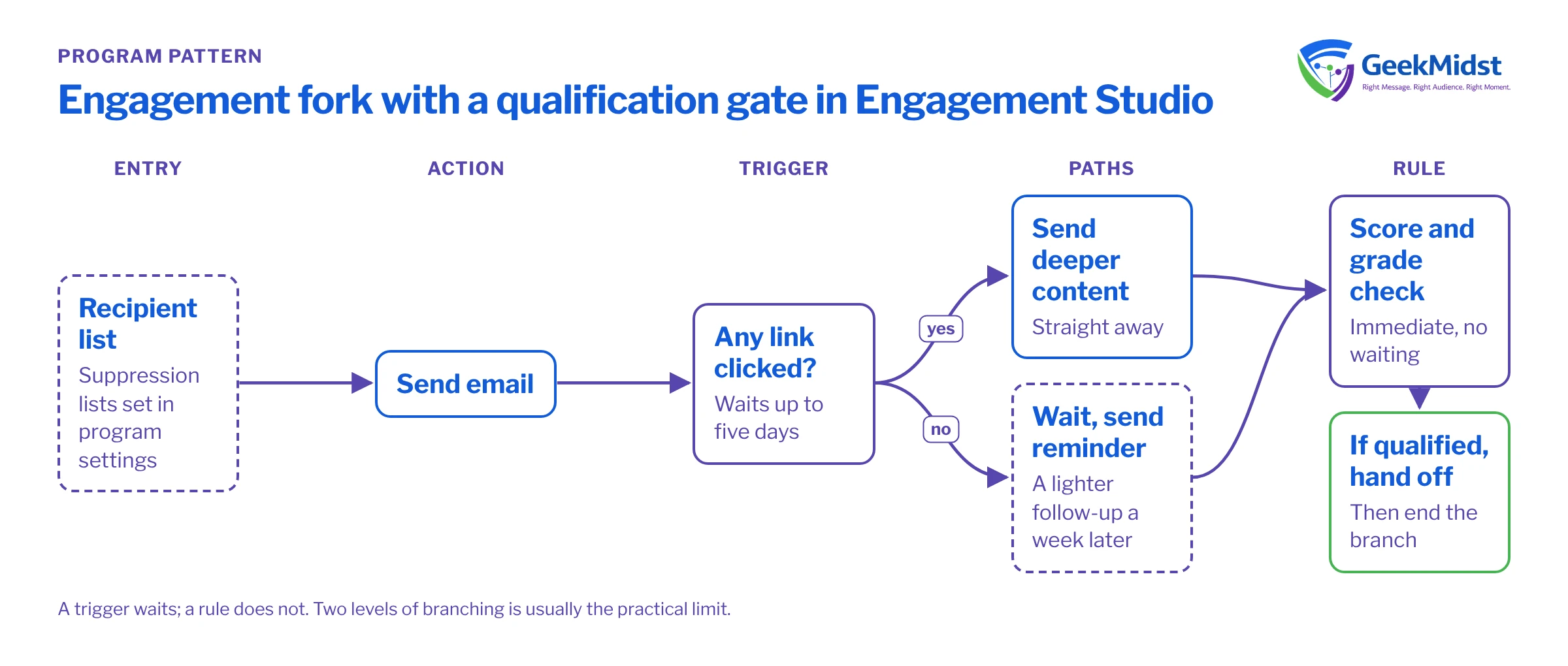
After each send, a click trigger splits engaged prospects onto a faster, deeper path and non-responders onto a slower one.
Qualification gate
Rules on score and grade decide whether to hand off to sales or continue nurturing. Pairs with your MQL rule.
→Event series
Invitation, reminder and follow-up steps keyed to a registration list, with separate branches for attendees and no-shows.
→Re-engagement
A short attempt to win back inactive prospects, ending with a clear decision to keep, slow down or stop mailing.
→Recycle track
A low-frequency program for leads returned by sales, with entry driven by a recycle status and exit on strong re-engagement.
Pattern details that matter
Engagement fork
Use link click triggers rather than opens. Some mail clients load images automatically for privacy reasons, so an open no longer reliably means a person read the email. A typical fork reads: send email, wait for "any link clicked" within five days, then on yes send the next deeper piece immediately, and on no wait a further week and send a lighter reminder. Keep forks shallow. Two levels of branching is usually the limit before the program becomes hard to test.
Qualification gate
Place a rule that checks score and grade after each meaningful content step. If the prospect qualifies, the yes branch assigns or notifies and then ends, or adds the prospect to a list that removes them from the program. Avoid duplicating your MQL automation rule inside every program; let one rule own the handoff and use the gate to stop nurturing someone who has already qualified.
Re-engagement
Re-engagement programs should be short and should end in a decision. For example: two messages over three weeks, then a rule on any activity. If there is none, add the prospect to a "do not mail" or low-frequency list, and record why. Mailing inactive addresses indefinitely hurts deliverability for everyone else.
Recycle track
Entry comes from a dynamic list based on a lead status or recycle reason set by sales. Suppress open opportunity contacts, keep the cadence low, and exit anyone whose engagement rises sharply so sales can be told.
Structuring for readability
- One job per program. If you are describing a program with "and", consider splitting it.
- Name steps meaningfully. Email names in a program should say what they are and which stage they serve.
- Put suppression in the program settings, not in rules at every step.
- End branches explicitly so it is clear where prospects stop.
- Version, do not patch. For significant changes, clone the program, change the copy and plan the switch-over, rather than editing a live program prospects are halfway through.
Testing a program before you start it
- 01
Review the map with a second person
Walk the canvas step by step and describe aloud what a prospect experiences on each path. Gaps in logic are much easier to hear than to see.
- 02
Use the test view
Engagement Studio's test view lets you simulate a path by choosing outcomes for each trigger and rule. Run each path at least once.
- 03
Seed real test prospects
Add a few internal test prospects with different field values to a test list and run them through a copy of the program to check emails, merge fields and timing.
- 04
Check suppression and entry counts
Confirm the recipient list size is what you expect and that suppression lists remove customers and open opportunities.
- 05
Start small
Where possible, start with a subset of the audience, watch the first week of reporting, then widen entry.
Common mistakes and how to diagnose them
- Prospects stuck on a step. Usually a trigger with a long wait window or a step that depends on a list they never join. The program report shows where prospects are waiting.
- No one goes down the yes branch. The trigger is checking the wrong email or asset, or the criteria use a field that is not populated.
- Prospects receive emails out of hours. Send day and time settings are not set, or the time zone assumption does not match the audience.
- Duplicate sends across programs. The same prospect is in two programs with no shared suppression list. Maintain a list of "in an active nurture" and suppress against it.
Pattern checklist
- The program does one job, written in one sentence
- Entry list and suppression lists defined in settings
- Triggers use clicks or form activity, not opens alone
- Every branch ends deliberately
- Each path tested in the test view and with seeded prospects
- A change process that clones rather than patches live programs
For the strategy behind the program, see designing B2B nurture programmes. When a program needs support from automation rules and lists, read automation rules, completion actions and dynamic lists.
Programs that nobody wants to touch?
We can map what your existing Engagement Studio programs actually do, then redesign them into simpler, testable patterns.


