

Lead Scoring and Grading in Account Engagement
Score measures interest, grade measures fit. Here is how to set both up in Account Engagement so sales trusts the leads it receives.

Most Account Engagement (formerly Pardot) orgs have scoring switched on from day one, yet sales teams still say the leads are poor. The usual cause is not the tool. It is a score that only ever goes up, a grade nobody configured beyond the default profile, and a handoff threshold that was picked once and never tested.
This guide walks through how scoring and grading actually work, how to implement them in a sensible order, and how to diagnose the problems that make sales stop trusting the numbers.
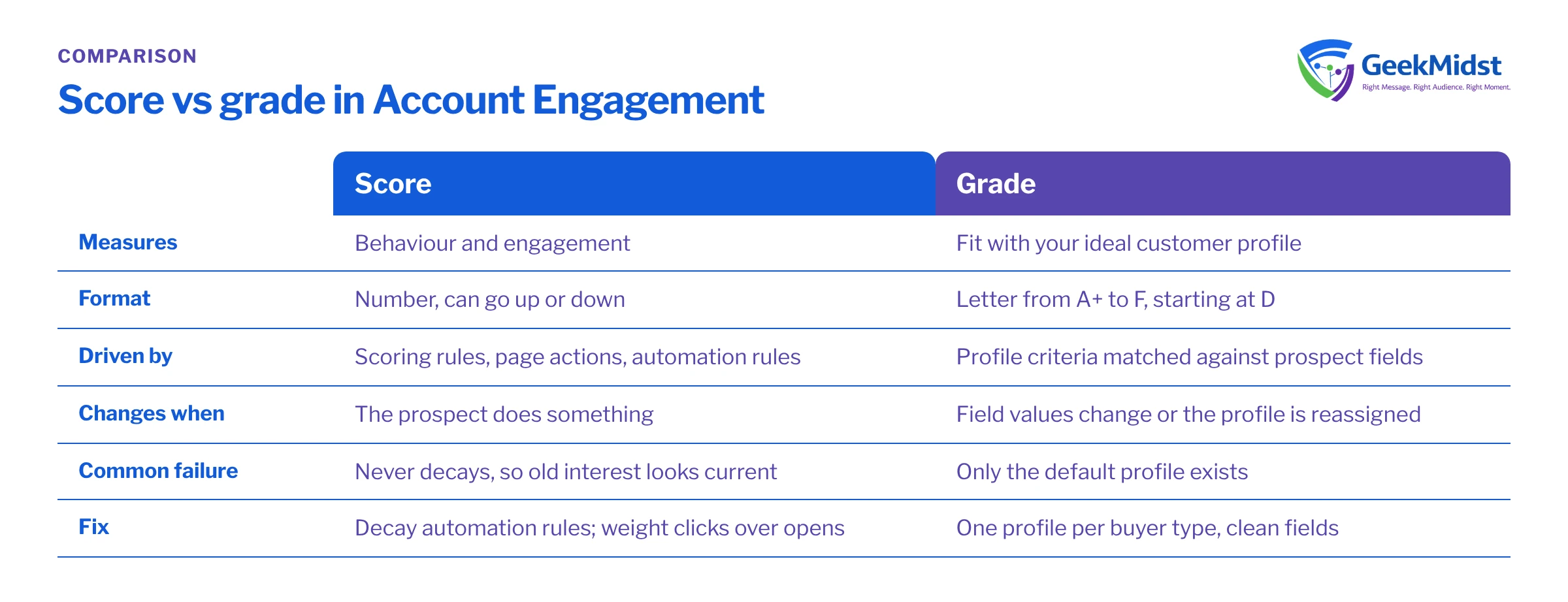
Score and grade measure different things
Score is a number that reflects a prospect's engagement: form submissions, page views, email clicks, file downloads and so on. Each activity adds or subtracts points according to your scoring rules. Score answers the question how interested is this person right now?
Grade is a letter from A+ to F that reflects how well the prospect matches your ideal customer. It is calculated from profile criteria such as job title, industry, company size or country. Every prospect starts at D in their assigned profile, and each criterion they match (or fail) moves the grade up or down by a third of a letter, two thirds, or a full letter. Grade answers is this the kind of person we want to sell to?
You need both. A high score with a poor grade is often a student, a competitor or a job seeker reading your content. A great grade with no score is a good-fit contact who has not engaged yet, which is a nurture problem, not a sales one.
Score versus grade at a glance
| Score | Grade | |
|---|---|---|
| Measures | Behaviour and engagement | Fit with your ideal customer profile |
| Format | Number, can go up or down | Letter from A+ to F |
| Driven by | Scoring rules, page actions, automation rules | Profile criteria matched against prospect fields |
| Changes when | The prospect does something | Field values change or the profile is reassigned |
| Common failure | Never decays, so old interest looks current | Only the default profile exists, so every grade is meaningless |
A sensible implementation order
- 01
Agree the definition with sales
Write down what a sales-ready lead looks like in plain words: role, company type, region, and the behaviour that signals buying intent. Without this, every number you configure is a guess.
- 02
Clean the fields grading depends on
Grading only works if job title, industry and company size are populated and consistent. Fix picklists, map form fields to the same fields, and decide how you will enrich missing values.
- 03
Build grading profiles
Create one profile per distinct buyer type or product line rather than relying on the default profile. Assign profiles with an automation rule or completion action based on a reliable field.
- 04
Tune scoring rules
Review the default point values in the scoring settings. Lower the weight of low-intent actions, raise high-intent ones such as pricing page visits or demo requests, and use page actions for pages that matter.
- 05
Add score decay
Account Engagement scores do not decay on their own. Use automation rules that subtract points when there has been no activity for a defined period, set to repeat.
- 06
Set and test the MQL threshold
Define the score and grade combination that triggers handoff, then back-test it against recent opportunities before switching on assignment.
- 07
Review with sales after a few weeks
Compare accepted and rejected leads, adjust weights and thresholds, and record each change so you can explain why the numbers moved.
Before you start
The worked example below assumes the Account Engagement managed package fields are on your Lead and Contact objects (pi__score__c and pi__grade__c), that the connector is syncing, and that your MQL rule is "score of 100 or more and grade of B or better". Your field names, threshold and grades will differ, so treat the query as a starting point for analysis, not a production report.
Worked example: setting the MQL rule
A typical handoff automation rule has criteria along these lines:
- Prospect score is greater than or equal to 100
- Prospect grade is greater than or equal to B
- Prospect is not assigned to a sales user (so the rule does not re-assign worked leads)
- Prospect email does not contain your own company domain
And actions such as:
- Assign to a queue or use Salesforce active assignment rules
- Add to the relevant Salesforce campaign with a status such as "MQL"
- Notify the assigned user or team
- Add a tag or update a lifecycle field so reporting can count MQLs over time
Preview the rule before you turn it on. The preview shows how many existing prospects already match, which is often a surprise, and tells you whether switching it on will flood the sales queue on day one.
Before agreeing the threshold, look at how your current leads would fall either side of it. A simple SOQL query in the Developer Console or a reporting tool gives you a quick view:
SELECT Id, Name, Company, Title, pi__score__c, pi__grade__c, Owner.Name
FROM Lead
WHERE IsConverted = false
AND pi__score__c >= 100
AND pi__grade__c IN ('A+', 'A', 'A-', 'B+', 'B')
ORDER BY pi__score__c DESC
LIMIT 200Grade is stored as text, so the query lists the accepted letters explicitly rather than using a comparison operator. Run the same query against leads that converted to opportunities in the last two quarters. If most of your real opportunities would have failed the threshold, the threshold is wrong, not the prospects.
Score decay without surprises
A decay rule usually looks like "last activity more than 30 days ago, subtract 10 points, repeat every 30 days". Two cautions. First, decide whether score can go below zero for your reporting and stop the rule from pushing it further. Second, decay changes historic comparisons: a prospect who was at 120 last quarter may be at 60 today. Keep a separate record, such as an MQL date field or campaign member status, so you can still count past handoffs.
Common mistakes and how to diagnose them
- Every prospect has the same grade. Usually only the default profile exists, or the criteria reference fields that are blank. Open a few prospects and check which profile is assigned and which field values the criteria are reading.
- Scores inflate overnight. Email opens are unreliable because some mail clients load images automatically for privacy protection. If opens carry points, reduce or remove them and weight clicks and form activity instead.
- Internal staff become MQLs. Your own team clicks emails and visits pricing pages. Exclude your domain in the MQL rule and consider filtering internal IP addresses from tracking.
- The MQL rule fires once and never again. Automation rules match a prospect once unless repeat is enabled. Decide whether a recycled lead should be able to re-qualify, and configure repeat with a sensible interval.
- Sales sees a different score in Salesforce. Check that the score and grade fields are syncing and that the connector user has edit access to them. See prospect sync errors for how to trace this.
If your edition includes Einstein Behavior Scoring, treat it as a complementary signal rather than a replacement for an agreed, explainable rule. Availability varies by edition, so check your org in Salesforce Help.
Implementation checklist
- A written definition of a sales-ready lead, agreed with sales leadership
- Grading fields cleaned and mapped consistently from forms and imports
- At least one grading profile per buyer type, with assignment automated
- Scoring weights reviewed, low-intent actions reduced
- Decay rule in place and tested on a small segment first
- MQL threshold back-tested against recent opportunities
- Internal and competitor domains excluded
- A review date booked with sales
Related reading
If you are building the programmes that move prospects towards the threshold, see designing B2B nurture programmes and automation rules, completion actions and dynamic lists. For hands-on help, our lead scoring and grading setup service covers definition workshops through to back-testing.
Want sales to trust your MQLs?
We can review your current scoring rules, grading profiles and handoff logic, then recommend changes you can test against your own pipeline data.


