

Salesforce Requirements Developers Can Build
A requirement is buildable when a developer can start without a meeting and a tester can prove it is done. Here is how to write them that way.

"Leads should be assigned to the right person" is a reasonable thing for a sales director to say. It is not a requirement. A developer reading it has to guess what "right" means, which leads are in scope, what happens at the weekend and what to do when the rule cannot decide. Each guess is a defect waiting to be found in UAT.
This guide shows how to turn requests like that into requirements a Salesforce admin or developer can build, and a tester can verify, without a round of clarification meetings.
What makes a requirement buildable
A buildable requirement answers five questions:
- Who and why. Which user or process needs this, and what business outcome it serves. This is what lets a developer choose between Flow, Apex or configuration sensibly.
- Trigger. What starts the behaviour: a record being created, a field changing, a schedule, a user action, an inbound API call.
- Data. Which objects and fields are read and written, with API names where they exist and proposed names where they do not.
- Rules. The logic, including the order rules are evaluated in and what happens when none apply.
- Proof. Acceptance criteria that can be tested with specific records and a specific expected result.
The user story format ("As a... I want... so that...") covers the first question well and the other four not at all. Use it as a heading, then add the rest.
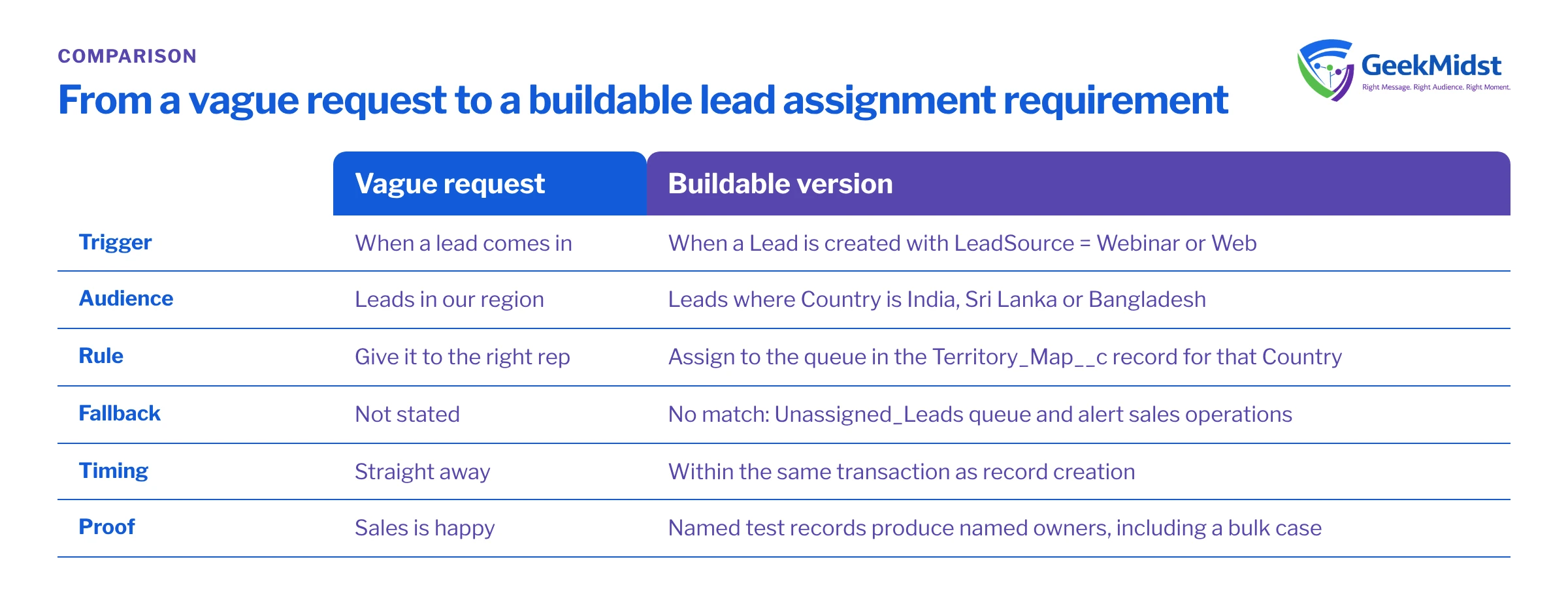
From vague to buildable
| Vague request | Buildable version | |
|---|---|---|
| Trigger | When a lead comes in | When a Lead is created with LeadSource = Webinar or Web |
| Audience | Leads in our region | Leads where Country is India, Sri Lanka or Bangladesh |
| Rule | Give it to the right rep | Assign to the queue named in the Territory_Map__c record for that Country |
| Fallback | Not stated | If no territory matches, assign to the Unassigned_Leads queue and notify the sales operations group |
| Timing | Straight away | Within the same transaction as record creation |
| Proof | Sales is happy | Five named test records produce five named owners in a sandbox |
Worked example: lead assignment
Here is the same request written as a requirement a team could pick up.
Story. As a regional sales manager, I want new inbound leads routed to my region's queue so that they are contacted by someone who covers that market.
Trigger. A Lead record is created with LeadSource equal to Webinar or Web. Leads created by data import are out of scope for this story.
Data.
- Reads
Lead.CountryandLead.LeadSource. - Reads the custom object
Territory_Map__c(fieldsCountry__c,Queue_Developer_Name__c), maintained by sales operations. - Writes
Lead.OwnerId.
Rules.
- Look up the
Territory_Map__crecord whereCountry__cmatchesLead.Countryexactly. - If found, set the owner to the queue named in
Queue_Developer_Name__c. - If not found, or if
Countryis blank, set the owner to theUnassigned_Leadsqueue and send an email alert to the Sales Operations public group. - Do not change the owner if the lead was created by a user who has set an owner manually.
Acceptance criteria.
- Given a Territory_Map__c record for India pointing to
India_Inbound, when a Web lead is created with Country = India, then its owner is the India_Inbound queue. - Given no Territory_Map__c record for Nepal, when a Webinar lead is created with Country = Nepal, then its owner is Unassigned_Leads and the alert is sent.
- Given a lead created through Data Import Wizard, then the owner is unchanged by this automation.
- Given 200 Web leads inserted in one API call, then all are assigned correctly with no errors.
That last criterion matters. Salesforce processes records in batches, and a rule that works for one record can fail when hundreds arrive together. Saying so in the requirement makes the developer design for bulk from the start.
Before you start: making criteria checkable
Acceptance criteria are strongest when a tester can check them with a query rather than by clicking through records. The example below assumes the field and object names used above and a sandbox where test leads were created today.
SELECT Id, Country, LeadSource, Owner.Name, CreatedBy.Name
FROM Lead
WHERE CreatedDate = TODAY
  AND LeadSource IN ('Web', 'Webinar')
ORDER BY CountryCommon mistakes and how to diagnose them
- Rules with no fallback. If a requirement does not say what happens when no rule matches, the build will do something arbitrary. Diagnose by asking "and if none of these apply?" for every rule.
- Field labels instead of API names. Labels change and can be duplicated. Ask the admin for API names, or mark new fields as proposed.
- Solution written as requirement. "Create a Flow that..." fixes the tool before the developer has seen the volume or the logic. Describe the behaviour and let the design choose. Our guide on when to use Apex instead of Flow covers how that choice is made.
- No volume or timing. "Update related records" means one thing for ten records and another for a million. State expected volumes and whether the result must be immediate or can run later.
- Silent edge cases. Merged records, inactive users as owners, deleted parents and records created by integrations break more automations than the main path does. List the ones you know about.
- Acceptance criteria that test opinions. "The page looks clean" cannot pass or fail. "The component shows the five most recent open Cases sorted by Created Date" can.
Review checklist
Before a requirement goes to build, check that it has:
- A story with a named user and outcome.
- A precise trigger and scope, including what is excluded.
- Objects and fields with API names or proposed names.
- Ordered rules with an explicit fallback.
- Expected volumes and timing.
- Known edge cases.
- Given, when, then acceptance criteria including one bulk case.
Related reading
Need requirements your team can build from?
GeekMidst can run requirements workshops, write stories with testable acceptance criteria and review an existing backlog for gaps before build starts.


