

Lead Routing and Assignment Automation
A reference design for routing every new lead to the right owner quickly and predictably in Salesforce, with clear rules, follow-up SLAs and the reports to prove it works.

This is an illustrative blueprint. It is a reference architecture, not a write-up of a specific client project; outcomes depend on your data and setup.
A lead that sits unowned, or lands with the wrong person, loses value with every hour that passes. Lead routing in Salesforce often grows by accretion: a few assignment rules, a flow someone added for a new region, and a manual queue that nobody checks at weekends. This blueprint describes a routing and assignment design that is predictable, easy to change and measurable.
This is a reference blueprint, not a write-up of a specific client project. Regions, segments and queue names are examples.
The business problem
- Assignment logic is split across assignment rules, flows, Apex and marketing automation, so nobody can say why a lead went where it did.
- Changing a territory means editing several rule entries and hoping nothing else breaks.
- Leads from existing customer accounts go to new-business reps instead of the account owner.
- Leads assigned to someone on leave sit untouched.
- There is no follow-up standard, or no way to check one.
Example routing matrix
| Condition | Owner | Fallback |
|---|---|---|
| Matches an existing customer account | Account owner | Account team queue |
| Country in India, company size above threshold | Enterprise India queue | Sales operations queue |
| Country in India, smaller company | Inside sales India queue | Sales operations queue |
| Country in EMEA list | EMEA inside sales queue | Sales operations queue |
| Partner-sourced lead | Partner manager for that partner | Channel queue |
| Anything else | Sales operations queue | Sales operations manager |
Architecture
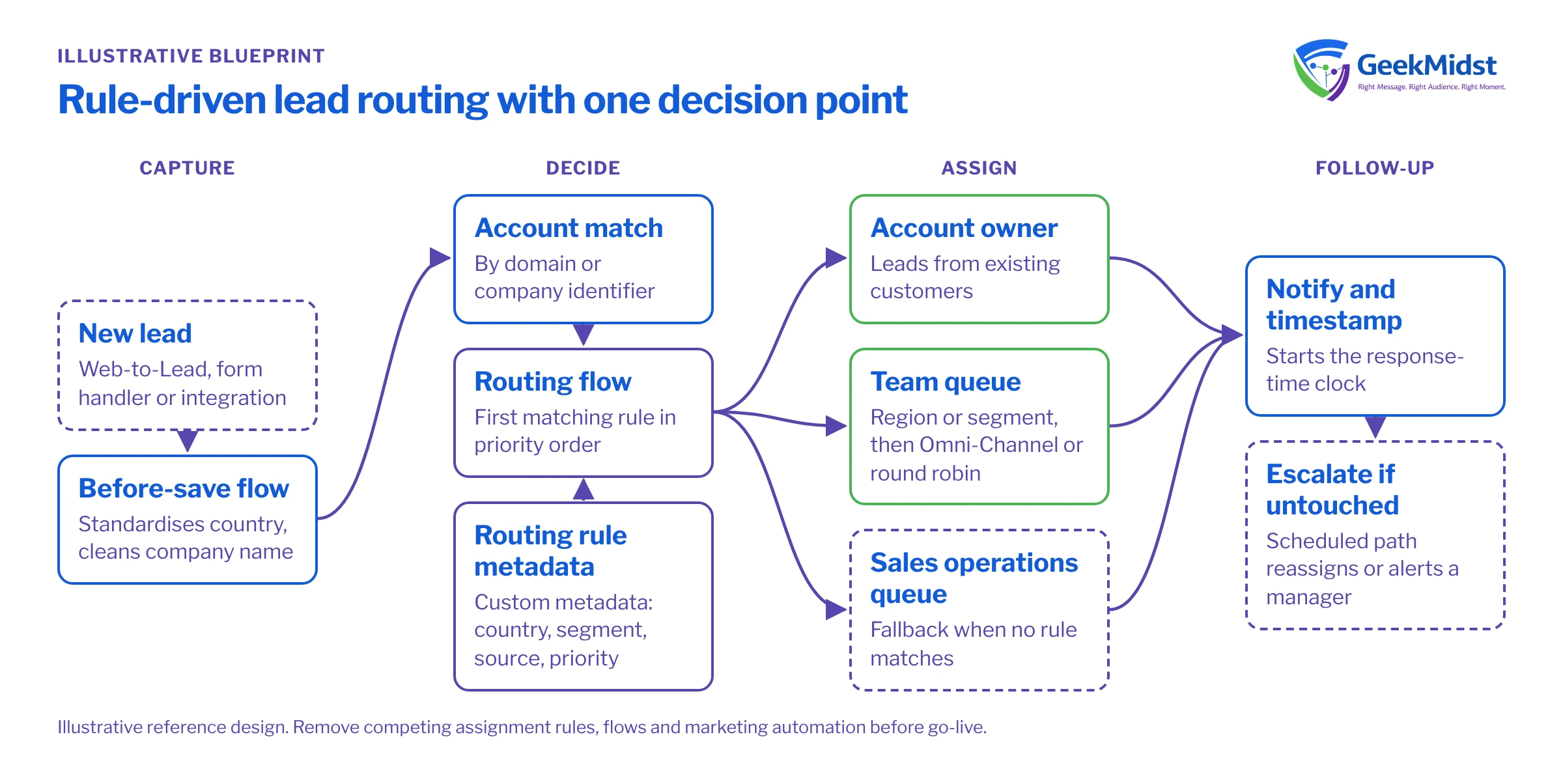
The design separates three concerns:
Rules as data. The routing matrix lives in custom metadata (for example, a Lead_Routing_Rule__mdt type with fields for country, segment, source, priority order and target queue). Admins change routing by editing records, deployable through the normal release process, rather than editing logic.
One decision point. A record-triggered flow on Lead (or Apex, if volume or complexity demands it) evaluates the matrix in priority order and sets the owner. Standard lead assignment rules can do the job for simple orgs; the point is to choose one mechanism and remove the others. If Account Engagement assigns prospects, have it use the active Salesforce assignment rule or hand over to the same flow, rather than keeping a separate set of rules.
Distribution within a team. Queues collect leads for a team. Omni-Channel routing or a simple round-robin approach then distributes them to available reps, taking availability into account so leads do not land with someone who is away.
Data flow for a new lead
- 01
Capture and normalise
Web-to-Lead, a form handler or an integration creates the lead. A before-save flow standardises country and cleans the company name.
- 02
Match to accounts
Matching logic checks for an existing account by domain or company identifier and stores the match on the lead.
- 03
Evaluate the matrix
The routing flow reads the custom metadata rules in priority order and assigns the first match, falling back to the operations queue.
- 04
Notify and start the clock
The new owner is notified and a routing timestamp is stored so response time can be measured.
- 05
Escalate if untouched
A scheduled path checks for first activity within the agreed window and reassigns or alerts a manager if there is none.
Re-running assignment from Apex
Sometimes leads need to be re-routed in bulk, for example after a territory change or when an integration created leads without firing assignment. The pattern below runs the default assignment rule on a set of leads. Call it from an asynchronous context, such as a scheduled path or a Queueable, rather than in the same save as the original change, to avoid recursive updates.
public with sharing class LeadReassignment {
    @InvocableMethod(label='Re-run lead assignment rule')
    public static void reassign(List<Id> leadIds) {
        Database.DMLOptions dmo = new Database.DMLOptions();
        dmo.assignmentRuleHeader.useDefaultRule = true;

        List<Lead> leads = new List<Lead>();
        for (Id leadId : leadIds) {
            leads.add(new Lead(Id = leadId));
        }
        Database.update(leads, dmo);
    }
}SELECT OwnerId, COUNT(Id) leadCount
FROM Lead
WHERE CreatedDate = LAST_N_DAYS:7
AND IsConverted = false
GROUP BY OwnerIdData model, testing and measurement
Add fields to Lead for the matched rule, the routing timestamp and the first activity timestamp, so every assignment is explainable and measurable. Restrict who can edit routing metadata and owner fields. Personal data on leads is subject to the same consent and retention rules as any other contact data, including the GDPR and India's Digital Personal Data Protection Act where they apply.
Testing. Build a set of test leads that hit every row of the matrix, every fallback and the account-match path, and run them in a full sandbox with realistic queue membership. Load a bulk batch to check the flow or trigger is bulk-safe; see record-triggered flow best practices and bulkifying Apex triggers. Run the old and new logic side by side on a copy of recent leads and review every difference with sales operations before cutover.
Measurement. Track time from creation to assignment and from assignment to first activity, per team, before and after the change. Report the share of leads that fell through to the fallback queue, since a rising share means the matrix has gaps, and the share of reassignments, which shows whether first assignments were right.
Risks and variations
- Competing automation. Leftover assignment rules, flows or marketing automation can overwrite the owner. Inventory them all before go-live.
- Account matching quality decides whether customer leads reach account owners. Expect to tune it.
- High volume may need Apex instead of Flow; see when to use Apex instead of Flow.
- Agentforce can help qualify or enrich leads, but keep the routing decision rule-based and auditable.
Our Salesforce Flow automation services cover design, build and testing of routing like this.
Leads going to the wrong place?
We can map your current routing, design a single rule-driven approach and test it against your real lead history before cutover.


