

AMPscript vs Server-Side JavaScript
AMPscript and Server-Side JavaScript overlap more than they should. Here is where each one is the better choice, with short examples and the mistakes to avoid.

Marketing Cloud Engagement offers two server-side languages, and many accounts use both inconsistently: AMPscript in one CloudPage, Server-Side JavaScript (SSJS) in the next, and a Script Activity that mixes them. Choosing deliberately makes code easier to debug and hand over.
AMPscript in brief
AMPscript is Marketing Cloud's own scripting language. It is evaluated per subscriber when an email is built and sent, and per request on CloudPages. It is concise for the jobs it was designed for: personalisation strings, lookups against data extensions, conditional content and simple data writes from CloudPages.
Its limits are structural. There is no try and catch, no native JSON parsing comparable to a full programming language, and complex logic quickly becomes hard to read.
Server-Side JavaScript in brief
SSJS runs JavaScript on Marketing Cloud servers using an older ECMAScript engine, so modern syntax such as let, const, arrow functions and template literals is not supported. It provides the Platform library, the Core library and WSProxy for SOAP API calls, along with HTTP functions and JSON handling.
SSJS is most at home in Script Activities in Automation Studio and in CloudPages that need API calls, structured error handling or loops over larger data sets. In emails, only part of SSJS is available, and AMPscript is usually the better fit there. Check the current reference on the Salesforce Developers site for what each context supports.
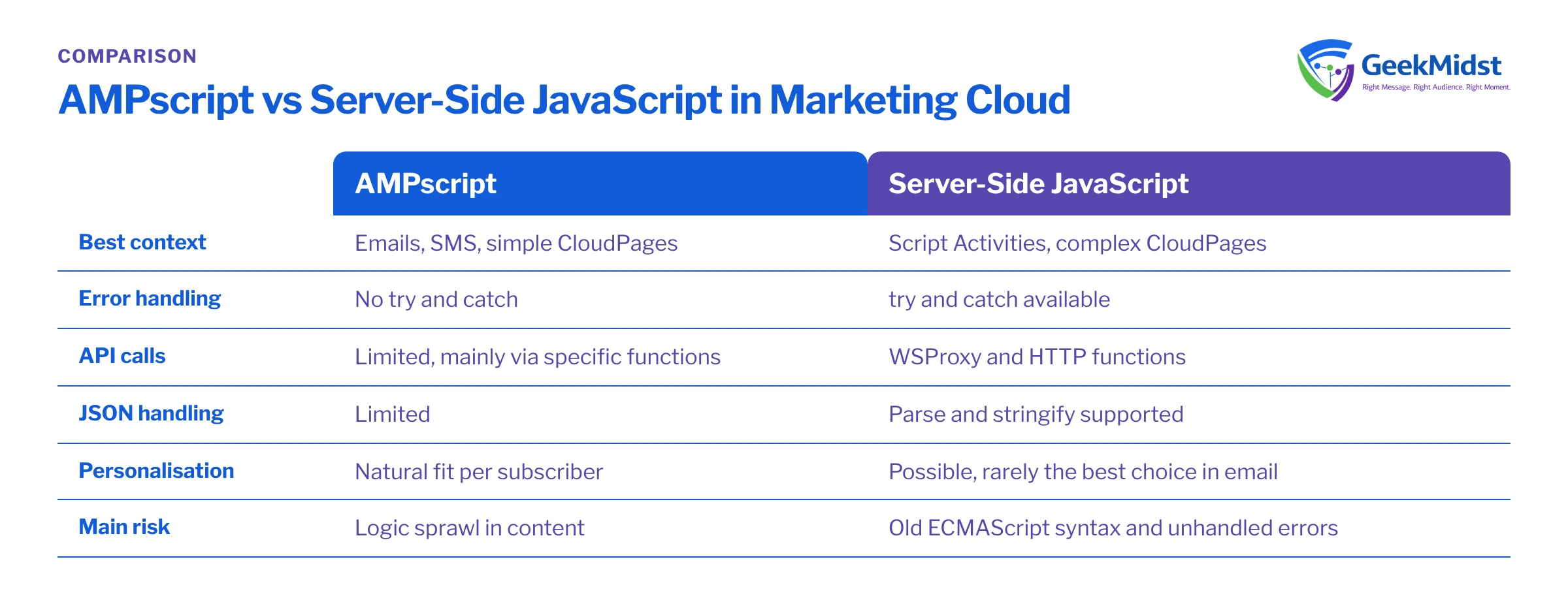
Side by side
| AMPscript | Server-Side JavaScript | |
|---|---|---|
| Best context | Emails, SMS, simple CloudPages | Script Activities, complex CloudPages |
| Learning curve | Short for marketers and email developers | Familiar to JavaScript developers, with quirks |
| Error handling | No try and catch | try and catch available |
| API calls | Limited, mainly via specific functions | WSProxy, HTTP functions |
| JSON handling | Limited | Parse and stringify supported |
| Per-subscriber personalisation | Natural fit | Possible, rarely the best choice in email |
| Debugging | Output variables, preview and test sends | Write output and caught errors to a log |
| Main risk | Logic sprawl in content | Old syntax rules and unhandled errors |
The same lookup in both languages
Both examples read rows for one subscriber from a sample Orders_DE data extension with fields SubscriberKey, OrderID and OrderDate. They are short illustrations, not drop-in code.
%%[
SET @key = _subscriberkey
SET @rows = LookupOrderedRows("Orders_DE", 1, "OrderDate desc", "SubscriberKey", @key)
SET @lastOrder = ""
IF RowCount(@rows) > 0 THEN
  SET @row = Row(@rows, 1)
  SET @lastOrder = Field(@row, "OrderID")
ENDIF
]%%
%%[ IF NOT EMPTY(@lastOrder) THEN ]%%
Your last order was %%=v(@lastOrder)=%%.
%%[ ENDIF ]%%<script runat="server">
Platform.Load("Core", "1.1.1");
try {
var rows = Platform.Function.LookupRows("Orders_DE", "SubscriberKey", "sample-key-001");
var count = rows ? rows.length : 0;
Write("Rows found: " + count);
} catch (e) {
Write("Lookup failed: " + Stringify(e));
}
</script>The AMPscript version uses LookupOrderedRows so the most recent order comes first; LookupRows does not guarantee order. See LookupRows vs LookupOrderedRows for the detail. The SSJS version shows what AMPscript cannot do: catch the error and report it rather than failing the page.
Which to use where
- Email and SMS personalisation: AMPscript. It is designed for this, and keeps logic close to the content.
- Preference centres and forms on CloudPages: AMPscript for straightforward reads and writes; SSJS when you need API calls or structured error handling. See building a preference centre.
- Script Activities in automations: SSJS. Use WSProxy for SOAP operations and wrap every step in try and catch.
- Calling external APIs: SSJS, with secrets kept out of the code and responses logged to a data extension.
- Mixing both: acceptable on CloudPages, where SSJS can read AMPscript variables with
Variable.GetValue("@name"). Keep the boundary clear and document it.
Common mistakes
- Modern JavaScript syntax in SSJS, which fails with unhelpful errors. Stick to
var, function declarations and string concatenation. - SSJS without try and catch in Script Activities, so automations fail with no useful message.
- Many lookups per subscriber in AMPscript against large data extensions, which slows sends. Precompute with SQL where you can.
- Business logic duplicated across content blocks in both languages. Centralise it in one place.
- Credentials or API keys written into SSJS code. Store them somewhere access-controlled and restrict who can view and edit the CloudPage or Script Activity.
- No logging. Write caught errors and key steps to a log data extension with a timestamp and a run identifier, so a failed automation can be diagnosed the next morning.
Agreeing team conventions
A short written convention prevents most of these problems. It should state which language is used in which context, how variables are named, where shared logic lives (for example, one content block per lookup routine), how errors are logged, and how code is reviewed before it reaches a live send or page. Store the code in version control outside Marketing Cloud as well, because content and script history inside the platform is limited and easy to overwrite.
Our AMPscript cheat sheet and guide to debugging personalisation errors help with the day-to-day work.
Our view: it depends on where the code runs
Use AMPscript for content and personalisation, and SSJS for automation scripts, API work and anything needing error handling. Teams with strong JavaScript skills sometimes push SSJS further into CloudPages, which is fine with discipline. What matters most is a consistent convention that the next developer can follow.
Questions we hear
Is SSJS faster than AMPscript?
Can I use SSJS in emails?
Why does my SSJS fail on modern syntax?
var and classic function syntax instead of let, const and arrow functions.How do I debug AMPscript without try and catch?
Do AMPscript and SSJS skills transfer to Marketing Cloud Next?
Get your Marketing Cloud code reviewed
We can review your AMPscript and SSJS, flag fragile patterns and agree conventions your team can follow. See our AMPscript development service.


